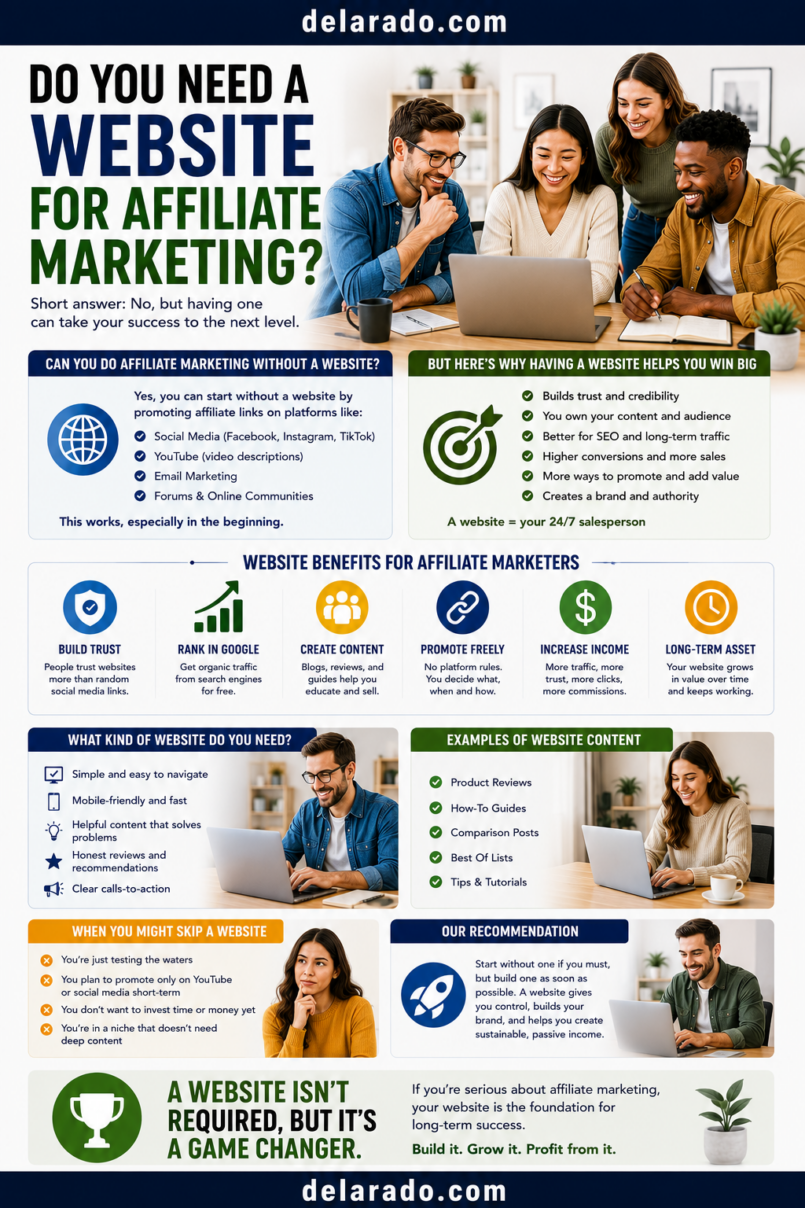
No, you do not always need a website to start affiliate marketing. You may be able to promote affiliate products through YouTube, social media, email newsletters, podcasts, online communities, or other approved platforms. However, a website is often one of the most useful long-term assets because it gives you a central place for articles, reviews, comparisons, disclosures, lead magnets, email signup forms, and evergreen content.
The best approach depends on your audience, content format, budget, skills, and the rules of the affiliate programs you join. Some programs require a website or established online presence, while others may allow social-media profiles, YouTube channels, newsletters, or creator platforms.
Who Is This Topic For?
This guide is for beginners who want to start affiliate marketing but are unsure whether they need to create a blog, website, YouTube channel, newsletter, social account, or another content platform first.
This Article Is Helpful If You Want To:
- Start affiliate marketing without a website
- Use YouTube for affiliate marketing
- Use social media for affiliate links
- Build an affiliate email list
- Create a niche website
- Choose the right content platform
- Understand affiliate program requirements
- Create helpful reviews and comparisons
- Build long-term affiliate content
- Learn which platform fits your goals
Can You Do Affiliate Marketing Without a Website?
Yes. You can potentially promote affiliate products without a website if the affiliate program allows your chosen promotion method. Common alternatives include YouTube, social media, email newsletters, podcasts, communities, and creator platforms.
However, you still need a place to publish helpful content and build trust. An affiliate link by itself is not a business strategy. People are more likely to click a recommendation when it comes with useful explanation, context, comparison, tutorial, product demonstration, or problem-solving content.
Possible Affiliate Marketing Platforms
- Website or blog
- YouTube channel
- TikTok
- Email newsletter
- Podcast
- Online community
- Link-in-bio page
- Creator storefront or resource page
Before using any platform, check the affiliate program’s rules. Some programs restrict direct linking, email promotion, paid advertising, social-media promotion, link shortening, coupon sharing, trademark bidding, or redirects.
Website vs. No Website
| Factor | With a Website | Without a Website |
|---|---|---|
| Content ownership | You control the pages, layout, navigation, and content structure | You depend more on third-party platform rules and algorithms |
| Search traffic | Can create articles that may attract search traffic over time | May rely more on video discovery, social reach, or direct audience relationships |
| Affiliate disclosures | Can add disclosures to articles, pages, and resource libraries | Must adapt disclosures to each platform’s format and space limits |
| Email list building | Can host signup pages, lead magnets, and landing pages | May need a separate landing page or email platform |
| Content lifespan | Evergreen articles and resource pages can remain useful for years if updated | Some social posts have shorter visibility periods |
| Program approval | May help meet some affiliate program application requirements | Some programs may accept an established social or video presence instead |
| Startup cost | Usually requires a domain, hosting, and website setup | Can begin with free or low-cost creator platforms |
| Customization | More control over pages, links, branding, and user experience | Limited by platform design, profile links, and content formats |
A website is not required in every situation, but it can give you more control and create a central home for your content and affiliate resources.
Benefits of Having a Website
Creates a Content Home Base
A website gives you one place to publish articles, tutorials, product reviews, comparison guides, resource pages, lead magnets, disclosures, and contact information.
Can Build Search-Focused Content
You can create helpful articles around questions people search for, such as “How to choose WordPress hosting,” “What camera should a beginner buy?” or “How to compare project management tools.”
Gives You More Control
You control your site structure, content categories, navigation, links, visual branding, email signup forms, and calls to action.
Supports Longer Content
A website can support detailed reviews, comparison tables, buyer guides, tutorials, checklists, FAQs, videos, screenshots, and product alternatives in one location.
Helps With Email List Building
You can create lead magnet pages, signup forms, resource libraries, email opt-in offers, and educational landing pages that connect to your email platform.
Can Improve Program Applications
Some affiliate programs may view an established website with useful content, disclosures, and clear audience focus as a stronger application than an empty social profile.
Creates Long-Term Assets
A well-maintained article or buyer guide can continue helping people over time, especially when you update prices, features, links, screenshots, and product recommendations.
Risks and Limitations of a Website
Requires Setup Time
You may need to choose a domain, hosting, website platform, theme, pages, privacy policy, disclosure information, email form, and content structure before publishing.
Has Ongoing Costs
Most websites have recurring costs such as domain renewal, hosting, premium themes, plugins, email platforms, design tools, security tools, and maintenance.
Needs Maintenance
Websites need updates, backups, security review, broken-link checks, content updates, performance monitoring, and occasional design improvements.
Search Traffic Takes Time
Publishing an article does not guarantee search traffic. It can take time for content to be discovered, indexed, evaluated, and found by the right audience.
Still Requires Useful Content
A website does not create commissions on its own. You still need original, helpful content that answers real audience questions and makes relevant recommendations.
Benefits of Starting Without a Website
Lower Starting Cost
You can begin with a YouTube channel, social-media profile, free newsletter plan, podcast platform, or creator profile without immediately paying for hosting and a domain.
Faster Content Publishing
Some creators find it easier to record a video, create a short post, or share a tutorial than to build a full website before publishing anything.
Can Build an Audience First
You can test content topics, learn what your audience asks, and build credibility through video or social content before investing in a website.
Good for Visual Demonstrations
YouTube, TikTok, Instagram Reels, and other video platforms can be useful for showing how a product works, demonstrating software, comparing tools, or explaining a process.
Can Support Personal Brands
Creators who build trust through personality, teaching style, expertise, or storytelling may prefer to begin with video, audio, or social media.
Can Help Test a Niche
A short series of videos or social posts can help you learn whether a topic is interesting to your audience before creating a larger website.
Risks of Starting Without a Website
You Depend More on Third-Party Platforms
Social platforms and video platforms can change their algorithms, policies, monetization rules, link features, reach, account access, and content formats.
Link Placement May Be Limited
Some platforms limit clickable links in captions, comments, bios, stories, profiles, or video descriptions. You may need a link-in-bio page or separate landing page.
Content May Have a Shorter Lifespan
Some social posts receive attention for only a short period. A detailed article or searchable video may remain useful longer.
Program Approval May Be Harder
Some programs prefer applicants with a website, published content, visible disclosures, and a clear content focus.
Disclosure Can Be More Challenging
Short-form content gives you less space to explain affiliate relationships. You still need clear disclosure near the recommendation or link.
Email List Building May Need Extra Tools
Social followers are not the same as email subscribers. You may need a separate email platform and landing page to collect email addresses.
Less Control Over User Experience
You cannot fully control platform layout, recommendations, advertisements, comment sections, account restrictions, or what other content appears near yours.
Affiliate Marketing Without a Website
YouTube Affiliate Marketing
YouTube can be useful for tutorials, screen recordings, product demonstrations, comparisons, buyer guides, reviews, unboxings, setup guides, and educational videos.
Useful YouTube Content
- How-to tutorials
- Product comparisons
- Beginner buying guides
- Setup walkthroughs
- Feature demonstrations
- Product pros and cons
- Frequently asked questions
- Alternative product videos
Example
Video title: How to Choose WordPress Hosting for a New Website
Video content: Explain support, backups, pricing, growth options, and ease of use.
Description: Add a clear affiliate disclosure, then include the relevant approved affiliate link.
YouTube Guidelines
- Disclose affiliate links clearly
- Use accurate titles and thumbnails
- Do not make unsupported product claims
- Do not create fake reviews
- Do not use misleading screenshots or results
- Use links only where platform and program rules allow
- Provide useful content beyond the link
Social Media Affiliate Marketing
Social media can help you share short educational content, product tips, quick demonstrations, comparisons, and links to more detailed resources.
Useful Social Content
- Quick tips
- Product use cases
- Mini tutorials
- Myth-versus-fact posts
- Short comparison videos
- Checklist graphics
- Before-and-after process explanations
- Frequently asked questions
- Tool demonstrations
- Resource previews
Social Media Disclosure Example
Ad / Affiliate: I may earn a commission if you purchase through the link in my profile.
Social Media Guidelines
- Use clear disclosures near recommendations
- Do not hide disclosure among many hashtags
- Do not claim you used a product if you have not
- Do not use fake customer reviews
- Do not use AI-generated people as fake customers
- Use a link-in-bio page if direct links are limited
- Follow the platform’s current branded-content rules
Short-form platforms can be useful for discovery, but you may still want a landing page, email list, or website where people can find more detailed information.
Email Affiliate Marketing
Email marketing can be a useful affiliate channel when subscribers have agreed to receive your messages and the affiliate program allows email promotion.
Useful Affiliate Email Content
- Product comparison guides
- Buyer checklists
- Beginner email courses
- Tool recommendations
- Relevant product updates
- Resource roundups
- Educational newsletter content
- Product-use tutorials
Email Disclosure Example
Disclosure: Some links in this email are affiliate links. If you make a qualifying purchase through one of these links, I may earn a commission.
Email Guidelines
- Use permission-based email lists
- Explain what subscribers will receive
- Do not buy or scrape email lists
- Use clear affiliate disclosures
- Send useful content, not constant promotions
- Include a clear unsubscribe option where required
- Check whether each affiliate program allows email links
- Use accurate subject lines
Email can be valuable because you communicate directly with subscribers, but it requires clear expectations, responsible list management, and relevant content.
Podcast Affiliate Marketing
Podcasts can support affiliate marketing through educational discussions, product explanations, interviews, buyer guides, and show notes.
Podcast Guidelines
- Disclose affiliate relationships verbally when recommending products
- Include written disclosure in show notes
- Use approved links in show notes or episode pages
- Do not make unsupported claims
- Do not imply personal testing without experience
- Use product recommendations only when relevant to the episode
Example Verbal Disclosure
Before we continue, please note that this episode includes affiliate links. If you purchase through a qualifying link in the show notes, I may earn a commission at no additional cost to you.
Link-in-Bio Pages
A link-in-bio page gives you one shareable link that can direct visitors to resources, articles, videos, lead magnets, product guides, or affiliate recommendations.
Useful Link-in-Bio Sections
- Start here guide
- Free lead magnet
- Latest article or video
- Top beginner resources
- Product comparison guide
- Newsletter signup page
- Affiliate disclosure information
- Contact page
Example Link-in-Bio Layout
Free Website Launch Checklist
How to Choose WordPress Hosting
Beginner WordPress Setup Guide
Website Tools I Recommend
Affiliate Disclosure
A link-in-bio page can be useful, but it should not become a confusing collection of unrelated product links.
When You Should Build a Website
Consider building a website when you want more control, want to create detailed content, plan to build search traffic, want a home for email list building, or need a central resource library.
A Website May Be Worth Building If You Want To:
- Publish detailed reviews and comparisons
- Create search-focused articles
- Build an email list
- Create lead magnet landing pages
- Organize content by category
- Build a product resource library
- Host disclosure, privacy, and contact pages
- Create a long-term brand asset
- Apply to affiliate programs that prefer websites
- Control your content structure and user experience
Simple Beginner Website Structure
- Home page
- About page
- Blog or resource library
- Product reviews category
- Comparison guides category
- Start here page
- Affiliate disclosure page
- Privacy policy
- Contact page
- Email signup page
A basic useful website is better than a polished but empty website. Start with clear pages and helpful content, then improve design and features over time.
Step-by-Step: Start Without a Website
Step 1: Choose a Platform
Choose one main platform such as YouTube, Instagram, TikTok, Pinterest, LinkedIn, a newsletter, or a podcast.
Step 2: Define a Focused Audience
Choose a specific group of people and a problem you want to help solve.
Step 3: Create Helpful Content
Create tutorials, reviews, comparisons, guides, demonstrations, checklists, or useful short-form content before promoting many products.
Step 4: Research Affiliate Programs
Find programs that allow your intended promotion method. Read rules for social media, email, paid ads, direct links, and content requirements.
Step 5: Add Clear Disclosures
Tell people that you may earn a commission from qualifying purchases. Place disclosure close to recommendations or links.
Step 6: Create a Link Destination
Use an approved direct affiliate link, a link-in-bio page, a landing page, a newsletter signup page, or a detailed resource page depending on program and platform rules.
Step 7: Build an Email List
Offer a relevant checklist, template, guide, or mini course so interested people can subscribe for more helpful content.
Step 8: Track and Improve
Review content performance, clicks, questions, engagement, and audience feedback. Focus on creating better content rather than simply posting more links.
Step-by-Step: Start With a Website
Step 1: Choose a Niche
Choose a focused topic and audience, such as WordPress tools for beginners, home coffee tools for new brewers, or productivity systems for freelancers.
Step 2: Choose a Domain and Hosting
Choose a simple domain name that fits your brand and topic. Select hosting that meets your website needs and budget.
Step 3: Build Essential Pages
Create a home page, about page, contact page, disclosure page, privacy policy, and resource or blog section.
Step 4: Publish Helpful Content
Start with beginner guides, tutorials, comparisons, checklists, and frequently asked questions before creating many product review pages.
Step 5: Join Relevant Programs
Apply to affiliate programs that fit your niche and confirm that your content and promotional methods follow their current rules.
Step 6: Add Links and Disclosures
Use approved affiliate links where they are relevant and include clear disclosure near the recommendation.
Step 7: Build an Email List
Create a lead magnet and signup page so readers can receive useful resources and future relevant content.
Step 8: Update and Improve
Review affiliate links, product availability, prices, content accuracy, disclosures, and user feedback regularly.
Website vs. YouTube vs. Social Media
| Platform | Best For | Potential Limitation |
|---|---|---|
| Website | Detailed reviews, comparisons, SEO content, resource libraries, lead magnets | Requires setup, maintenance, and content development |
| YouTube | Tutorials, demonstrations, reviews, screen recordings, visual comparisons | Requires video production and depends on platform discovery |
| Visual tips, Reels, product education, personal brand content | Limited link placement and shorter content lifespan | |
| TikTok | Short educational videos, quick demonstrations, discovery content | Fast-moving content and platform-dependent reach |
| Evergreen visual guides, checklists, tutorials, product ideas | Requires strong visual content and consistent publishing | |
| Email newsletter | Direct relationship building, educational sequences, relevant recommendations | Requires permission, consistent value, and a list-building strategy |
| Podcast | Educational discussions, interviews, reviews, trusted creator voice | Links are usually placed in show notes rather than spoken-clickable format |
Many affiliate marketers eventually use a combination: social media or video for discovery, a website for detailed information, and email for ongoing relationship building.
Programs That Can Help
WordPress
WordPress can help create an affiliate website with articles, reviews, comparison pages, resource libraries, lead magnets, disclosure pages, and email signup forms.
YouTube Studio
YouTube Studio can help publish tutorials and reviews, add descriptions, include disclosures, manage captions, and review channel performance.
Canva
Canva can help create lead magnets, product comparison graphics, social posts, video thumbnails, checklists, templates, resource guides, and branded visual content.
Email Marketing Platforms
MailerLite, ConvertKit, Brevo, Mailchimp, and similar tools can help create signup forms, landing pages, lead magnets, newsletters, and educational email sequences.
Link-in-Bio Tools
Link-in-bio tools can help social creators organize a small set of useful links, such as a lead magnet, detailed guide, resource page, video, contact page, and affiliate disclosure information.
Google Search Console
Google Search Console can help website owners identify search queries, content opportunities, pages that need updating, and topics readers search for.
Google Analytics
Google Analytics can help measure website traffic, user engagement, email signups, traffic sources, and outbound link activity when configured appropriately.
Affiliate Networks
Affiliate networks can connect publishers with merchants and may provide tracking, reporting, payouts, and program applications. Examples include Impact, CJ, ShareASale, Awin, Rakuten Advertising, and PartnerStack.
Common Mistakes
Posting Affiliate Links Without Helpful Content
Links alone rarely build trust. Create useful tutorials, reviews, comparisons, explanations, and resources that help people understand whether a product fits their needs.
Assuming Every Program Allows Direct Social Links
Affiliate programs may restrict direct linking, email promotion, link shortening, paid ads, coupon sites, or certain social-media platforms. Read the current rules before posting.
Not Using Affiliate Disclosures
Tell people when you may earn a commission. Place the disclosure clearly near the recommendation or link.
Using Only One Platform Forever
Starting with one platform is useful, but over time consider building an email list or website so you are not fully dependent on one social or video platform.
Creating a Website Before Defining an Audience
A website is more useful when you know who it serves and what topics it will cover. Start with a clear niche and content plan.
Building an Overcomplicated Website
You do not need a large custom website to begin. Start with essential pages and helpful content, then improve over time.
Claiming Product Experience You Do Not Have
Do not say you tested, used, or recommend a product from personal experience if that is not true. Be transparent about research-based content.
Using Fake Reviews or Testimonials
Do not use fabricated customer feedback, AI-generated testimonials, fake screenshots, false product results, or invented ratings.
Buying Email Lists or Followers
Do not buy email addresses, scrape contacts, purchase fake followers, or use fake engagement. Build a real audience through useful content and clear opt-ins.
Making Unsupported Claims
Do not promise guaranteed income, traffic, sales, rankings, health outcomes, product performance, or business success.
Frequently Asked Questions
Do I need a website for affiliate marketing?
No. You can potentially use YouTube, social media, email, podcasts, communities, or other approved platforms. A website can still be valuable because it gives you more control over content, disclosures, email list building, and long-term resources.
Can I do affiliate marketing on YouTube without a website?
Yes, if the affiliate program allows YouTube promotion. Create useful videos, include clear disclosures, use accurate claims, and place approved affiliate links where the platform and program permit.
Can I do affiliate marketing on social media?
Yes, if the affiliate program and social platform allow it. Use clear disclosures, relevant content, and honest recommendations. You may need a link-in-bio page or landing page when direct linking is limited.
Can I use affiliate links in email without a website?
Possibly, but some affiliate programs restrict email promotion. Use permission-based email marketing, disclose affiliate relationships clearly, and review each program’s current rules.
Why should I build a website for affiliate marketing?
A website can support detailed reviews, comparison tables, tutorials, search-focused articles, lead magnets, email signup forms, disclosure pages, and a long-term content library.
What is the best platform for affiliate marketing beginners?
The best platform depends on your skills and audience. A website is useful for detailed written content, YouTube is useful for visual tutorials, social media is useful for discovery, and email is useful for direct relationships. Many beginners start with one platform and add others later.
Can I start affiliate marketing without money?
You may start with free social or video platforms, but you will still invest time in learning, researching products, creating content, building trust, and following program rules. A website usually adds some recurring costs.
Do affiliate programs require a website?
Some programs may require a website or established online presence, while others may accept YouTube channels, social profiles, newsletters, or other creator platforms. Check the requirements of each program.
Can I use a link-in-bio page for affiliate links?
Possibly, if the affiliate program allows it. Keep the page organized, include clear disclosures, and link to useful resources rather than creating a confusing list of unrelated product links.
Should I build a website or YouTube channel first?
Choose the format you can maintain and that fits your audience. Start with a website if you prefer writing detailed guides and comparisons. Start with YouTube if you prefer demonstrations, tutorials, and visual explanations. Consider building an email list in either case.
What should I avoid when promoting affiliate products without a website?
Avoid posting links without context, hidden disclosures, spam comments, fake reviews, misleading product claims, purchased followers, bought email lists, prohibited direct-link methods, and content that does not help the audience.