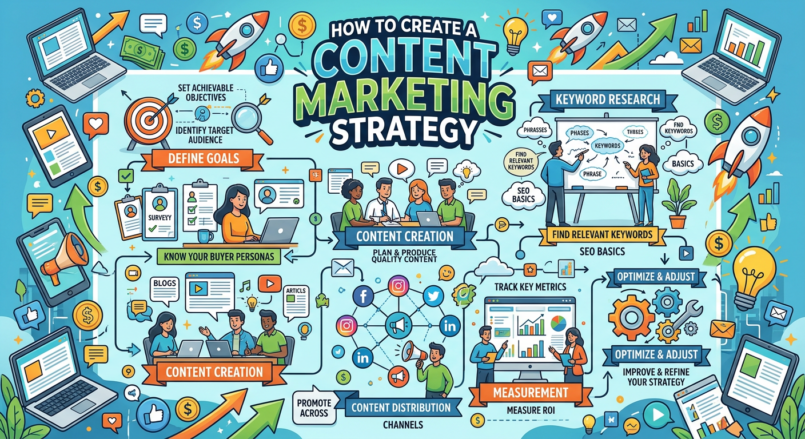
A content marketing strategy is a documented plan for creating, publishing, distributing, and improving useful content that helps a specific audience. It connects your business goals with the questions, problems, and decisions your potential customers have.
Content marketing is not simply publishing blog posts or posting on social media every day. A strong strategy gives every article, video, email, guide, Pin, checklist, or case study a purpose. It helps the right people discover your business, learn from you, trust you, join your email list, and take a relevant next step.
You do not need to publish on every platform or create hundreds of pieces of content to begin. Start with one audience, one business goal, one primary content channel, and a repeatable process for creating genuinely useful content.
What Is Content Marketing?
Content marketing is the process of creating and sharing useful information to attract, educate, and build trust with a target audience. Content can include articles, videos, newsletters, checklists, templates, podcasts, product reviews, case studies, social-media posts, webinars, guides, and digital tools.
Instead of interrupting people with promotions only, content marketing helps them solve a problem or make a better decision before they are ready to buy.
Examples of Content Marketing
- A web designer publishes a guide about what local businesses should include on a website.
- An affiliate website creates detailed software comparisons and buying guides.
- A digital product seller shares free templates and tutorials that relate to paid products.
- A fitness coach creates YouTube videos explaining beginner workout concepts.
- An eCommerce store publishes product-care guides and buying advice.
- A freelance writer sends a weekly newsletter with practical content tips.
- A local contractor publishes answers to common customer questions.
Google’s Search Essentials recommends creating helpful, reliable, people-first content and using the words people would use to find it in prominent places such as titles, headings, alt text, and link text. [194]
Why You Need a Strategy
Without a strategy, content becomes random. You may publish articles that do not fit your audience, create posts that do not support your business goals, or spend too much time on platforms that do not bring relevant visitors.
A strategy helps you make decisions before creating content. It identifies who you want to help, what problems they have, what topics matter, which formats to use, how to distribute content, and how to measure success.
A Content Strategy Helps You:
- Choose a clear audience.
- Focus on useful topics.
- Create content that supports business goals.
- Build topical authority over time.
- Choose realistic publishing channels.
- Build an email list.
- Support affiliate, service, product, or course offers.
- Reuse content across multiple platforms.
- Track what works and improve it.
- Avoid wasting effort on low-value content.
Start With a Business Goal
Every content strategy should support a real business goal. Content may generate traffic, but traffic is only useful when it helps the business create meaningful outcomes.
Common Content Marketing Goals
- Build brand awareness.
- Increase organic search traffic.
- Grow an email list.
- Generate service inquiries.
- Sell digital products.
- Support affiliate marketing.
- Increase eCommerce product sales.
- Book consultations.
- Educate existing customers.
- Reduce repetitive customer-support questions.
- Build trust before a larger purchase.
- Increase customer retention.
Use SMART Goals
A SMART goal is specific, measurable, achievable, relevant, and time-bound.
Examples
- Publish 12 helpful beginner WordPress guides in the next 90 days.
- Grow the email list by 100 relevant subscribers in six months.
- Generate five website consultation inquiries per month from organic content by the end of the year.
- Increase lead magnet conversion rate from 2% to 4% over three months.
- Create four product comparison articles that support relevant affiliate offers this quarter.
Do not start with a goal such as “go viral” or “make a full-time income next month.” Focus on useful actions and measurable improvements you can control.
Define Your Target Audience
Content works best when it is made for a specific audience. Trying to create content for everyone usually leads to vague articles, unclear messaging, and weak offers.
Audience Questions to Answer
- Who are they?
- What is their experience level?
- What problem are they trying to solve?
- What goals do they have?
- What questions do they ask?
- What objections might stop them from buying?
- Which platforms do they use?
- What content formats do they prefer?
- What products, services, or tools do they already use?
Audience Profile Example
Audience: Beginner bloggers with full-time jobs.
Goals: Build a WordPress website, publish useful content, grow an email list, and create an online business.
Problems: Limited time, limited budget, confusing technical advice, uncertainty about tools, and no clear content plan.
Preferred content: Step-by-step articles, checklists, product comparisons, templates, and short tutorial videos.
Possible next steps: Download a website-launch checklist, compare hosting options, join an email list, or purchase a content calendar template.
A content strategy becomes much easier once you know whose questions you are trying to answer.
Research Customer Problems
Good content begins with real audience needs. Do not create content only because a keyword tool shows search volume. Create content because it answers a question, reduces confusion, helps people make a decision, or solves a practical problem.
Where to Find Content Ideas
- Google autocomplete suggestions.
- Google “People also ask” questions.
- Related searches in Google.
- Google Search Console queries.
- Google Trends.
- YouTube search suggestions.
- Pinterest search suggestions.
- Customer emails and support tickets.
- Sales calls and consultations.
- Reddit communities.
- Facebook groups.
- Competitor reviews and comments.
- Amazon reviews.
- Industry forums.
- Social-media comments.
Customer Question Examples
For an online business marketing website, useful questions may include:
- How do I start affiliate marketing?
- How do I build an email list?
- What is the best web hosting for beginners?
- How do I create a digital product?
- How do I write SEO blog posts?
- How do I choose a niche?
- How do I get my first freelance client?
Market research and competitive analysis can help identify customer needs, industry trends, competitors, and market gaps so businesses can refine their offerings and positioning. [240]
Study Your Competitors
Competitive analysis is not about copying other businesses. It is about understanding what content already exists, what customers respond to, and where you can offer a clearer, more useful, more focused, or more trustworthy answer.
What to Review
- Competitor website structure.
- Blog topics and categories.
- Top-ranking articles.
- Videos and social-media content.
- Lead magnets and email sign-up offers.
- Products and services.
- Pricing pages.
- Customer reviews.
- Frequently asked questions.
- Comments and complaints.
- Brand messaging.
- Calls to action.
Questions to Ask
- Who does this competitor serve?
- What problem do they focus on?
- Which topics do they cover well?
- What topics are missing or outdated?
- What customer questions are unanswered?
- Can I explain the topic more clearly for beginners?
- Can I include original examples, templates, or firsthand experience?
- Can I serve a more specific audience?
A competitive analysis helps you understand what others offer, how they price it, and how they attract target customers. It can help you define a clear differentiator for your own content and business. [239]
Create Content Pillars
Content pillars are broad topics your business wants to be known for. They help you organize your website, create topic clusters, and avoid publishing unrelated content.
Example Content Pillars for an Online Marketing Website
- Website building and WordPress.
- SEO and content marketing.
- Email marketing and lead generation.
- Affiliate marketing.
- Digital products and sales funnels.
- Online business strategy.
- AI tools for marketers.
- Freelancing and client acquisition.
Example Content Pillars for a Local Web Design Business
- Small business websites.
- Local SEO.
- Google Business Profile.
- Lead generation.
- Website conversion optimization.
- Customer reviews.
- Email follow-up systems.
Choose three to five core pillars at first. You can expand later, but a focused website is easier for readers and search engines to understand.
Build Topic Clusters
A topic cluster is a group of related content pieces organized around one central theme. It often includes a broad pillar article and several specific supporting articles that link to one another.
Example: Email Marketing Topic Cluster
- Pillar article: How to Create an Email List for Beginners.
- How to Create a Lead Magnet.
- How to Write a Welcome Email Sequence.
- Best Email Marketing Tools for Beginners.
- How to Create an Email Signup Form.
- Email Marketing Mistakes Beginners Make.
- How Often Should You Email Subscribers?
Example: Affiliate Marketing Topic Cluster
- Pillar article: How to Start Affiliate Marketing Step by Step.
- How to Choose an Affiliate Marketing Niche.
- How to Write an Affiliate Product Review.
- How to Disclose Affiliate Links.
- How to Use Pinterest for Affiliate Marketing.
- Best Affiliate Programs for Your Niche.
- How to Build an Affiliate Website.
Topic clusters help visitors find related information and can create a more useful, organized website experience.
Choose Content Formats
Different people prefer different formats. The best format depends on the audience, topic, platform, and desired action.
| Content Format | Best For | Example |
|---|---|---|
| Blog article | Search visibility, in-depth education, comparisons, tutorials. | How to Create a Lead Magnet. |
| Video tutorial | Demonstrations, walkthroughs, product setup, education. | How to Set Up a WordPress Website. |
| Email newsletter | Building direct audience relationships. | Weekly beginner marketing tip. |
| Lead magnet | Email list growth and practical value. | Website Launch Checklist. |
| Pinterest Pin | Visual discovery and evergreen traffic. | 10 Website Launch Steps for Beginners. |
| Short-form video | Quick tips, awareness, product demonstrations. | One WordPress mistake to avoid. |
| Case study | Building trust and explaining process. | How a local business improved its website contact process. |
You do not need to use every format. Start with the format you can create consistently and that your audience is likely to use.
Choose One Primary Channel
Many beginners try to publish on every platform at once. This often leads to low-quality content, inconsistent posting, and burnout. Choose one primary channel, then use secondary channels to distribute or repurpose the core content.
SEO and Blogging
Best for long-term search traffic, tutorials, reviews, comparisons, and detailed guides. It works well for people who enjoy writing, researching, and building a website asset.
YouTube
Best for tutorials, product demonstrations, software walkthroughs, reviews, education, and personality-driven teaching.
Best for visual discovery, templates, printables, lifestyle topics, home, food, DIY, blogging, business resources, and evergreen traffic strategies.
Best for consultants, freelancers, agencies, business-to-business services, professional audiences, and thought leadership.
Instagram and TikTok
Best for short educational videos, visual brands, product demonstrations, behind-the-scenes content, creators, and community engagement.
Best for building direct relationships with subscribers who have chosen to hear from you. Email should support, not replace, your main discovery channel.
Create a Content Calendar
A content calendar helps you organize what you will publish, when you will publish it, and how each piece supports a larger goal. It does not need to be complicated.
Simple Content Calendar Fields
- Publish date.
- Content title.
- Content pillar.
- Target audience.
- Main keyword or topic.
- Search intent.
- Content format.
- Primary call to action.
- Distribution channels.
- Internal links to add.
- Status.
- Performance notes.
Example Content Calendar
| Week | Content Topic | Format | CTA |
|---|---|---|---|
| Week 1 | How to Build a WordPress Website. | Blog post and Pinterest Pins. | Download the Website Launch Checklist. |
| Week 2 | How to Choose Web Hosting for Beginners. | Comparison article and email. | Read hosting reviews or compare plans. |
| Week 3 | How to Create a Lead Magnet. | Blog post and short video. | Download lead magnet ideas worksheet. |
| Week 4 | How to Create a Content Marketing Strategy. | Pillar article and newsletter. | Download content calendar template. |
Plan only as far ahead as you can reasonably maintain. A realistic monthly calendar is more useful than an ambitious year-long plan that you never follow.
Match Content to the Buyer Journey
Not every person is ready to buy immediately. Some people are learning about a problem, while others are comparing solutions or deciding between products. Your content should support each stage.
| Journey Stage | Reader Question | Useful Content | Possible Next Step |
|---|---|---|---|
| Awareness | What is this problem and how do I solve it? | Beginner guides, definitions, checklists, tutorials. | Read another guide or download a free resource. |
| Consideration | Which solution or approach is right for me? | Comparisons, reviews, case studies, webinars, tool guides. | Join email list, compare options, book a call. |
| Decision | Should I choose this product or service now? | Product pages, service pages, pricing guides, FAQs, testimonials. | Purchase, start a trial, request a quote, or book a consultation. |
| Retention | How do I get the most value after buying? | Onboarding guides, tutorials, FAQ pages, customer emails. | Use product, renew, upgrade, refer, or leave feedback. |
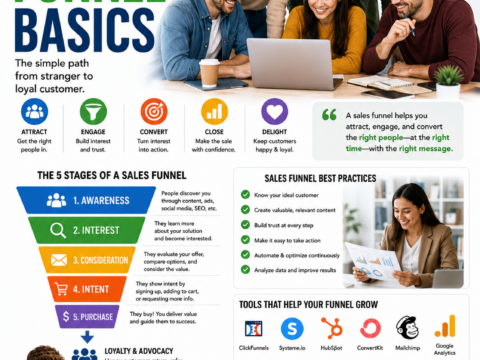
A healthy strategy includes more than top-of-funnel articles. It also includes product education, comparison content, onboarding resources, and customer support content.
Write People-First Content
People-first content is content made primarily to help the reader, not to manipulate algorithms or publish at scale without value. It should be accurate, relevant, well-organized, and based on real insight, research, or experience.
People-First Content Checklist
- Does this content answer a real audience question?
- Does it match the reader’s likely intent?
- Is it clear who the content is for?
- Does it include helpful examples, steps, or evidence?
- Does it demonstrate experience or depth of knowledge?
- Are factual claims accurate and reviewed?
- Does it explain limitations or alternatives when relevant?
- Would a reader feel satisfied after reading it?
- Does it have a useful next step?
Google’s helpful-content guidance emphasizes creating satisfying content for people while using SEO best practices to bring searchers additional value. [179]
Do Not Create Content Only To:
- Target every possible keyword.
- Publish large volumes of generic AI-generated articles.
- Copy competitors without adding value.
- Force affiliate links into unrelated topics.
- Make exaggerated product or income claims.
- Create misleading clickbait headlines.
- Rank for topics outside your real focus or experience.
Build a Content Creation Workflow
A repeatable workflow helps you publish consistently without sacrificing quality. Your workflow can be simple at the beginning.
Basic Content Workflow
- Choose one audience question or topic.
- Research search intent and customer needs.
- Review relevant competitors and official sources.
- Create an outline.
- Write the first draft.
- Add examples, experience, screenshots, or templates.
- Fact-check important claims.
- Add internal links and a relevant call to action.
- Proofread and check formatting on mobile.
- Publish and distribute.
- Review performance and update later.
Use AI Carefully
AI can help brainstorm, outline, draft, repurpose, edit, and organize content. You should still review every output for accuracy, originality, relevance, privacy, copyright concerns, and alignment with your audience.
Do not use AI to mass-produce content without human review. Your content should reflect your real knowledge, experience, research process, and brand voice.
Repurpose Content Strategically
Repurposing means turning one useful piece of content into multiple formats. This helps you get more value from your research without creating unrelated content from scratch every day.
Example Repurposing System
Start with one detailed article:
How to Create a Lead Magnet for an Online Business
Then repurpose it into:
- A YouTube tutorial.
- Five Pinterest Pins.
- An Instagram carousel.
- Three short-form videos.
- An email newsletter.
- A free lead magnet checklist.
- A LinkedIn post.
- A short social-media thread.
- A related product tutorial.
Each version should fit the platform and give people a reason to engage. Do not copy and paste the exact same content everywhere without adapting it.
Distribute Content
Publishing an article is only the first step. Distribution helps the right audience discover it. Choose distribution channels based on where your audience spends time and how they prefer to learn.
Content Distribution Channels
- Email newsletter.
- Google Search and SEO.
- YouTube.
- Pinterest.
- Instagram.
- TikTok.
- LinkedIn.
- Facebook groups where participation is appropriate.
- Relevant online communities.
- Partnerships and guest appearances.
- Podcast interviews.
- Paid ads after validation.
Distribution Example
After publishing an article about “How to Build an Email List,” you could:
- Send it to your email subscribers.
- Create a Pinterest Pin that links to the article.
- Record a short video with one email list-building tip.
- Link to it from related articles about blogging and lead magnets.
- Create a checklist lead magnet tied to the article.
- Share a concise LinkedIn post for business audiences.
Do not spam links in communities or comments. Share content where it is relevant and where you can contribute genuine value.
Use Calls to Action
Every major content piece should give the reader a relevant next step. The CTA should match what the reader is likely ready to do.
Top-of-Funnel CTAs
- Read the next beginner guide.
- Download a checklist.
- Subscribe to the newsletter.
- Watch a tutorial video.
- Explore the resource library.
Consideration CTAs
- Compare tools.
- Read a product review.
- Download a planning worksheet.
- Book a discovery call.
- View a case study.
Decision CTAs
- View product details.
- Request a quote.
- Book a consultation.
- Start a free trial.
- Purchase the template or course.
Do not fill every article with unrelated calls to action. Choose one main next step that adds value to the reader’s current journey.
Track Content Performance
A content strategy should evolve based on data, feedback, and customer behavior. Track meaningful outcomes, not only likes or page views.
Useful Content Metrics
- Organic search impressions and clicks.
- Website users and sessions.
- Top landing pages.
- Average engagement time.
- Email subscribers.
- Lead magnet downloads.
- Contact form submissions.
- Consultation bookings.
- Product page clicks.
- Affiliate-link clicks.
- Digital product sales.
- Traffic source performance.
- Customer feedback and questions.
Google Analytics’ Traffic Acquisition report is designed to show where website and app visitors come from, including both new and returning users. It can help you compare the engagement and key events generated by sources such as organic search, email, social media, referrals, and paid campaigns. [523]
How to Use Data
- Expand topics that attract the right audience.
- Update pages with impressions but few clicks.
- Improve lead magnets that receive traffic but few signups.
- Strengthen calls to action on high-traffic pages.
- Create supporting content around successful articles.
- Reduce effort on channels that do not fit your audience.
- Use customer questions to create new content.
Do not make major decisions based on a few days of data. Look for patterns over several weeks or months.
Audit Existing Content
If you already have content, review it before creating more. Some older articles may be outdated, unclear, poorly linked, or no longer relevant to your current audience and offers.
Content Audit Questions
- Is the content still accurate?
- Does it match current audience needs?
- Does it align with a core content pillar?
- Does it receive impressions, clicks, leads, or sales?
- Does it have a clear call to action?
- Does it link to related content?
- Does it need updated screenshots, examples, or pricing?
- Should it be updated, merged, redirected, or removed?
Content Audit Actions
- Keep and promote high-performing content.
- Update useful but outdated content.
- Improve weak titles and introductions.
- Add internal links and better calls to action.
- Merge overlapping articles.
- Remove or redirect content that no longer serves a purpose.
Content marketing is not only about publishing new work. Updating existing content can be one of the most effective ways to improve usefulness and performance.
Create a Monthly Content Review
A monthly review helps you stay focused and prevents content marketing from becoming a collection of disconnected tasks.
Monthly Review Questions
- Which content created the most useful traffic?
- Which articles brought email subscribers or leads?
- Which traffic sources created the best engagement?
- What questions did customers ask this month?
- Which content needs updating?
- Which topic cluster needs more supporting articles?
- Which call to action performed best?
- What content should be repurposed?
- What should we stop doing because it does not support our goals?
Simple Monthly Process
- Review traffic and conversion data.
- Review customer feedback and questions.
- Choose one top-performing topic to expand.
- Choose one weak page to improve.
- Plan next month’s content around your pillars.
- Assign distribution tasks for each content piece.
- Document what you learned.
Common Content Marketing Mistakes
- Publishing without a clear audience.
- Creating content for every platform at once.
- Choosing topics only because they have high search volume.
- Ignoring search intent.
- Creating generic, copied, or unreviewed AI content.
- Publishing without a call to action.
- Creating content unrelated to your business offer.
- Promoting products before building trust.
- Not building an email list.
- Relying on only one platform.
- Never updating older content.
- Tracking likes and views but not leads, sales, or subscriber growth.
- Changing strategy too often without enough data.
A 90-Day Content Marketing Plan
Days 1–30: Build the Foundation
- Define one business goal.
- Choose one target audience.
- Research customer problems and competitor content.
- Choose three to five content pillars.
- Create a simple content calendar.
- Set up Google Analytics and Google Search Console.
- Publish three to five foundational articles or videos.
Days 31–60: Create and Distribute
- Publish supporting content around core pillars.
- Add internal links between related content.
- Create one relevant lead magnet.
- Set up an email signup form and welcome sequence.
- Choose one primary distribution channel.
- Repurpose one core article into multiple useful formats.
Days 61–90: Improve and Expand
- Review traffic, signups, leads, and customer feedback.
- Improve the best-performing content.
- Create new content around questions users are asking.
- Update pages with impressions but low clicks.
- Test a new call to action or lead magnet placement.
- Document what worked and plan the next 90 days.
The goal of the first 90 days is not guaranteed traffic or sales. It is to build useful content assets, learn what your audience responds to, and create a repeatable system.
Final Thoughts
A content marketing strategy gives your business direction. It helps you create useful content for a specific audience, connect that content to real business goals, distribute it through relevant channels, and improve based on data.
Start simple. Choose one audience, one goal, a few content pillars, one primary channel, and a realistic publishing schedule. Focus on helpful, people-first content that answers real questions and gives readers a useful next step.
Content marketing is not about producing the most content. It is about creating the right content for the right people and building trust over time.
Frequently Asked Questions
What is a content marketing strategy?
A content marketing strategy is a documented plan for creating, publishing, distributing, and improving useful content that supports business goals and helps a specific audience.
What should be included in a content marketing strategy?
Include your business goal, target audience, customer problems, content pillars, topic clusters, formats, publishing schedule, distribution channels, calls to action, metrics, and review process.
How often should I publish content?
Choose a schedule you can maintain while preserving quality. One helpful article or video per week can be more effective than publishing daily content that does not serve the audience well.
What is a content pillar?
A content pillar is a broad topic your business wants to be known for. Supporting articles, videos, emails, and resources can be organized around that topic to create a useful content cluster.
How do I find content ideas?
Use customer questions, search suggestions, Google Search Console, Google Trends, competitor research, reviews, forums, support tickets, social-media comments, and sales conversations.
Can AI help create a content marketing strategy?
AI can help brainstorm topics, organize content calendars, draft outlines, repurpose content, and identify questions to research. You should still apply human judgment, fact-check outputs, add real expertise, and ensure content serves a real audience need.
How do I measure content marketing success?
Measure results that match your goal, such as organic search traffic, email subscribers, lead magnet downloads, consultation requests, product sales, affiliate-link clicks, customer retention, and revenue after expenses.