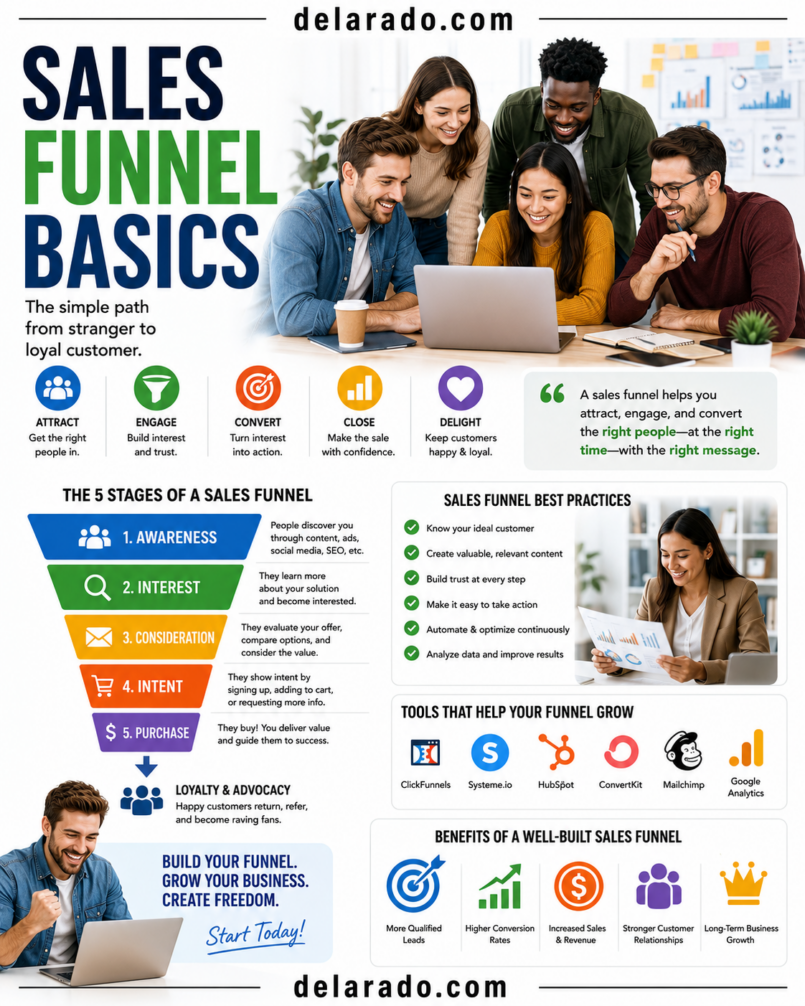
A sales funnel is the path a potential customer takes from first discovering your business to taking a meaningful action, such as joining your email list, booking a consultation, requesting a quote, starting a trial, or making a purchase. A simple funnel helps you guide people toward the next useful step instead of expecting them to land on a website and immediately buy.
The best sales funnels are not designed to pressure people. They help the right audience understand a problem, evaluate realistic options, make an informed decision, and receive useful support after becoming a customer. A common funnel model includes awareness, consideration, conversion, and loyalty stages.
Who Is This Topic For?
This guide is for bloggers, affiliate marketers, eCommerce stores, service businesses, freelancers, agencies, consultants, coaches, course creators, local businesses, software companies, and anyone who wants a more organized path from content to customer action.
This Article Is Helpful If You Want To:
- Turn website visitors into email subscribers
- Generate more qualified leads
- Create a lead magnet
- Sell a product or service online
- Book more consultations or appointments
- Improve a product or service page
- Build an email follow-up sequence
- Understand where potential customers leave
- Improve customer onboarding
- Create a content-to-sale workflow
A Sales Funnel May Be Especially Useful For:
- A local business that wants more quote requests
- A consultant who wants qualified consultation bookings
- An online store that wants more product purchases
- A blogger building an email list
- A course creator selling a digital program
- An agency offering website, marketing, or design services
- A software business offering a free trial or demo
- An affiliate marketer recommending relevant products
What Is a Sales Funnel?
A sales funnel is a visual and practical model for the customer journey. It shows the steps someone takes before becoming a customer and, ideally, after becoming one.
It is called a funnel because not every person who sees your content will become a customer. Some people may read an article and leave. Others may join your email list, compare options, request more information, or purchase. The goal is not to force every visitor through the funnel; it is to make the next appropriate action clear for the people your offer can genuinely help.
Common Funnel Stages
| Stage | What the Potential Customer Is Doing | Useful Content or Action |
|---|---|---|
| Awareness | Recognizing a problem or discovering a topic | Blog posts, videos, social content, SEO pages, educational guides |
| Consideration | Researching possible solutions | Checklists, case studies, comparisons, webinars, email sequences, FAQs |
| Conversion | Choosing whether to buy, book, subscribe, or request a quote | Product pages, service pages, demos, consultation pages, transparent pricing, testimonials |
| Loyalty | Using the product or service and deciding whether to return or recommend it | Onboarding, support, tutorials, customer emails, renewal support, referral programs |
HubSpot describes awareness as problem recognition, consideration as evaluating solutions, conversion as the final decision, and loyalty as post-purchase retention or expansion.
Benefits of a Sales Funnel
Creates a Clear Customer Journey
A funnel helps you decide what someone should do after reading an article, watching a video, visiting a product page, or clicking an advertisement. Instead of sending everyone to a generic homepage, you can provide a next step that matches their intent.
Improves Content Planning
You can create content for different stages of the customer journey. Educational content may attract new visitors, comparison content can help people evaluate options, and service pages can help ready-to-buy visitors decide.
Helps You Qualify Leads
A lead magnet, form, quiz, webinar registration, quote request, or consultation booking can help identify people who want more information. This can save time by separating casual visitors from people who may be ready for a relevant offer.
Supports Better Follow-Up
Email sequences, onboarding messages, helpful resources, reminders, and customer support can give people useful information after they show interest instead of relying on a single sales page.
Shows Where People Leave
Funnel tracking can help you see whether visitors leave after viewing a landing page, form, product page, checkout, or thank-you page. Google Analytics funnel reports can show the steps users take and where drop-off occurs.
Can Improve Customer Experience
A simple funnel can reduce confusion by providing clear pricing, realistic expectations, helpful answers, easy contact options, accessible forms, and relevant next steps.
Helps Measure Marketing More Clearly
You can compare content, traffic sources, landing pages, emails, ads, and offers based on meaningful actions rather than only page views or follower counts.
Risks and Limitations
A Funnel Cannot Fix a Weak Offer
No landing page, email sequence, countdown timer, or automation tool can make an unclear, overpriced, low-quality, or unsuitable product valuable to customers.
Too Many Steps Can Reduce Action
Long forms, unnecessary account creation, unclear navigation, repeated popups, too many email confirmations, and complicated checkout pages can make people leave before completing the intended action.
Misleading Urgency Can Damage Trust
Do not use fake scarcity, fabricated countdown timers, false “only one spot left” claims, deceptive pricing, or unrealistic income and performance claims to pressure people into buying.
Privacy and Consent Matter
Do not collect more personal information than you need. Explain what people are signing up for, protect collected data, and give people a reasonable way to unsubscribe from marketing communications where required.
Automation Needs Human Review
Automated emails, chatbots, lead scoring, scheduling, and follow-up workflows can make mistakes. Review them regularly for outdated links, inaccurate pricing, misleading messages, and poor customer experience.
Not Every Visitor Is Ready to Buy
Some visitors are researching, comparing, learning, or returning later. A good funnel respects that by providing useful content and low-pressure next steps instead of treating every visit as an immediate sales opportunity.
Metrics Can Be Misleading
A high conversion rate from a small or poorly qualified sample does not necessarily mean the funnel is healthy. Review traffic quality, refunds, cancellations, customer satisfaction, support volume, and retention alongside conversion metrics.
Simple Funnel Example
Here is a simple funnel for a website-design consultant who serves small businesses.
| Funnel Stage | Content or Page | Visitor Action | Business Goal |
|---|---|---|---|
| Awareness | Blog article: “What Should a Small Business Website Include?” | Reads the guide | Attract relevant visitors |
| Consideration | Free Website Launch Checklist | Joins email list to download it | Provide value and earn permission to follow up |
| Conversion | Website design services page | Books a discovery call | Start a qualified sales conversation |
| Loyalty | Client onboarding guide and support emails | Completes project steps and refers others | Deliver a stronger customer experience |
The funnel does not require complicated software. It can begin with one helpful article, one relevant lead magnet, one clear landing page, a short email sequence, and one straightforward service page.
Step-by-Step Process
Step 1: Define the Main Goal
Choose one primary conversion goal for the funnel. Do not ask visitors to subscribe, purchase, book a call, download five resources, follow every social account, and complete a survey all at once.
Common Funnel Goals
- Collect email subscribers
- Sell a product
- Book a consultation
- Generate quote requests
- Start a free trial
- Register people for a webinar
- Promote a course
- Get demo requests
- Generate affiliate clicks
- Encourage repeat purchases
Example Goal
Generate qualified consultation bookings from small-business owners who need a new or improved website.
A clear goal makes it easier to choose the audience, offer, landing page, call to action, tracking events, and follow-up sequence.
Step 2: Define the Audience
Identify who the funnel is meant to help. Be specific about the person’s current situation, problem, awareness level, and desired outcome.
Audience Questions
- Who is this person?
- What problem are they trying to solve?
- What do they already know?
- What might stop them from acting?
- What questions do they need answered?
- What does success look like for them?
- What type of offer would be genuinely useful?
- Where are they likely to discover your content?
Example Audience
Local service-business owners with an outdated website who want more customer inquiries but do not know what should be included on a modern, mobile-friendly website.
Do not build the funnel around assumptions alone. Review customer emails, sales calls, reviews, support requests, search terms, comments, and survey responses.
Step 3: Map the Customer Journey
Write down what a potential customer needs at each stage. This helps you avoid pushing a sales offer before someone understands the problem or trusts your business.
| Stage | Customer Question | Helpful Asset | Next Step |
|---|---|---|---|
| Awareness | Why is my website not generating inquiries? | Educational blog post or video | Read a related guide or download a checklist |
| Consideration | What should I do to improve my website? | Checklist, audit guide, webinar, case-study lesson | Request more information or view services |
| Conversion | Is this service right for my business? | Service page, process explanation, pricing guidance, consultation page | Book a call or request a quote |
| Loyalty | What happens after I become a customer? | Onboarding email, client portal, tutorial, support guide | Use the service successfully and continue the relationship |
The goal is to match content to the customer’s current need. Someone searching for “what is web hosting?” may need a beginner guide, while someone viewing your pricing page may need clear service details and a simple way to contact you.
Step 4: Create a Relevant Offer
Your funnel needs an offer that gives people a useful reason to take the next step. An offer does not have to be a discount. It can be helpful information, a practical tool, a free resource, a product, or a service.
Awareness-Stage Offers
- Helpful blog article
- Short tutorial video
- Beginner guide
- Free checklist
- Template
- Glossary
- Educational email series
Consideration-Stage Offers
- Comparison guide
- Case study with permission
- Buyer checklist
- Product demonstration
- Webinar
- Free audit framework
- FAQ resource
Conversion-Stage Offers
- Product purchase
- Service package
- Consultation booking
- Demo request
- Free trial
- Quote request
- Paid workshop or course enrollment
Example Lead Magnet
Free Website Launch Checklist: A beginner-friendly checklist covering domains, hosting, WordPress setup, essential pages, website backups, contact forms, and launch-day review steps.
Your lead magnet should solve a small, real problem. Avoid vague offers such as “Unlock Your Success Blueprint” when the visitor cannot tell what they will receive.
Step 5: Build a Landing Page
A landing page has one main purpose: help a visitor understand the offer and decide whether to take the next step.
Landing Page Elements
- Specific headline
- Short explanation of the offer
- Who the offer is for
- What the visitor will receive
- Benefits stated realistically
- Relevant visual or preview
- Simple form or purchase option
- Privacy or consent language where appropriate
- Clear call to action
- Frequently asked questions if needed
Weak Headline
Transform Your Business Today
Stronger Headline
Download the Free Website Launch Checklist for First-Time WordPress Site Owners
Strong Call to Action
Send Me the Free Checklist
Use clear language. Tell people what happens after they click, what information you collect, and whether they will receive future emails.
Step 6: Keep Forms Simple
Ask only for the information you need at that stage. A free checklist may require only an email address, while a quote request may need more details to determine whether your business can help.
For a Simple Lead Magnet
- First name, if genuinely useful
- Email address
- Consent checkbox if required for your use case
For a Consultation Request
- Name
- Email address
- Business name
- Website address, if relevant
- Short description of the project
- Preferred contact method
Do not ask for a phone number, full address, detailed budget, company size, or unnecessary personal information unless it is genuinely required for the next step.
Step 7: Create a Follow-Up Sequence
After someone signs up, purchases, requests information, or books a call, follow up with useful and relevant communication. The first follow-up should deliver what you promised.
Simple Lead Magnet Email Sequence
- Deliver the resource and explain how to use it
- Share one helpful tip related to the resource
- Answer a common question or mistake
- Share a relevant guide, tutorial, or case-study lesson
- Offer a suitable next step, such as a consultation or product page
Example First Email
Subject: Your Website Launch Checklist Is Ready
Thanks for requesting the Website Launch Checklist. It covers the essential steps for planning a domain, hosting, WordPress setup, key pages, backups, and a basic launch review.
Start with the first section, “Choose Your Website Goal,” before comparing tools or purchasing a plan.
Do not immediately send a sequence of aggressive sales messages after offering a free resource. Continue to provide useful information and make offers relevant to the subscriber’s stated interest.
Step 8: Create a Conversion Page
A conversion page helps someone decide whether to buy, book, request a quote, or begin a trial. It should answer the questions that matter before making a decision.
A Service Page May Include:
- Who the service is for
- The problem it helps solve
- What is included
- What is not included
- Your process
- Timeline expectations
- Pricing or pricing guidance
- Portfolio examples with permission
- Real testimonials with permission
- Frequently asked questions
- Consultation or quote-request form
A Product Page May Include:
- Accurate product photos
- Clear product description
- Materials, features, and specifications
- Price and payment information
- Shipping or access details
- Returns or refund information
- Real reviews, where applicable
- Customer support details
- Clear purchase button
Do not use AI-generated customer reviews, fake testimonials, false scarcity, altered screenshots, or invented product results to increase conversions.
Step 9: Build Customer Onboarding
The funnel does not end at a sale. A strong onboarding process helps customers understand what happens next, reduces confusion, and can improve retention and referrals.
Customer Onboarding May Include:
- Order confirmation or welcome email
- Clear next steps
- Account-access instructions
- Project timeline
- Product-use tutorial
- Support contact options
- FAQ document
- Implementation checklist
- Feedback request after appropriate use
- Renewal or reorder information where relevant
Example
After a client books a website project, send a welcome email with the project timeline, payment details, content-submission checklist, communication expectations, and a link to the client portal.
Good onboarding reduces the gap between a sale and a successful outcome.
Step 10: Add Tracking
Track the key actions in your funnel so you can identify where people continue and where they leave. Use tracking to improve user experience, not to collect unnecessary personal data.
Useful Funnel Events
- Landing page view
- Lead magnet form view
- Lead magnet form submission
- Email confirmation
- Product-page view
- Add to cart
- Checkout started
- Purchase completed
- Consultation page view
- Consultation form submitted
- Demo request submitted
- Resource download
Google Analytics custom funnel reports can show the steps users take to complete a task and identify where users drop off between funnel stages.
Simple Funnel Formula
You can calculate a stage-to-stage conversion rate with:
\[
\text{Conversion Rate} = \frac{\text{People Who Completed the Next Step}}{\text{People Who Reached the Previous Step}} \times 100
\]
Example
If 500 people visit a landing page and 25 submit a form, the landing-page-to-signup conversion rate is:
\[
\frac{25}{500} \times 100 = 5\%
\]
Review the quality of those signups, not just the percentage. A smaller number of highly relevant leads may be more valuable than many people who never engage again.
Step 11: Review Drop-Off Points
Find the stage where people most often leave, then investigate the likely cause. Do not change every part of the funnel at once.
| Drop-Off Point | Possible Cause | What to Review |
|---|---|---|
| Few people click from content to landing page | Call to action is weak or unrelated | Content relevance, CTA wording, offer match, link placement |
| Many visitors leave the landing page | Offer is unclear or page is confusing | Headline, page speed, mobile layout, value explanation, form length |
| People view but do not submit the form | Form asks for too much or trust is low | Field count, privacy language, page clarity, delivery expectations |
| Subscribers do not open emails | Subject lines or expectations are weak | Permission language, welcome email, sender identity, relevance |
| Leads do not book a call | Offer or next step is not clear enough | Service-page content, pricing guidance, process, booking friction |
| Cart abandonment is high | Unexpected cost, unclear policy, technical issue, low trust | Checkout flow, shipping, payment options, refund policy, errors |
Change one major element at a time when possible. For example, test a clearer headline or shorter form before redesigning the entire funnel.
Programs That Can Help
WordPress
WordPress can host landing pages, blog posts, service pages, product pages, resource libraries, lead-magnet pages, and customer education content.
WooCommerce
WooCommerce can help WordPress-based businesses sell products, manage checkout, provide order confirmations, create coupons, and track eCommerce actions when configured appropriately.
Elementor, Kadence, or Similar Builders
Page builders can help create landing pages, sales pages, service pages, lead-magnet pages, thank-you pages, and responsive layouts without building every page from code.
MailerLite, ConvertKit, or Brevo
Email marketing platforms can help collect subscribers, send lead magnets, build welcome sequences, segment audiences, schedule campaigns, and manage unsubscribe preferences.
HubSpot
HubSpot can support landing pages, forms, email automation, customer relationship management, lead tracking, pipeline management, and reporting for businesses with more complex sales processes.
Google Analytics
Google Analytics can help track website behavior and funnel progress. Its Funnel Exploration reports can visualize the steps users take toward a key action and highlight points of drop-off.
Google Search Console
Google Search Console can help identify search queries, pages, impressions, and clicks that may support awareness-stage content planning.
Canva
Canva can help create lead-magnet covers, checklists, worksheets, social-media graphics, landing-page visuals, diagrams, presentations, and branded promotional assets.
Calendly or Scheduling Tools
Scheduling tools can help qualified prospects select a consultation time, answer pre-call questions, receive reminders, and reduce manual scheduling work.
Hotjar or Microsoft Clarity
Behavior-analysis tools can help you understand how visitors interact with pages. Use them responsibly and review your privacy obligations before enabling session recordings, heatmaps, or similar tracking features.
Common Mistakes
Trying to Sell Too Soon
Someone reading an introductory guide may not be ready to buy. Offer a useful next step that matches their level of awareness.
Creating a Generic Lead Magnet
A vague PDF with broad advice may not motivate signups. Create a specific resource that solves a small, immediate problem.
Using Too Many Calls to Action
Choose one primary action per page. Too many buttons, offers, popups, and competing links can make visitors unsure what to do next.
Making the Form Too Long
Only ask for information necessary for the current step. Long forms can create unnecessary friction and reduce trust.
Using Misleading Scarcity or Urgency
Do not use false countdown timers, fake inventory levels, invented deadlines, or misleading “limited offer” claims.
Not Delivering the Promised Resource
If someone gives you their email address for a checklist, template, webinar, or guide, deliver it immediately and make it easy to access.
Ignoring Mobile Users
Review landing pages, forms, checkout steps, scheduling tools, images, buttons, and emails on a phone. A funnel that works on desktop may be difficult to use on mobile.
Not Measuring the Funnel
Without tracking meaningful steps, it is difficult to know whether people are finding the offer, signing up, booking, buying, or leaving at a specific stage.
Optimizing Only for Conversions
Review cancellations, refunds, complaints, customer satisfaction, support volume, repeat purchases, and retention. A funnel that produces purchases but leaves customers disappointed is not healthy.
Using Fake Reviews or Testimonials
Do not create fake reviews, invent customer stories, use stock people as customers, or use AI-generated testimonials. Testimonials should reflect real experiences and be used with permission.
Hiding Affiliate or Sponsorship Relationships
If you earn a commission, receive payment, receive free products, or have another material connection to a promoted business, disclose it clearly and close to the endorsement or link.
Frequently Asked Questions
What is a sales funnel?
A sales funnel is the series of steps a potential customer takes from first learning about a business to becoming a customer and, ideally, continuing the relationship. Common stages include awareness, consideration, conversion, and loyalty.
Do small businesses need a sales funnel?
Most small businesses benefit from having a simple, documented customer path. It can be as basic as helpful content, a contact or lead-magnet page, a follow-up email, a clear service or product page, and a customer onboarding process.
What is the difference between a sales funnel and a marketing funnel?
People often use the terms interchangeably. A marketing funnel generally focuses on attracting and nurturing potential customers, while a sales funnel often emphasizes the decision, purchase, quote request, or consultation stage. In practice, both should work together.
How many steps should a sales funnel have?
Use only the steps needed for your audience and offer. A low-cost product might use a short path from product page to checkout, while a high-value service may need educational content, a lead magnet, an email sequence, a consultation, and a proposal.
What is a lead magnet?
A lead magnet is a useful resource offered in exchange for contact information or permission to follow up. Examples include checklists, templates, guides, calculators, webinars, worksheets, and email courses.
What makes a good landing page?
A good landing page clearly explains the offer, who it helps, what the visitor receives, why it is useful, and what happens after they complete the form or click the main call to action.
Do I need email marketing for a funnel?
Email can be useful when people need time to learn, compare, or decide. However, some funnels can use direct purchase pages, booking tools, store checkout, phone calls, or in-person follow-up instead. Choose the communication method that fits your customers.
How do I track a sales funnel?
Define the key steps, such as landing-page view, form submission, product-page view, checkout, purchase, or booking. Use analytics and CRM tools to measure how many people move from one step to the next. Google Analytics Funnel Exploration can help visualize those steps and drop-off points.
What is a good funnel conversion rate?
There is no universal benchmark that applies to every business. Rates depend on traffic source, offer type, price, audience trust, industry, device, and funnel stage. Compare results against your own historical performance and focus on lead quality and customer outcomes.
Can I use affiliate links in a sales funnel?
Yes, but the recommendation should be relevant and useful, and your financial relationship should be disclosed clearly and conspicuously where viewers can see it. Do not present affiliate links as neutral recommendations if you may earn a commission.
Should I use countdown timers in a sales funnel?
Only use a timer when it reflects a real deadline, such as a genuine registration close date or an actual promotion end. Do not reset fake timers or create false scarcity to pressure buyers.
What should happen after a sale?
Send a confirmation, explain next steps, provide access or delivery details, offer support information, and help the customer use the product or service successfully. Post-purchase support is part of the funnel and can support loyalty.