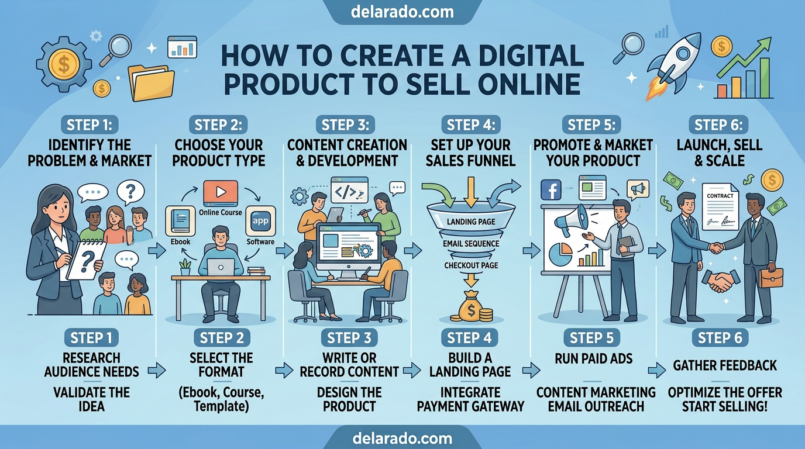
A digital product is a product customers can access online instead of receiving through physical shipping. Common examples include templates, eBooks, checklists, worksheets, spreadsheets, printables, mini-courses, online courses, prompt packs, video tutorials, software, digital art, and membership resources.
Digital products can be attractive because they do not require physical inventory, warehouse space, packaging, or shipping. However, they are not automatic income. You still need to understand your audience, create something useful, market it honestly, deliver it reliably, provide customer support, and update it when needed.
The best digital product is usually not the largest or most complicated one. It is a focused solution that helps a specific person make meaningful progress on a problem they already want to solve.
What Is a Digital Product?
A digital product is a non-physical item that customers receive or access electronically. It may be downloaded, viewed in a browser, delivered by email, unlocked through a membership area, or accessed through a course platform.
Examples of Digital Products
- eBooks and guides.
- PDF checklists.
- Canva templates.
- Notion templates.
- Google Sheets trackers.
- Printable planners.
- Social-media content calendars.
- Email marketing templates.
- Website templates.
- Prompt packs.
- Online mini-courses.
- Video tutorials.
- Online workshops.
- Digital art and graphics.
- Stock photos and design assets.
- Membership resource libraries.
- Software or web tools.
A digital product may be simple or complex. A one-page website-launch checklist can be a digital product. So can a 20-hour course, a software subscription, or a complete template library.
Why Sell Digital Products?
Digital products can give you more control over what you sell and how you deliver value. You do not have to rely entirely on affiliate commissions, client work, sponsorships, or advertising revenue.
Potential Benefits
- No physical inventory.
- No packaging or shipping.
- Instant or automated delivery.
- Ability to sell repeatedly.
- Flexible pricing options.
- Opportunity to bundle products.
- Ability to update products over time.
- Potential to build an email list and customer base.
- Ability to combine products with services, coaching, or memberships.
- More control over customer experience and brand.
Important Realities
- You still need customer demand.
- You need a way to attract the right audience.
- You need a clear product promise.
- You need to provide customer support.
- You may need to update content or templates.
- You need transparent pricing and refund terms.
- You need to account for taxes, payment fees, and platform costs.
- You must avoid misleading claims about outcomes or income.
Digital products can be scalable, but they are not “set it and forget it.” The strongest products improve through customer feedback and ongoing maintenance.
Start With the Customer Problem
The most common product mistake is starting with what you want to create instead of what your audience needs. Start by identifying a specific problem your target customer already has.
Customer Problems Digital Products Can Solve
- They need to save time.
- They need a simple process.
- They do not know where to start.
- They need a planning system.
- They need templates for repeated work.
- They need a checklist to avoid mistakes.
- They need guidance on choosing a tool or product.
- They want to learn a specific skill.
- They need help organizing information.
- They want to reduce confusion or overwhelm.
Use This Product Formula
I help [specific audience] achieve [specific outcome] with [digital product type].
Examples
- I help beginner bloggers plan articles with a blog content calendar template.
- I help freelance creators organize client work with a Notion project workflow template.
- I help local service businesses improve websites with a small-business website audit toolkit.
- I help new affiliate marketers choose a niche with a niche research worksheet.
- I help email marketing beginners create welcome sequences with a template bundle.
A focused product is easier to create, explain, test, market, and improve than a vague product that promises to solve everything.
Validate the Product Idea First
Validation means collecting evidence that people are interested in the problem and may value your solution. You do not need absolute certainty before creating a product, but you should avoid spending months on a large product based only on assumptions.
Google’s people-first content guidance asks whether you have an existing or intended audience that would find your content useful if they came directly to you, whether you demonstrate firsthand expertise or depth of knowledge, and whether people leave feeling they learned enough to achieve their goal. These are useful questions for digital product validation too. [237]
Ways to Validate a Digital Product Idea
- Ask your email subscribers what they need help with.
- Review customer support questions.
- Read comments on blog posts, videos, and social-media content.
- Review competitor products and customer reviews.
- Look for repeated questions in forums and communities.
- Create a free lead magnet on the same topic.
- Offer a live workshop before building a course.
- Create a small beta version.
- Create a waitlist page.
- Pre-sell transparently with a clear delivery timeline.
- Offer one-on-one services to learn customer needs.
Example
Suppose you want to sell a “12-Month Blog Content Calendar.” Before building it, publish a free Weekly Blog Planning Worksheet. If many readers download it, reply with planning questions, or ask for more advanced templates, that is useful evidence that a larger planning product may be relevant.
Validation does not guarantee sales. It reduces the risk of building a product that nobody wants.
Choose the Right Product Format
Choose the smallest format that solves the customer’s problem effectively. Do not create a large course when a checklist or template would provide the result faster.
| Product Format | Best For | Example |
|---|---|---|
| Checklist | Helping someone complete a process. | Website Launch Checklist. |
| Template | Saving time on repeated work. | Welcome Email Template Pack. |
| Spreadsheet | Planning, tracking, calculations, or organization. | Content Calendar Spreadsheet. |
| Notion template | Digital organization and workflow systems. | Freelancer Project Dashboard. |
| eBook or guide | Teaching a focused process or framework. | Beginner SEO Setup Guide. |
| Mini-course | Teaching one defined outcome. | How to Build a Lead Magnet in One Weekend. |
| Online course | Teaching a larger skill or transformation. | Beginner WordPress Website Course. |
| Resource library | Providing ongoing access to multiple resources. | Monthly Social Media Template Library. |
For beginners, templates, worksheets, checklists, small guides, and mini-products are often easier to test than large courses or memberships.
Create a Minimum Viable Product
A minimum viable product, often called an MVP, is the simplest version of your product that can deliver useful value and help you test demand. It should not be low quality. It should be focused and complete enough to solve one problem.
Examples of MVP Digital Products
- One content calendar template instead of a full marketing course.
- Five welcome email templates instead of a 50-email library.
- A niche research worksheet instead of an advanced affiliate marketing program.
- A three-lesson mini-course instead of a 30-module course.
- A website audit checklist instead of a full business toolkit.
- A one-hour workshop instead of a large membership.
Why Start Small?
- You can launch faster.
- You can collect feedback sooner.
- You reduce the cost of a wrong assumption.
- You can improve based on real customer questions.
- You can build a larger product from proven smaller products.
- You can test pricing and product positioning.
A small product can become the foundation for a bundle, course, coaching program, membership, or higher-priced service later.
Plan Your Product Contents
Once you choose the format, map the product around the customer’s desired outcome. Every section, file, lesson, or template should help the buyer make progress.
Product Planning Questions
- What should the customer be able to do after using this product?
- What steps do they need to take?
- What information do they need first?
- What common mistakes should the product help them avoid?
- What templates, examples, or resources will help them act faster?
- What questions might they have while using it?
- How will they know they are using it correctly?
Example: Content Calendar Template Bundle
Outcome: Help beginner bloggers plan and publish content more consistently.
Included files:
- Monthly content calendar.
- Topic brainstorming worksheet.
- Keyword research tracker.
- Blog post outline template.
- Internal-linking checklist.
- Publishing checklist.
- Quick-start guide.
The product should have a clear “Start Here” instruction so buyers know what to do first.
Create the Product
The tools you choose depend on your product format. Start with simple, reliable tools that you can use confidently.
Tools for Templates and Downloads
- Canva for checklists, workbooks, guides, and graphics.
- Google Docs for written templates and guides.
- Google Sheets for trackers, calculators, and calendars.
- Notion for workflow and organizational templates.
- Microsoft Excel or Word for familiar downloadable formats.
- Adobe Express for branded PDFs and graphics.
Tools for Courses and Video Products
- CapCut for video editing.
- InVideo.io for video creation.
- Synthesia.io for AI-assisted avatar videos.
- ElevenLabs for AI voiceovers.
- Canva for slides and lesson visuals.
- Screen-recording software for tutorials.
Tools for Selling and Delivery
- ThriveCart.
- Systeme.io.
- WooCommerce.
- Shopify.
- Gumroad.
- Podia.
- Teachable.
- Thinkific.
- Payhip.
Choose tools based on the product you are selling, payment requirements, customer experience, delivery method, tax obligations, and budget. Do not purchase multiple overlapping platforms before you have a working product and customers.
Make the Product Easy to Use
A valuable product can still lead to customer frustration if it is confusing, poorly organized, difficult to access, or missing instructions. Your product should be designed around the customer experience.
Usability Checklist
- Use clear file names.
- Include a “Start Here” guide.
- Explain what each file does.
- Provide examples where helpful.
- Use clear formatting and readable text.
- Test all download links.
- Test templates before selling them.
- Explain software requirements or compatibility.
- State whether updates are included.
- Provide a customer support contact method.
Example Product Folder Structure
Beginner Blogger Content Calendar Bundle
- 01 – Start Here.pdf
- 02 – Monthly Content Calendar.xlsx
- 03 – Topic Brainstorming Worksheet.pdf
- 04 – Keyword Tracker.xlsx
- 05 – Blog Post Outline Template.docx
- 06 – Internal Linking Checklist.pdf
- 07 – Publishing Checklist.pdf
Clear organization reduces support requests and helps customers get value faster.
Price Your Digital Product
Pricing is not only about how long a product took to create. It should reflect the value to the customer, the problem it solves, the alternatives available, your target audience’s budget, support needs, platform fees, taxes, and your business goals.
Pricing Questions
- What problem does the product solve?
- How much time, confusion, or effort can it save the customer?
- What similar products cost?
- What level of support is included?
- What are your payment processing and platform costs?
- Will you offer a one-time price, subscription, or bundle?
- Will you offer updates?
- What price feels accessible for the intended audience?
Simple Product Pricing Categories
- Low-cost entry product: Small checklist, template, or mini-resource.
- Core product: Complete toolkit, template bundle, guide, or mini-course.
- Premium product: In-depth course, advanced toolkit, coaching, or service bundle.
Do not price a product based on unrealistic promises. A template may save someone time, but it does not guarantee a specific amount of money, traffic, sales, or business success.
Create a Product Sales Page
A sales page explains what the product is, who it is for, what it includes, how it works, how much it costs, and how to purchase. It should help customers make an informed decision.
Sales Page Sections
- Clear product headline.
- Short description of the outcome.
- Who the product is for.
- Who the product is not for.
- The problem it solves.
- What is included.
- Product previews, screenshots, or sample pages.
- How the product works.
- Compatibility requirements.
- Price and payment information.
- Refund, return, or cancellation policy.
- Frequently asked questions.
- Support information.
- Clear purchase button.
Headline Formula
Help [audience] achieve [desired outcome] with [product name].
Example Headline
Plan a Full Year of Blog Content With the Beginner Blogger Content Calendar Bundle.
Example Product Description
The Beginner Blogger Content Calendar Bundle is a digital planning system designed to help new bloggers organize article ideas, keywords, publishing dates, internal links, and promotional tasks in one place.
Use clear language. Do not use false scarcity, fake testimonials, misleading previews, hidden fees, or unsupported claims.
Set Up Checkout and Delivery
Customers should be able to purchase and receive their digital product without confusion. The checkout process should clearly show the product, price, payment terms, and applicable policies.
Checkout Checklist
- Use a reputable payment processor.
- Show the product name and price clearly.
- State whether it is a one-time payment or recurring subscription.
- Show taxes, fees, or currency details where applicable.
- Link to refund and privacy policies.
- Use HTTPS for secure checkout.
- Send an order confirmation email.
- Deliver download links or access instructions immediately.
- Provide customer support contact details.
Post-Purchase Thank-You Page Example
Thank You for Your Purchase
Your Beginner Blogger Content Calendar Bundle is ready.
1. Check your inbox for your order confirmation and access link.
2. Download the files and open the “Start Here” guide first.
3. Begin by adding your next four content ideas to the monthly calendar.
4. If you need help, contact us at [Support Email].
Test the complete customer journey yourself before launching. Purchase the product using a test transaction if your platform allows it, confirm the emails arrive, verify download links, and check every file.
Write Clear Refund and Support Policies
Digital products may have different refund considerations than physical products because customers can access or download the item immediately. Your refund policy should be clear, accessible, and consistent with applicable law and payment platform requirements.
Policy Questions to Answer
- Do you offer refunds?
- What conditions apply?
- How long do customers have to request one?
- How should customers contact support?
- What happens if a download link does not work?
- Can customers receive updates?
- Can customers share, resell, or redistribute the product?
- What license does the customer receive?
Do not hide policies in fine print or make them difficult to find. If you are unsure what rules apply to your business, payment provider, country, or product type, consult a qualified legal professional.
Avoid Misleading Income Claims
If your digital product teaches business, marketing, investing, work-from-home methods, eCommerce, affiliate marketing, or other money-making topics, be especially careful about earnings claims.
The FTC has proposed expanding rules addressing deceptive or unsubstantiated earnings claims involving certain money-making opportunities. It has emphasized that covered sellers should be truthful about likely earnings and have written substantiation for claims they make. [294]
Do Not Claim That Your Product Will:
- Guarantee income.
- Make customers rich quickly.
- Replace a full-time job automatically.
- Guarantee traffic or rankings.
- Guarantee affiliate commissions.
- Guarantee eCommerce sales.
- Work without effort or risk.
Use More Honest Language
- “This template is designed to help you organize your content planning process.”
- “This guide explains the steps I use to research niche ideas.”
- “Results vary based on your audience, effort, niche, product, and marketing strategy.”
- “This resource is educational and does not guarantee business results.”
Honest positioning protects your customers, your reputation, and your business.
Promote Your Digital Product
A good product needs a way to reach the right people. Start with one or two marketing channels that match your audience and product.
Promotion Channels
- SEO blog content.
- Email marketing.
- YouTube tutorials.
- Pinterest Pins.
- Instagram and TikTok content.
- LinkedIn posts.
- Affiliate partnerships.
- Webinars and workshops.
- Podcasts.
- Online communities.
- Paid ads after validation.
Content-to-Product Example
Blog post: How to Plan Blog Content as a Beginner → Free Weekly Content Planning Worksheet → Email sequence → Beginner Blogger Content Calendar Bundle
Helpful Promotional Content
- How-to tutorials related to the product.
- Before-and-after workflow examples that do not exaggerate results.
- Product walkthrough videos.
- Frequently asked questions.
- Free mini-tips from the product.
- Case studies with permission.
- Comparison guides explaining who the product is for.
- Behind-the-scenes product creation content.
Make promotional content useful even for people who do not buy. This builds trust and helps the right customers understand whether your product fits their needs.
Build an Email Funnel
Email marketing can help you build a relationship with potential customers before asking them to buy. Start with a relevant free lead magnet, then provide useful educational emails that naturally connect to the product.
Simple Digital Product Email Sequence
- Deliver the free lead magnet.
- Teach one helpful quick win.
- Explain a common mistake.
- Share a related tutorial or use case.
- Introduce the paid digital product.
- Answer common objections or FAQs.
- Invite the subscriber to explore the product.
Do not send only sales emails. The goal is to provide enough value that subscribers understand your approach and can decide whether the paid product is helpful.
Collect and Use Customer Feedback
Customer feedback helps improve the product, sales page, instructions, support materials, and future offers. Ask customers what was useful, what was unclear, and what they still need help with.
Questions to Ask Customers
- What problem were you trying to solve?
- What made you choose this product?
- What part of the product was most useful?
- What was confusing or difficult?
- What would you improve?
- What related problem should the next product solve?
- Would you be willing to provide an honest testimonial?
Use Feedback to Improve
- Add a clearer quick-start guide.
- Create a tutorial video.
- Improve template instructions.
- Add missing examples.
- Update the FAQ section.
- Create a complementary product.
- Clarify who the product is and is not for.
Use only real testimonials with permission. Do not buy, invent, or edit testimonials in ways that change their meaning.
Track Product Performance
Track the data that helps you understand whether your product and marketing are working. Focus on meaningful business outcomes, not only views or followers.
Important Metrics
- Product page visits.
- Checkout starts.
- Completed purchases.
- Conversion rate.
- Average order value.
- Refund rate.
- Customer support requests.
- Traffic source by sales.
- Email signups.
- Email clicks to the product page.
- Customer feedback.
- Revenue and profit after costs.
Simple Conversion Formula
Conversion rate = Number of purchases ÷ Product page visitors × 100
For example, if 200 people visit a product page and 10 purchase, the conversion rate is 5%.
Use data to improve the customer experience. If people view the page but do not buy, review product positioning, price clarity, page design, product previews, FAQs, traffic source, and audience fit.
Common Digital Product Mistakes
- Creating a large product before validating demand.
- Trying to sell to everyone.
- Solving too many problems in one product.
- Creating a product with no clear outcome.
- Using vague or misleading sales copy.
- Making unsupported income or performance claims.
- Hiding prices, fees, refund terms, or subscription details.
- Failing to test delivery links and checkout.
- Providing no instructions or support.
- Using fake reviews or testimonials.
- Ignoring taxes, licensing, and legal requirements.
- Buying expensive software before validating the product.
- Never updating the product after launch.
A 30-Day Digital Product Plan
Week 1: Choose and Validate
- Choose one target audience.
- Identify one specific problem.
- Research customer questions, competitor products, and reviews.
- Choose a simple product format.
- Write a product promise and outline.
Week 2: Create the Minimum Viable Product
- Create the first version of the product.
- Add a clear “Start Here” guide.
- Test templates, files, formulas, or lessons.
- Prepare product preview images.
- Write basic FAQs.
Week 3: Build the Sales and Delivery System
- Create a product sales page.
- Set pricing and delivery details.
- Write refund, support, and licensing policies.
- Set up checkout and automated delivery.
- Create a thank-you page and order confirmation email.
- Test the full customer experience.
Week 4: Launch and Learn
- Publish helpful content related to the product problem.
- Create a relevant lead magnet.
- Send an email sequence to interested subscribers.
- Share the product through one main traffic channel.
- Collect customer questions and feedback.
- Review product page visits, sales, support requests, and refund patterns.
Final Thoughts
Creating a digital product to sell online starts with a specific audience and a specific problem. Choose the simplest format that delivers a useful outcome, validate interest before building something large, create a clear sales page, and make delivery easy.
Focus on customer value over complexity. A small, useful template or checklist can be more valuable than a massive course that overwhelms the buyer. Be transparent about what customers receive, how much it costs, what support is included, and what results they can realistically expect.
The best digital products earn trust because they genuinely help people make progress.
Frequently Asked Questions
What is the easiest digital product to create?
Checklists, templates, worksheets, spreadsheets, mini-guides, printables, and simple resource lists are often easier to create than large courses or memberships. Choose a format that solves one specific problem for your audience.
Do I need an audience before creating a digital product?
An existing audience can help, but it is not required. You can validate demand through market research, free content, lead magnets, customer interviews, a waitlist, beta testing, services, or a small launch.
How much should I charge for a digital product?
Pricing depends on the value provided, audience budget, problem solved, product type, competitor pricing, support requirements, fees, taxes, and business goals. Start with a realistic price and adjust based on customer feedback and data.
Can I use AI to create digital products?
AI can help with brainstorming, drafting, design concepts, outlines, and workflow support. You should review outputs for accuracy, originality, copyright concerns, usefulness, privacy, and alignment with your real expertise. Do not use AI to create misleading or low-value products.
Do digital products need a refund policy?
Clear refund and support policies are important for customer trust and may be required by applicable laws or platforms. Requirements vary, so review your legal obligations and payment platform policies.
How do I deliver a digital product automatically?
Checkout platforms such as ThriveCart, Systeme.io, Gumroad, WooCommerce, Shopify, Podia, Teachable, and Thinkific can automate delivery through download pages, email access links, or customer accounts.
Can I make money selling digital products?
Yes, digital products can generate revenue, but there is no guarantee. Success depends on customer demand, product usefulness, pricing, traffic, trust, marketing, customer experience, support, and consistent improvement.