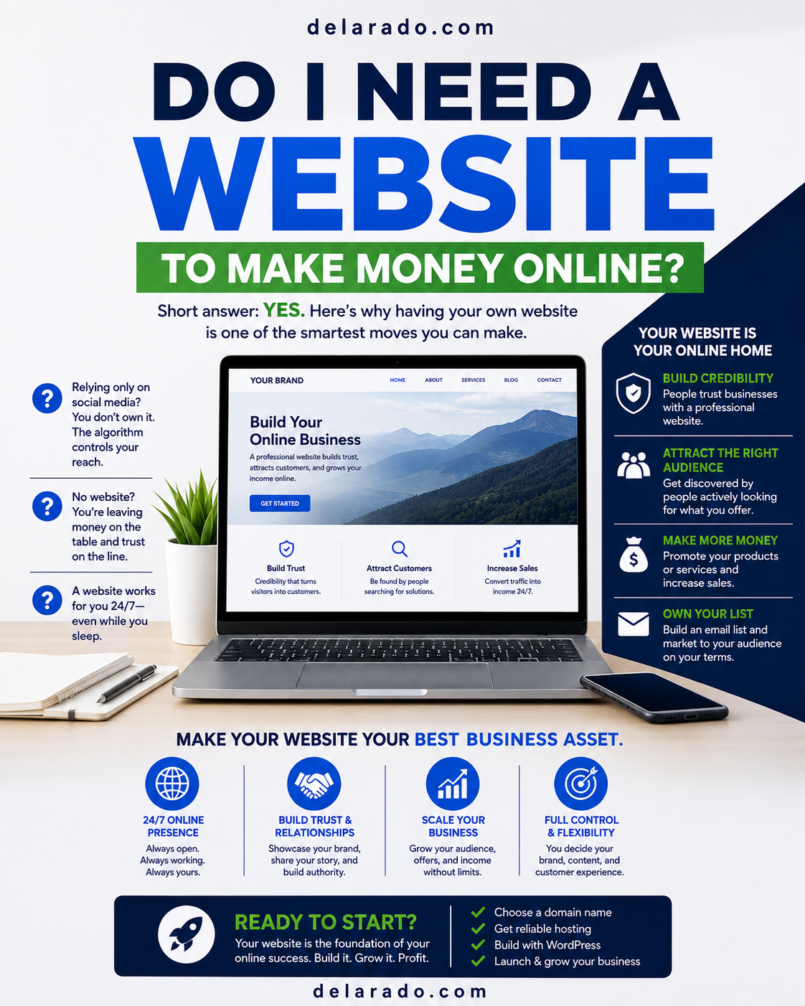
No, you do not absolutely need a website to make money online. People earn through freelance services, online marketplaces, social media, YouTube, referrals, hosted storefronts, newsletters, and creator platforms every day.
However, a website is usually one of the most valuable long-term assets an online business can build. It gives you a place you control to explain your offers, publish useful content, collect email subscribers, build trust, appear in search results, and guide potential customers toward relevant products or services.
You can begin without a website, but if your goal is to create a durable online business rather than depend entirely on another company’s platform, a website is highly recommended.
Who Is This For?
This guide is for anyone who wants to earn online and is deciding whether a website should be part of their plan. It is especially relevant for beginners, freelancers, affiliate marketers, creators, service providers, coaches, consultants, digital-product sellers, local businesses, and eCommerce entrepreneurs.
A Website Is Especially Useful If You Want To:
- Start a blog or niche content website
- Build an affiliate marketing business
- Offer freelance or consulting services
- Sell digital products, templates, guides, or courses
- Build an email list
- Promote a local service business
- Create a personal brand
- Sell physical products online
- Publish YouTube, Pinterest, Instagram, TikTok, or LinkedIn content
- Build a long-term online asset you control
You May Be Able to Start Without a Website If You:
- Offer a simple freelance service through referrals
- Sell through an existing online marketplace
- Use social media to test an early business idea
- Build a YouTube channel or newsletter first
- Use a hosted checkout page for one digital product
- Work with a few clients from your professional network
Starting without a website can be sensible when you are testing an idea. A website becomes more valuable when you want to organize your business, grow an audience, create trust, and reduce dependence on external platforms.
How People Earn Without Websites
You can earn online through several models without owning a website. These options can help you validate demand, gain practical experience, build a portfolio, or earn early income.
Freelance Services
Freelancers can find work through referrals, local networking, LinkedIn, social media, job boards, professional communities, direct outreach, or freelance marketplaces. Common services include writing, editing, virtual assistance, social-media management, graphic design, WordPress support, video editing, basic SEO research, customer support, and consulting.
Marketplaces
Online marketplaces can help sellers reach buyers without building a store from scratch. Depending on the marketplace, you may sell physical products, handmade goods, digital downloads, print-on-demand products, services, consulting, or used items.
Social Media and Creator Platforms
Creators can build an audience on YouTube, Instagram, TikTok, Pinterest, LinkedIn, Facebook, podcasts, or similar platforms. Possible income sources include services, sponsorships, affiliate partnerships, digital products, creator programs, memberships, and brand collaborations.
Hosted Product and Course Platforms
Hosted platforms may allow you to sell downloads, courses, subscriptions, or services through their own storefronts and checkout pages. These options can be helpful when you need to validate a product without building a full site immediately.
Email Newsletters
You can also start with an email newsletter platform. Newsletter businesses may earn through sponsorships, paid subscriptions, services, affiliate offers, digital products, or other relevant resources.
None of these methods require a website at the beginning. But most can become stronger when you later add a website as the central place for your content, brand, offers, and email list.
Benefits of Having a Website
A website gives your business an online home that is not controlled entirely by a marketplace, social platform, or algorithm. It can support your existing marketing channels and make your business easier to understand and trust.
You Control Your Online Presence
Social platforms and marketplaces can change their rules, fees, algorithms, or access to your audience. A website on a domain you own gives you more control over your pages, branding, navigation, content, and customer experience.
You Can Build Search Visibility
A website gives you a place to publish articles, tutorials, comparison pages, product reviews, service pages, FAQs, buying guides, and resource hubs. These pages may be found by people searching for relevant answers, products, and services.
Google’s SEO Starter Guide recommends creating content that is helpful, reliable, people-first, unique, easy to read, well organized, and kept up to date. [344]
You Can Build an Email List
Visitors can subscribe to receive a checklist, guide, template, newsletter, mini-course, or product update. An email list lets you communicate directly with people who have chosen to hear from you instead of relying entirely on social-media reach.
You Can Build Credibility
A professional website can include an About page, Contact page, product or service details, educational resources, customer support information, policies, testimonials, and disclosures. These details can help visitors understand who you are and whether your business is trustworthy.
You Can Sell Different Offers
One website can support several relevant revenue streams, including freelance services, consulting, coaching, affiliate marketing, digital products, memberships, courses, appointment bookings, lead generation, and eCommerce products.
You Can Create a Better Customer Journey
A website can guide a visitor from a helpful article to a relevant next step. For example, a person may read a tutorial, download a checklist, join an email list, compare tools, request a quote, book a consultation, or purchase a product.
You Can Build a Long-Term Asset
Helpful articles, email subscribers, customer reviews, product pages, service pages, internal links, and search visibility can continue creating value after they are published. A website takes work to maintain, but it can become more valuable as you add useful resources.
Risks and Limitations
A website is valuable, but it is not a shortcut to automatic income. It creates responsibilities, costs, and a need for ongoing improvement.
A Website Does Not Guarantee Traffic
Publishing a website does not automatically produce visitors, rankings, customers, leads, or income. You still need useful content, a clear offer, an audience strategy, and one or more traffic sources.
There Are Ongoing Costs
Possible expenses include domain registration, hosting, email software, payment processing, premium plugins, design tools, security, backups, and professional support. Keep costs low at first and only add tools that solve a genuine business need.
You Need to Maintain the Site
Self-hosted websites need regular updates, backups, security checks, broken-link reviews, form testing, and content updates. Ignoring maintenance can cause performance, security, and trust problems.
You Need to Protect Customer Information
If your site collects names, email addresses, messages, payments, or other customer information, you may have privacy and data-protection responsibilities. Use suitable policies, secure accounts, reputable providers, and professional guidance when appropriate.
Poor Design Can Hurt Trust
A slow, cluttered, insecure, outdated, or mobile-unfriendly website can cause visitors to leave. Focus on clear writing, easy navigation, HTTPS security, readable design, fast-loading pages, and useful calls to action.
Why Relying on One Platform Is Risky
Starting with a marketplace or social platform can be useful. The risk is allowing that platform to become your entire business.
Platform-Only Risks Include:
- Algorithm changes that reduce reach
- Increasing marketplace fees
- Account restrictions or suspensions
- Policy changes
- Limited access to customer data
- Limited branding and design control
- Reduced ability to build search traffic
- Limited control over the customer journey
A website does not replace social media, marketplaces, or video platforms. It gives them a useful destination. A YouTube tutorial can lead to a detailed guide, a Pinterest Pin can lead to a lead magnet, and a social post can direct people to a product or service page.
Step-by-Step: When to Build a Website
Step 1: Define Your Main Goal
Decide what you want your website to do. The purpose of the website should guide its design, pages, content, and calls to action.
Possible Goals
- Get freelance or consulting clients
- Build an email list
- Publish SEO content
- Promote affiliate products
- Sell digital products
- Sell physical products
- Book appointments or consultations
- Build credibility for a local business
- Display a portfolio
Simple Goal Statement
This website helps [specific audience] solve [specific problem] and encourages them to [main next step].
Example
This website helps beginner bloggers build WordPress websites and encourages them to download a free Website Launch Checklist.
Step 2: Choose a Domain Name
A domain name is the website address people type into a browser, such as yourbusiness.com. Choose one that is simple, readable, memorable, and appropriate for your business.
The U.S. Small Business Administration identifies registering a domain name as an early step for businesses that want an online presence. [381]
Domain Name Tips
- Keep it easy to spell and pronounce
- Avoid unnecessary hyphens and numbers
- Choose a name that works as a professional email address
- Check for possible trademark conflicts
- Choose a name that can grow with your business
- Keep ownership and renewal access under your control
Step 3: Choose Website Hosting and a Platform
For a self-hosted WordPress website, you need hosting. Hosting stores the website files and database that make your site available online. WordPress is the software you can use to create pages, publish blog posts, upload media, and add useful features.
DreamHost and SiteGround are examples of companies that offer WordPress-compatible hosting. Compare current plan features, support, SSL certificates, backups, security tools, renewal pricing, and upgrade options before purchasing.
Features to Look For
- WordPress compatibility
- Easy WordPress installation
- SSL certificate and HTTPS support
- Reliable backups
- Security features
- Helpful customer support
- Transparent renewal pricing
- Room to upgrade as your site grows
Step 4: Create Essential Pages
You do not need a huge site before launch. Start with the pages that allow visitors to understand, trust, and contact your business.
Essential Website Pages
- Homepage
- About page
- Contact page
- Services or product pages
- Blog or resource hub
- Privacy Policy
- Terms of Use
- Affiliate Disclosure, when relevant
- Refund, return, or cancellation policy, when relevant
- Frequently asked questions
Step 5: Create Helpful Content
Content can help people discover your business and decide whether your offer is relevant. Useful content includes tutorials, reviews, comparisons, buyer guides, case studies, videos, FAQs, checklists, and resource pages.
Create content for people first. Do not publish generic articles only to target keywords or promote links. Google emphasizes that helpful, reliable, people-first content should be clear, accurate, original, and useful to its intended audience. [344]
Step 6: Build an Email List
Offer a useful resource that solves a small audience problem, then invite visitors to subscribe. This gives you a way to continue helping people after they leave your website.
Lead Magnet Examples
- Website Launch Checklist
- Beginner SEO Checklist
- Content Planning Template
- Affiliate Niche Research Worksheet
- Small Business Website Audit Guide
Step 7: Choose One Primary Traffic Channel
After the website is live, focus on one main traffic source instead of trying to master every platform immediately.
Traffic Source Options
- Search engine optimization
- YouTube tutorials
- Email marketing
- Instagram or TikTok
- Local search
- Referrals and partnerships
- Online communities
- Direct outreach
Choose the channel that best matches your audience and preferred content format. You can add more channels later after creating a reliable process.
Programs That Can Help
WordPress
WordPress can help you create and manage a website with pages, blog posts, menus, media, themes, plugins, categories, and content tools. It can support blogs, service websites, affiliate sites, digital product stores, membership projects, and eCommerce.
DreamHost and SiteGround
DreamHost and SiteGround offer WordPress-compatible hosting options. Before choosing a plan, review current pricing, renewal costs, backups, security features, support, terms, performance tools, and plan limitations.
Wegic
Wegic is an AI-assisted website-building option that may help beginners create early website concepts, portfolios, landing pages, and business pages. Review all AI-generated copy, images, claims, legal pages, and mobile layouts before publishing.
Google Search Console
Google Search Console can help website owners monitor indexing, search impressions, clicks, technical issues, search queries, and sitemap information.
Google Analytics
Google Analytics can help you understand traffic sources, visitor activity, top website pages, and key actions such as email signups, contact form submissions, and product purchases.
Email Marketing Platforms
MailerLite, HubSpot, ConvertKit, Brevo, ActiveCampaign, and Systeme.io can support email signup forms, landing pages, lead magnet delivery, welcome sequences, newsletters, automations, and subscriber segments.
Affiliate Marketing and Website Disclosures
If you use affiliate links, sponsored content, free products, or other financial relationships in your website content, disclose those relationships clearly and near the relevant recommendation.
The FTC says that when a connection between an endorser and a retailer or brand could affect how consumers evaluate an endorsement, the relationship should be disclosed clearly and conspicuously. [181]
Simple Affiliate Disclosure Example
This article may contain affiliate links. If you purchase through a qualifying link, I may earn a commission at no additional cost to you.
A disclosure page is useful, but it should not replace a clear notice close to affiliate recommendations within relevant articles or product reviews.
Common Mistakes
Waiting for a Perfect Website
A simple, useful website that is live can help your business more than an elaborate project that never launches. Begin with a clear message, essential pages, and one useful next step.
Relying Only on Social Media
Social media can be useful for discovery and audience engagement, but it should not be your only business asset. A website and email list give you more control over your content and relationships.
Buying Too Many Tools
Do not subscribe to every page builder, SEO platform, premium theme, email tool, AI assistant, and funnel system you find. Start with a small practical stack and upgrade only when a tool solves a real bottleneck.
Publishing Content With No Clear Audience
Every page, article, video, or lead magnet should help a defined audience solve a relevant problem. Generic content is less likely to earn trust or create meaningful results.
Ignoring Mobile Visitors
Many visitors browse from phones. Use a responsive design, readable text, easy-to-tap buttons, compressed images, and simple navigation.
Forgetting Legal and Trust Pages
Privacy policies, terms, contact information, refund policies, disclosures, and customer support details help establish transparency. Use policies appropriate to your business and seek qualified guidance when needed.
Expecting a Website to Create Income Automatically
A website is a business foundation, not a guarantee. You still need customer research, a useful offer, helpful content, traffic, trust, support, and ongoing improvement.
Frequently Asked Questions
Can I make money online without a website?
Yes. You can earn through freelance services, marketplaces, social media, YouTube, hosted storefronts, referrals, newsletters, and creator programs. A website is not required to begin, but it can become a valuable long-term asset.
Do affiliate marketers need a website?
A website is not required by every affiliate program, but it is strongly recommended. It gives you a place to publish helpful reviews, comparisons, tutorials, disclosures, resource pages, and email signup forms.
Do freelancers need a website?
Freelancers can get clients through referrals, marketplaces, networking, direct outreach, and social media. A website can still help by displaying services, portfolio examples, testimonials, contact information, and a clear offer.
Can I sell digital products without a website?
Yes. Hosted checkout and storefront platforms can let you sell digital products without a complete website. A website can later help you publish product information, build an email list, create search visibility, and strengthen your brand.
What is the cheapest way to start a website?
A basic website can often begin with a domain name, beginner WordPress hosting, a lightweight free theme, essential plugins, and free tools such as Google Search Console and Google Analytics. Costs vary by provider, plan, location, and renewal pricing.
How long does it take for a website to make money?
There is no guaranteed timeline. Results depend on your niche, business model, audience demand, offer quality, content, traffic strategy, competition, customer experience, and consistency.
Should I build a website before starting an online business?
It depends on the business model. You can validate some services or products before building a full website. For most long-term online businesses, a simple website is helpful because it provides a foundation for trust, content, email collection, search visibility, and growth.