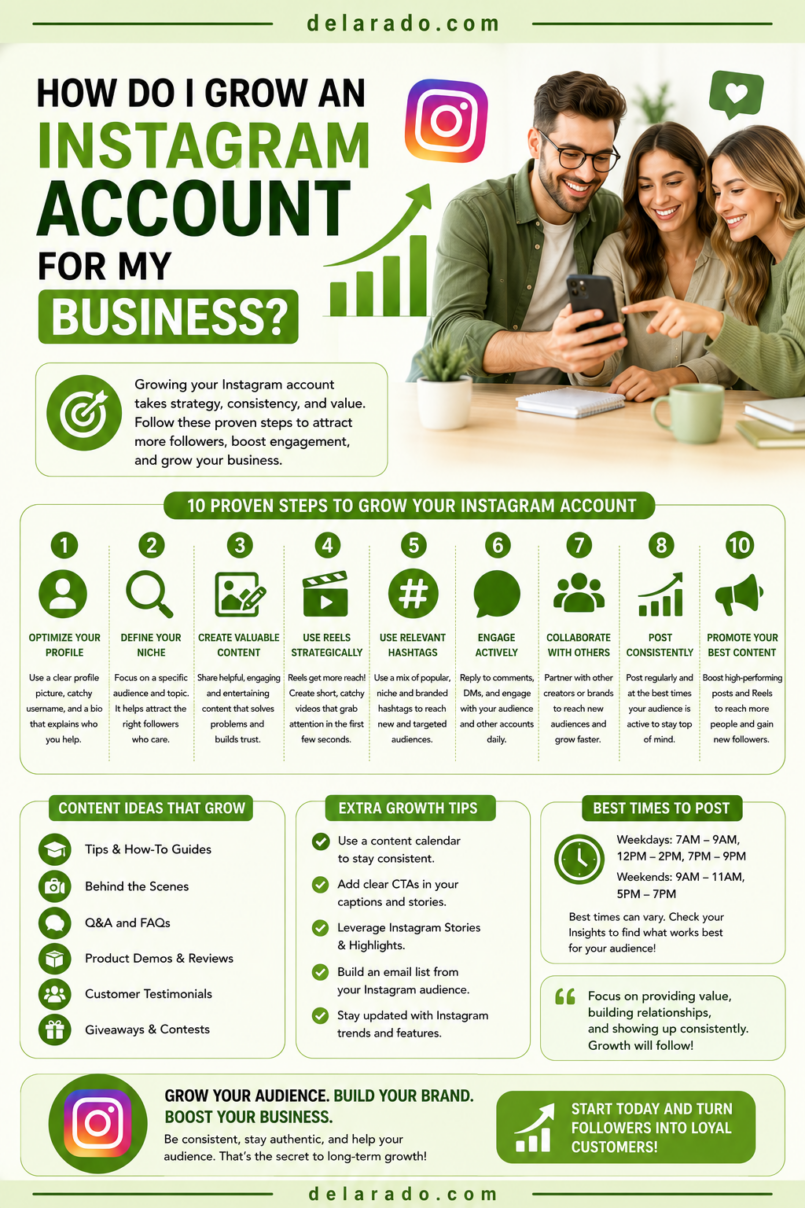
To grow an Instagram account for your business, create useful content for a specific audience, make your profile easy to understand, publish consistently, use Reels and carousels strategically, respond to real people, and guide interested followers toward a relevant next step such as your website, email list, product page, consultation form, or local business contact page.
Instagram growth is not only about getting more followers. The better goal is to build an audience that includes potential readers, customers, clients, subscribers, partners, and advocates. A smaller, relevant audience that clicks, saves, replies, books, and buys is usually more valuable than a large audience with little connection to your business.
Instagram’s professional dashboard includes a Best Practices section with personalized guidance covering creation, engagement, reach, monetization, and platform guidelines. [901][902]
Who Is This Topic For?
This guide is for small business owners, local businesses, bloggers, affiliate marketers, freelancers, consultants, eCommerce sellers, coaches, creators, course creators, service providers, and personal brands using Instagram for marketing.
This Guide Is Helpful If You Want To:
- Build a relevant Instagram audience
- Get more profile visits and website clicks
- Use Instagram Reels and carousels strategically
- Grow an email list from Instagram
- Generate leads, calls, or bookings
- Promote products or services honestly
- Improve engagement with followers
- Create a sustainable content system
- Build trust with potential customers
- Understand what to measure beyond follower count
What Does Instagram Growth Mean?
Instagram growth can include more followers, but meaningful growth involves building awareness, engagement, trust, website traffic, email subscribers, leads, bookings, customers, or product sales.
Meaningful Instagram Growth Metrics
- Reach
- Profile visits
- Reel views and watch time
- Shares
- Saves
- Comments
- Story replies
- Direct messages
- Website link clicks
- Email signups
- Consultation bookings
- Product purchases
- Qualified follower growth
Example
A local web designer may care less about reaching 100,000 followers and more about getting 20 qualified consultation requests each month from local business owners who found helpful website tips on Instagram.
Set goals based on what helps your business, not only on public follower numbers.
Benefits of Growing an Instagram Account
Builds Brand Awareness
Instagram can help people discover your business through Reels, posts, Stories, shares, search, recommendations, location tags, direct messages, and other social interactions.
Creates Visual Trust
Photos, videos, carousels, demonstrations, behind-the-scenes content, customer stories, and educational posts can help people understand your brand and feel more confident in what you offer.
Supports Website Traffic
Instagram can direct people to a website, lead magnet, product page, service page, booking page, blog article, or email signup form through profile links, Stories, and other available features.
Helps You Understand Customers
Comments, direct messages, poll responses, and question stickers can reveal what your audience needs, what they do not understand, and what content or offers may help them.
Works for Many Business Models
Instagram can support local services, personal brands, eCommerce products, affiliate content, education, digital products, creative businesses, consultants, events, and communities.
Supports Organic and Paid Marketing
Organic content can help you test topics, messages, and formats. If a post performs well organically, it may become a stronger candidate for paid promotion or ad testing.
Risks and Limitations
Follower Growth Does Not Guarantee Sales
An account can grow quickly while generating little website traffic, lead quality, or revenue. Connect content to a relevant website and track real business actions.
Algorithms Can Change
Instagram controls what content users see. Reach can change because of platform updates, content trends, competition, user behavior, and changes to recommendation systems.
Buying Followers Creates Weak Results
Purchased followers, likes, comments, and views can distort analytics, reduce engagement quality, damage trust, and create an audience that does not become customers.
Content Creation Takes Time
Reels, carousels, photos, Stories, captions, editing, comments, and analytics require time. Build a system that fits your available resources.
Over-Promotion Can Reduce Trust
If every post is a sales pitch, people may unfollow or ignore your content. Balance promotion with useful education, stories, demonstrations, and customer support.
Disclosures Matter
If you earn affiliate commissions, receive payment, receive gifted products, or have another material connection to a brand, disclose it clearly in the post and near the endorsement. The FTC’s social-media guidance says disclosures should be easy to notice and understand. [485]
Step-by-Step Instagram Growth Strategy
Step 1: Define a Clear Business Goal
Do not begin with “I want more followers.” Decide what Instagram should help your business accomplish.
Possible Goals
- Increase local awareness
- Drive website traffic
- Grow an email list
- Generate consultation requests
- Get more product sales
- Promote an online course
- Build a personal brand
- Share blog content
- Increase event registrations
- Support customer questions
Goal Template
Over the next 90 days, use Instagram to help [audience] solve [problem] and encourage them to [primary action].
Example
Over the next 90 days, use Instagram to help beginner bloggers understand WordPress setup and encourage them to download a free Website Launch Checklist and join the email list.
Step 2: Define Your Target Audience
Instagram growth works best when you create content for a defined audience. Avoid trying to attract anyone and everyone.
Audience Questions
- Who do I want to reach?
- What problem are they trying to solve?
- What questions do they ask?
- What level of experience do they have?
- What type of content would help them?
- What content would they save or share?
- What would make them visit my website?
- What action should they take after following me?
Example Audience
A beginner blogger who wants to start a WordPress website, has a limited budget, feels overwhelmed by hosting and SEO, and needs simple tutorials, checklists, and honest tool comparisons.
Once you understand the audience, content ideas become clearer: “How to choose hosting,” “three WordPress mistakes,” “beginner SEO checklist,” and “how to start an email list.”
Step 3: Optimize Your Instagram Profile
Your profile should tell people who you help, what you offer, and what they should do next. A visitor should understand your account in a few seconds.
Profile Optimization Checklist
- Use a recognizable name and username
- Use a clear profile photo or logo
- Use a business or professional account if appropriate
- Write a concise audience-focused bio
- Include your main topic, service, or benefit
- Add a website or landing-page link
- Add contact information where appropriate
- Use a location if you serve a local area
- Create relevant Story Highlights
- Pin important posts or Reels
- Enable two-factor authentication
Bio Formula
I help [audience] achieve [outcome] through [topic, service, or method]. Get [resource] below.
Example Bio
I help beginner bloggers build WordPress websites with clear tutorials, SEO tips, and honest tool guides. Get the free Website Launch Checklist below.
Story Highlight Ideas
- Start Here
- About
- Services
- Reviews
- FAQ
- Free Guide
- Products
- Tips
- Behind the Scenes
- Contact
Step 4: Create Content Pillars
Content pillars are three to six repeatable topics that make your account easier to plan and help followers understand why they should stay.
Example Content Pillars for a Beginner Blogging Account
- WordPress setup tutorials
- SEO and keyword research tips
- Blogging and content planning
- Email list building
- Honest website-tool reviews
- Common beginner mistakes
Example Content Pillars for a Local Service Business
- Customer education
- Service explanations
- Common problems and solutions
- Local community content
- Team and behind-the-scenes posts
- Seasonal reminders
Example Content Pillars for an eCommerce Business
- Product demonstrations
- Product care and usage tips
- Customer stories with permission
- Gift guides
- Behind-the-scenes packaging or production
- Frequently asked questions
Use your pillars to create a balance of educational, trust-building, community, and promotional content.
Step 5: Use Reels for Discovery
Reels can help new people discover your content. Use them to answer specific questions, explain quick tips, show demonstrations, share common mistakes, and introduce useful ideas.
Reel Ideas
- Three things to know before buying a product
- How to solve a common customer problem
- One beginner mistake to avoid
- Quick product demonstration
- Myth versus fact
- Behind-the-scenes process
- Answering a common FAQ
- Simple comparison between two options
- Checklist preview
- Before-and-after explanation
Reel Structure
Hook: Begin with a specific problem, question, or benefit.
Value: Explain or demonstrate one useful lesson.
Call to action: Invite people to save, share, comment, follow, or visit a relevant resource.
Example
Hook: “Before you buy WordPress hosting, check these three things.”
Value: Explain support, backup options, and website scalability.
Call to action: “Save this for later, then download the full Website Launch Checklist from the link in our profile.”
Instagram’s creator Best Practices hub provides guidance on creation, engagement, reach, monetization, and guidelines within the professional dashboard. [901][902]
Step 6: Use Carousels for Saves and Education
Carousels can be useful for checklists, tutorials, mistakes, comparisons, step-by-step processes, FAQ answers, and other information people may want to save for later.
Carousel Ideas
- Five steps to complete a task
- Five mistakes to avoid
- Beginner checklist
- Product comparison
- Before-and-after process explanation
- Myth versus fact
- Frequently asked questions
- Quick guide to choosing an option
- Blog post summary
- Service process overview
Carousel Structure
- Slide 1: Clear, useful headline
- Slides 2–7: Tips, steps, examples, or explanations
- Final slide: Summary and next action
Example Carousel
Slide 1: “Five WordPress Setup Mistakes Beginners Make”
Slides 2–6: Explain one mistake and a practical correction on each slide.
Final slide: “Save this checklist and download the complete Website Launch Checklist from the link in our profile.”
Use clear, readable slides and one main idea per slide. Do not fill carousels with dense paragraphs that are hard to read on a phone.
Step 7: Use Stories to Build Relationships
Stories can be useful for timely, casual, interactive, and behind-the-scenes content. They help people see the human side of your business and can encourage direct engagement.
Story Ideas
- Polls
- Question stickers
- Quick tips
- Behind-the-scenes updates
- Daily business updates
- Product or service reminders
- Customer FAQs
- Countdowns for events or launches
- New blog post announcements
- Testimonials with permission
Story Poll Examples
- “What feels hardest about starting a website: hosting, design, content, or SEO?”
- “Would you rather have a keyword research checklist or a WordPress setup checklist?”
- “Do you prefer short tutorials or detailed guides?”
Use Story replies and poll results as audience research. Turn repeat questions into future Reels, carousels, blog posts, or email content.
Step 8: Post Consistently
Consistency helps your business remain visible and gives you more opportunities to learn what content works. For many small businesses, two to four feed posts or Reels per week is a realistic starting point.
Simple Weekly Instagram Schedule
| Day | Content Type | Goal |
|---|---|---|
| Monday | Carousel or educational post | Saves and trust-building |
| Wednesday | Reel answering a common question | Discovery and reach |
| Friday | Lead magnet, blog post, or service promotion | Website traffic or conversions |
| Weekend | Stories, poll, or behind-the-scenes content | Engagement and audience research |
Do not post at a volume you cannot maintain. A consistent two-post-per-week strategy can be more effective than a daily posting schedule that quickly becomes exhausting.
Step 9: Use Relevant Captions and Keywords
Write captions that provide context, explain the post, and help the right people understand why it matters. Use relevant keywords naturally, especially words your audience may search for.
Caption Structure
- Opening hook or first useful line
- Short explanation, tip, or story
- Relevant details or steps
- Call to action
- Disclosure if needed
Example Caption
Starting a WordPress website? Do not choose hosting only because it has the lowest price.
Check support quality, backup options, site speed, and whether the plan can grow with your website.
Save this post for later, then get the full Website Launch Checklist from the link in our profile.
Hashtag Guidance
Use relevant hashtags where they fit naturally, but do not rely on large generic hashtag lists or unrelated popular tags. Prioritize content clarity and audience relevance over hashtag volume.
Step 10: Engage With People
Instagram growth is not only publishing. Responding to comments, questions, and messages can build trust and create future content ideas.
Engagement Routine
- Reply to legitimate comments
- Answer questions clearly
- Thank people for useful feedback
- Respond to direct messages during stated business hours
- Save common questions for future content
- Moderate spam and harassment
- Move sensitive customer issues to private support channels
- Engage thoughtfully with relevant accounts in your niche
Do not use automated comments, fake engagement, generic direct messages, or aggressive sales messages. Focus on genuine interactions with people who may actually benefit from your content.
Step 11: Collaborate With Relevant People
Collaborations can help you reach a related audience. Work with complementary businesses, customers, local organizations, creators, or experts whose audiences could genuinely benefit from your content.
Collaboration Ideas
- Co-create a Reel
- Host a joint live Q&A
- Share an expert interview
- Create a local business feature
- Run a joint educational workshop
- Cross-promote a useful resource
- Create a product demonstration together
- Interview a customer or partner with permission
Example
A web designer and an email marketing consultant create a joint Reel explaining how a local business can turn website visitors into email subscribers. Both businesses share the Reel and link to their relevant resources.
Do not collaborate only to trade followers. Choose partnerships that create genuine value for both audiences.
Step 12: Use a Relevant Link Destination
When someone visits your profile, give them a useful next step. Send visitors to a page that matches the content they saw.
Useful Profile Link Destinations
- Free lead magnet landing page
- Email signup page
- Service booking page
- Product collection
- Blog resource hub
- Start Here page
- Current promotion page
- Local service page
- Consultation request page
Example
If your content teaches beginners about WordPress setup, link to a free Website Launch Checklist—not a generic homepage with many unrelated links.
Use simple tracking links or analytics parameters where appropriate so you can see which Instagram content drives website visits and conversions.
Step 13: Use Disclosures and Honest Marketing
Disclose affiliate links, gifted products, sponsorships, paid partnerships, or other material relationships clearly. Your audience should understand when you may benefit financially from a recommendation.
Affiliate Disclosure Example
Disclosure: This post may contain affiliate links. If you purchase through a qualifying link, I may earn a commission at no extra cost to you.
Sponsored Content Example
Sponsored by [Brand]. I received compensation to create this content. All opinions are my own.
Disclosure Best Practices
- Use clear everyday language
- Place disclosures with the endorsement
- Make the disclosure visible before people need to expand a caption
- Use visible on-screen disclosure in videos when appropriate
- Use verbal disclosure in video when appropriate
- Do not hide disclosures among hashtags
- Do not claim to have used a product when you have not
The FTC says that creators who endorse products through social media should disclose material connections with brands, including payments and free products, in a way that is clear and conspicuous. [485]
Step 14: Review Instagram Insights
Use Instagram Insights to learn which content earns meaningful engagement and supports your business goals.
Track Awareness Metrics
- Reach
- Impressions
- Reel views
- Accounts reached
- Follower growth
- Profile visits
Track Engagement Metrics
- Likes
- Comments
- Shares
- Saves
- Story replies
- Direct messages
- Watch time where available
Track Business Metrics
- Website clicks
- Email signups
- Consultation bookings
- Contact form submissions
- Product purchases
- Affiliate link clicks
- Qualified customer inquiries
Questions to Ask
- Which Reels reach new people?
- Which carousels get saved or shared?
- Which topics produce comments and questions?
- Which posts bring people to the profile link?
- Which content leads to email signups or inquiries?
- What should be repeated, updated, or stopped?
Watch time, completion rate, saves, shares, comments, and likes can all be useful signals when evaluating Reels, but connect those signals to website and business outcomes where possible. [903]
Step 15: Improve Your Strategy Monthly
Instagram growth is an ongoing process. Review results each month and improve one or two areas at a time.
Monthly Review Checklist
- Identify your top-performing Reels
- Identify your most-saved carousels
- Review posts that drove profile visits
- Review website clicks and conversions
- Note recurring audience questions
- Review content pillars for gaps
- Update your content calendar
- Plan more content around proven topics
- Test one new format or hook
- Check profile links and contact details
Do not change your entire strategy because of one low-performing post. Look for patterns over several weeks or months.
Programs That Can Help
Instagram Professional Dashboard
Instagram’s professional dashboard can provide insights, creator tools, and Best Practices guidance related to content creation, engagement, reach, monetization, and platform guidelines. [901][902]
Meta Business Suite
Meta Business Suite can help manage Facebook and Instagram posts, messages, scheduling, ads, account permissions, and insights from one place.
Canva
Canva can help create carousel templates, Reel covers, Story graphics, quote graphics, lead magnet previews, Pinterest Pins, and other branded visuals.
CapCut and Adobe Express
CapCut and Adobe Express can help create short-form videos with captions, text overlays, voiceovers, vertical formatting, basic editing, and visual effects.
Later, Buffer, Hootsuite, and Metricool
Social media tools can help plan a content calendar, schedule content, organize assets, review engagement, and manage multiple platforms. Compare current features and pricing before choosing a tool.
Google Analytics
Google Analytics can help track whether Instagram visitors reach your website, join your email list, submit a contact form, make a purchase, or complete another important action.
MailerLite, ConvertKit, Brevo, HubSpot, and ActiveCampaign
Email marketing tools can help create landing pages, signup forms, lead magnets, welcome sequences, and subscriber follow-up after people visit from Instagram.
WordPress
WordPress can provide the useful content behind your Instagram strategy, including blog articles, resource hubs, landing pages, product reviews, service pages, free checklists, and email signup forms.
Common Mistakes
Trying to Appeal to Everyone
Define a clear audience. Specific useful content often attracts better followers than vague general content.
Buying Followers, Likes, or Comments
Purchased engagement creates weak metrics and rarely results in customers. Focus on earning real attention through useful content and genuine interaction.
Posting Only Sales Messages
Balance promotion with education, tutorials, behind-the-scenes content, customer questions, stories, and useful resources.
Using Weak Profile Information
Your bio, profile link, Highlights, contact details, and pinned posts should make it easy for a new visitor to understand what you do and where to go next.
Ignoring Reels and Carousels
Reels can help with discovery, while carousels can be effective for educational, saveable content. Use both formats when they fit your audience and message.
Using Every Trend
Only use trends that fit your business, values, and audience. A relevant useful post is more sustainable than forcing your brand into every viral format.
Not Responding to Comments
Engagement is a conversation. Answer legitimate questions and use audience feedback to create future content.
Hiding Affiliate or Sponsorship Disclosures
Make disclosures clear, easy to see, and close to the endorsement. Do not hide them in a group of hashtags or at the end of a long caption. [485]
Not Tracking Business Outcomes
Do not focus only on views and followers. Track profile visits, website clicks, email signups, inquiries, bookings, sales, and customer quality.
Giving Up Too Soon
Instagram growth takes testing and consistency. Review patterns over time, improve what works, and maintain a schedule you can realistically sustain.
Frequently Asked Questions
How do I grow my Instagram business account?
Grow an Instagram business account by defining a target audience, optimizing your profile, creating useful content pillars, posting Reels and carousels consistently, engaging with real people, using clear calls to action, and measuring website traffic, leads, and sales.
How often should a business post on Instagram?
Many small businesses can start with two to four feed posts or Reels per week, plus Stories when they have useful updates or engagement opportunities. Choose a schedule you can maintain without lowering quality.
Do Reels help grow an Instagram account?
Reels can help new people discover content, especially when they answer a specific question, use a clear early hook, provide useful value, and include a relevant next step. Results are not guaranteed.
What should I post on Instagram for my business?
Post content that helps your audience: tutorials, quick tips, carousels, customer questions, product demonstrations, behind-the-scenes content, checklists, stories, comparisons, common mistakes, and relevant offers.
How do I get more followers on Instagram without buying them?
Create useful audience-specific content, use a clear profile, publish consistently, engage with relevant accounts and followers, collaborate with complementary businesses, and give people a clear reason to follow.
Should I use hashtags on Instagram?
Use relevant hashtags when they add context, but do not rely on generic or unrelated hashtag lists. Clear content, useful captions, platform-appropriate formats, and audience relevance matter more than hashtag quantity.
How do I get website traffic from Instagram?
Use a clear profile link, promote relevant blog posts or lead magnets, explain what people will get by clicking, use Stories and posts to direct people to useful resources, and track website visits through analytics.
Can I use affiliate links on Instagram?
Yes, if permitted by Instagram and the affiliate program. Use clear disclosures, recommend products honestly, and avoid unsupported claims or misleading promotions.
How do I know which Instagram content works?
Review Insights for reach, views, shares, saves, comments, profile visits, link clicks, direct messages, and business outcomes such as email signups, leads, bookings, and sales.
Do I need to show my face to grow on Instagram?
No. You can use screen recordings, hands-only demonstrations, product videos, voiceovers, carousels, checklists, graphics, text-based Reels, customer FAQs, and behind-the-scenes content without appearing on camera.