A sales funnel for digital products is a customer journey that helps someone move from discovering your content to deciding whether your product is useful for them. It may include a blog post, video, Pinterest Pin, lead magnet, email sequence, sales page, checkout page, product delivery, and follow-up support.
A good funnel is not a trick designed to pressure people into buying. It is a clear and helpful path that gives the right person useful information at the right time. It should make the offer easy to understand, the price and terms easy to find, and the next step easy to complete.
You do not need complicated software, dozens of upsells, or expensive advertising to begin. A simple funnel can work well: helpful content, one relevant lead magnet, a short email sequence, a clear product page, and a checkout process that customers can trust.
What Is a Sales Funnel?
A sales funnel is the process people move through as they become aware of a problem, learn about possible solutions, decide whether your offer fits their needs, make a purchase, and potentially become repeat customers.
Not every visitor will follow the same path. Some people may buy quickly because they already know what they need. Others may read articles, compare options, join your email list, and take time before purchasing.
HubSpot describes a common conversion-funnel model with four stages: awareness, consideration, conversion, and loyalty. Awareness is when a person recognizes a problem, consideration is when they evaluate solutions, conversion is the final decision, and loyalty happens after purchase. [500]
Simple Digital Product Funnel
Helpful content → Lead magnet → Email sequence → Product page → Checkout → Product delivery → Customer support → Follow-up offer or review request
Example
A visitor searches for “how to plan blog content” and finds your article. The article offers a free weekly content-planning worksheet. After subscribing, the visitor receives several helpful emails about content planning. One email introduces your complete content calendar template bundle. The visitor reads the product page, purchases the bundle, receives it immediately, and receives onboarding instructions.
Why Digital Products Need a Funnel
Digital products can include templates, checklists, eBooks, worksheets, printables, spreadsheets, prompt packs, mini-courses, video courses, toolkits, memberships, software, and resource libraries.
Many digital products solve a problem that a potential customer may not understand immediately. A funnel gives you a way to educate people before asking them to buy.
A Funnel Can Help You:
- Attract people already interested in your topic.
- Build trust through useful information.
- Collect email subscribers with permission.
- Explain the product’s value clearly.
- Address common questions and objections.
- Make it easier for people to buy when ready.
- Deliver the product automatically.
- Improve customer onboarding.
- Encourage repeat purchases and referrals.
- Measure where customers leave the process.
The goal is not to force every visitor through a complicated path. The goal is to give interested people clear options and helpful information at each stage.
Start With a Clear Digital Product
Before building a funnel, make sure your product solves a real problem for a defined audience. A funnel cannot fix a product that people do not want or do not understand.
Use This Product Formula
I help [specific audience] achieve [desired outcome] with [digital product type].
Examples
- I help beginner bloggers plan content consistently with a blog content calendar template.
- I help freelance creators manage client projects with a Notion workflow template.
- I help local service businesses improve their websites with a small-business website audit checklist.
- I help new affiliate marketers select a niche with a niche research worksheet.
- I help online entrepreneurs write better welcome emails with a five-email sequence template pack.
Questions to Answer Before Building the Funnel
- Who is the product for?
- What problem does it solve?
- What result can the customer realistically expect?
- What is included?
- What is not included?
- How will the customer access the product?
- What does it cost?
- What support will be available?
- What refund, return, or cancellation terms apply?
- What makes this product different from alternatives?
Be specific and realistic. Do not promise that a template, course, or digital product will guarantee income, rankings, sales, health outcomes, or personal success.
Choose One Audience
A sales funnel works better when it speaks to a specific audience. Trying to sell one digital product to everyone can make the message unclear and reduce trust.
Audience Examples
- Beginner bloggers.
- Freelance designers.
- Small local business owners.
- New affiliate marketers.
- Content creators.
- Online course creators.
- Etsy sellers.
- Remote workers.
- New parents planning meals.
- Students organizing study time.
Audience Profile Example
Audience: Beginner bloggers with full-time jobs.
Problem: They struggle to decide what to write and publish consistently.
Goal: Build a useful blog without spending hours planning each week.
Free resource: Weekly Blog Content Planning Worksheet.
Paid product: 12-Month Blog Content Calendar and Keyword Planning Template.
A clear audience helps you create content, lead magnets, emails, and product pages that feel relevant instead of generic.
The Four Funnel Stages
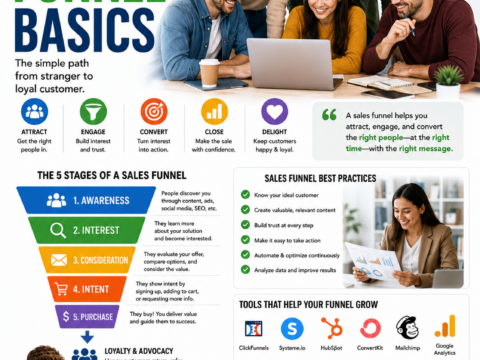
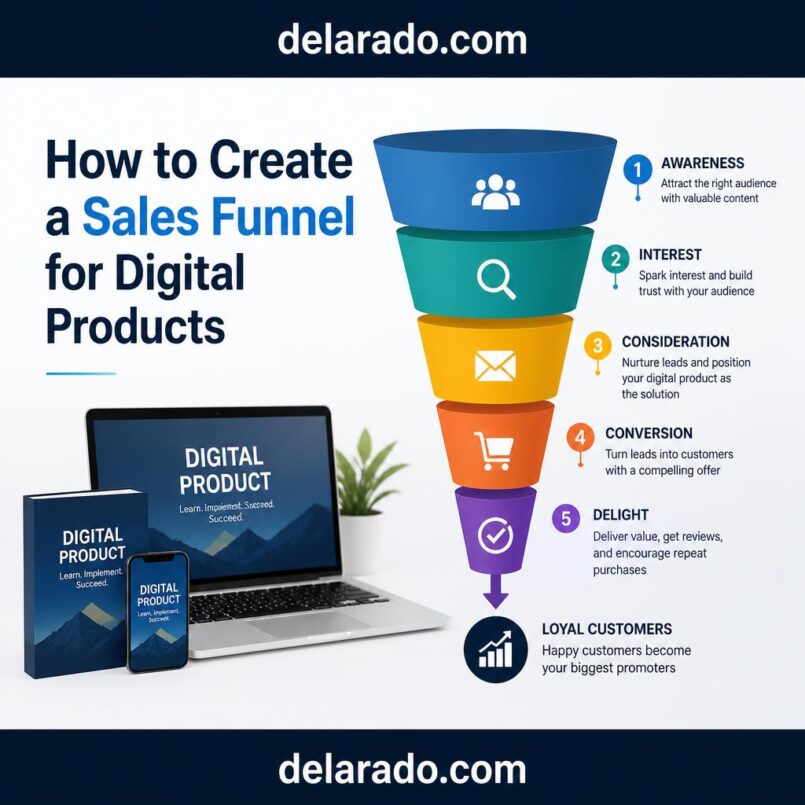
A simple digital product funnel can follow the awareness, consideration, conversion, and loyalty stages.
| Funnel Stage | Customer Question | Useful Content or Tool | Business Goal |
|---|---|---|---|
| Awareness | What problem do I have, and how can I solve it? | Blog posts, videos, Pinterest Pins, social posts, tutorials. | Attract relevant visitors. |
| Consideration | Which approach or solution fits me? | Lead magnets, comparisons, checklists, case studies, email sequences. | Build trust and collect permission-based leads. |
| Conversion | Is this product worth buying now? | Sales page, checkout page, FAQ, testimonials, product demo. | Help qualified customers make an informed purchase. |
| Loyalty | How do I use this well, and what should I do next? | Onboarding email, product guide, customer support, updates, follow-up resources. | Deliver value, reduce refunds, and build long-term trust. |
Not every visitor needs every stage. Someone who already knows they want a specific template may go directly to the product page. Someone new to your topic may need educational content first.
Step 1: Attract Relevant Traffic
The top of the funnel is where people first discover your business. Use content that helps people understand or solve the problem your product addresses.
Traffic Sources for Digital Products
- Search engine optimization.
- Blog articles.
- YouTube tutorials.
- Pinterest content.
- Instagram Reels and carousels.
- TikTok educational videos.
- Email newsletter referrals.
- Affiliate partnerships.
- Podcasts or webinars.
- Direct partnerships.
- Paid advertising after validation.
Top-of-Funnel Content Ideas
- How to Plan Blog Content as a Beginner.
- 10 Common Productivity Mistakes Freelancers Make.
- How to Audit a Small Business Website.
- How to Choose an Affiliate Marketing Niche.
- How to Write a Welcome Email Sequence.
- How to Create a Content Calendar.
- How to Build an Email List for Beginners.
Google recommends creating content primarily for people, not to manipulate rankings. Helpful content should serve an intended audience, demonstrate relevant expertise or depth of knowledge, and leave readers feeling that they have learned enough to achieve their goal. [237]
Your educational content should be valuable even if a reader never buys your product.
Step 2: Create a Relevant Lead Magnet
A lead magnet is a free resource that helps you collect email subscribers with permission. It should solve a smaller version of the problem your paid product solves.
Lead Magnet and Product Alignment
| Paid Product | Related Lead Magnet | Natural Next Step |
|---|---|---|
| Blog content calendar template. | Weekly Blog Planning Worksheet. | Purchase the full annual calendar and planning bundle. |
| Client project-management template. | Freelance Client Onboarding Checklist. | Purchase the complete client workflow system. |
| Website audit toolkit. | Five-Point Homepage Review Checklist. | Purchase the full website audit toolkit. |
| Email template bundle. | One Welcome Email Template. | Purchase the complete email-sequence template bundle. |
A lead magnet should not be a disguised sales pitch. It should be genuinely useful and give the subscriber a positive first experience with your brand.
Step 3: Build a Landing Page
A landing page is a focused web page designed around one action. For a lead magnet, the action is subscribing. For a product, the action may be purchasing or viewing the checkout page.
Lead Magnet Landing Page Elements
- Clear benefit-focused headline.
- Short explanation of who the resource is for.
- Bullets describing what is included.
- Preview image or screenshot if helpful.
- Simple email sign-up form.
- Privacy and consent information.
- Clear button text.
Lead Magnet Landing Page Example
Plan Your Next Month of Blog Content in One Hour
Download the free Weekly Blog Planning Worksheet designed for beginner bloggers who want a simpler way to choose topics, organize keywords, and publish consistently.
Inside the worksheet:
- Topic brainstorming prompts.
- Keyword research space.
- Weekly publishing checklist.
- Internal-linking prompts.
Enter your email to receive the worksheet and occasional practical blogging tips. You can unsubscribe at any time.
Button: Send Me the Worksheet
Keep the page focused. Avoid adding multiple unrelated offers or navigation links that distract from the main action.
Step 4: Create a Welcome Email Sequence
After a visitor subscribes, send the lead magnet immediately and begin a short sequence that helps them use it. The sequence should provide useful education, answer common questions, and introduce the paid product only when it is relevant.
Example Five-Email Sequence
- Email 1: Welcome the subscriber and deliver the free resource.
- Email 2: Explain a common mistake related to the problem.
- Email 3: Share a tutorial, example, or case study.
- Email 4: Introduce the paid product as a more complete solution.
- Email 5: Answer common objections and invite the subscriber to explore the product.
Example Product Introduction Email
Subject: A simpler way to plan your blog content
Hi [First Name],
If the free weekly worksheet helped you organize your next blog post, you may want a more complete planning system.
The Blog Content Calendar Bundle includes a 12-month planning calendar, keyword tracker, article outline templates, internal-linking checklist, and publishing workflow.
It is designed for beginner bloggers who want a clear system without creating every planning document from scratch.
You can view the full details, included files, pricing, and FAQs here: [Product Page Link].
Thanks,
Your Name
Do not use misleading urgency, fake countdowns, or exaggerated claims. Help people understand the product and let them decide whether it is appropriate for them.
Step 5: Create a Clear Product Page
Your product page should answer the questions a potential buyer needs answered before purchasing. A vague page creates uncertainty and can lead to low conversions, refunds, or support issues.
Product Page Sections
- Clear product title.
- Short description of the main benefit.
- Who the product is for.
- Who it may not be for.
- The problem it solves.
- What is included.
- Preview images, screenshots, or sample pages.
- How the product works.
- How the product is delivered.
- Price and payment details.
- Refund, return, or cancellation policy.
- Frequently asked questions.
- Testimonials, if genuine and used with permission.
- Clear purchase button.
Product Page Headline Formula
Help [audience] achieve [desired result] with [product name].
Example
Plan a Full Year of Blog Content With the Beginner Blogger Content Calendar Bundle.
Product Description Example
The Beginner Blogger Content Calendar Bundle is a digital planning system for new bloggers who want to organize article ideas, keywords, publishing dates, internal links, and promotion tasks in one place.
Use plain language. Avoid vague phrases such as “revolutionary,” “life-changing,” or “guaranteed success” unless you can substantiate a specific claim.
Step 6: Make Checkout Easy and Transparent
Checkout should be simple, secure, and clear. Customers should know exactly what they are buying, what they will be charged, and what will happen after payment.
Checkout Best Practices
- Use a reputable payment processor.
- Show the product name clearly.
- Show the full price before payment.
- Clearly identify one-time and recurring charges.
- Show currency where relevant.
- Provide links to refund, return, or cancellation policies.
- Use secure HTTPS checkout pages.
- Collect only necessary customer information.
- Send an order confirmation email.
- Deliver access instructions immediately.
Tools such as ThriveCart, Systeme.io, WooCommerce, Shopify, Podia, Gumroad, Teachable, and Thinkific can support digital product checkout and delivery. Choose the tool that fits your product type, payment needs, tax requirements, delivery process, and budget.
Be Careful With Subscriptions and Trials
If your funnel includes a recurring subscription, membership, automatic renewal, continuity plan, or trial that converts into a paid plan, be especially clear about pricing, renewal terms, cancellation instructions, and customer consent.
The FTC’s amended Negative Option Rule applies broadly to negative-option marketing, including automatic renewals and free trials. The FTC states that businesses must not misrepresent material aspects of an offer, must disclose material terms before a customer signs up, must obtain proof of consent before charging, and must make cancellation as easy as enrollment. [497]
For Subscription or Trial Offers, Clearly Explain:
- The initial price.
- Whether a free trial becomes a paid subscription.
- When the first charge occurs.
- How often charges recur.
- The amount of each recurring charge.
- How to cancel.
- What happens after cancellation.
- Refund rules, if any.
Do not hide recurring billing terms in fine print, use confusing checkboxes, or make customers contact support through unnecessary steps to cancel.
Step 7: Deliver the Product Immediately
Once a customer purchases a digital product, deliver it promptly. A smooth delivery experience reduces confusion, support requests, refunds, and chargebacks.
Post-Purchase Delivery Checklist
- Show a thank-you page after purchase.
- Send an order confirmation email.
- Provide a clear download link or access instructions.
- Explain how to use the product.
- Include a support contact method.
- Link to relevant tutorials or onboarding material.
- Explain product updates or access terms if applicable.
- Provide a receipt where appropriate.
Thank-You Page Example
Thank You for Your Purchase
Your Beginner Blogger Content Calendar Bundle is ready.
1. Check your email for your order confirmation and download link.
2. Download the files and open the “Start Here” guide first.
3. If you need help, contact us at [Support Email].
4. Start by planning your next four article topics using the monthly calendar tab.
Make the customer’s next step obvious. Do not leave them wondering where to find their purchase or how to use it.
Step 8: Build Customer Loyalty
The funnel should not end when someone pays. Customer loyalty comes from delivering value after the sale.
Post-Purchase Email Ideas
- Welcome and product access instructions.
- Quick-start tutorial.
- Common mistakes to avoid.
- How to get the most value from the product.
- Helpful related articles.
- Product update notifications.
- Support check-in.
- Request for honest feedback.
- Invitation to a related product only if relevant.
For example, after someone buys a content calendar, send a short email three days later asking whether they were able to set up their first month. Include a link to a tutorial about choosing blog topics.
Helpful onboarding can improve the customer experience and may reduce refund requests by ensuring customers know how to use what they bought.
Use Upsells Carefully
An upsell is an additional offer presented after or during a purchase. Upsells can be useful if they genuinely improve the customer’s result. They become harmful when they distract, pressure, mislead, or create unexpected costs.
Ethical Upsell Examples
- A template bundle offered after someone buys one individual template.
- A video walkthrough offered with a spreadsheet product.
- A content-planning bonus offered with a blog calendar.
- A relevant coaching session offered after a course purchase.
- A website setup service offered after a beginner website checklist download.
Upsell Best Practices
- Make the upsell optional.
- Explain what it includes and costs.
- Do not preselect extra charges.
- Do not use fake scarcity.
- Do not make it difficult to decline.
- Only offer products that are genuinely relevant.
- Keep checkout simple.
A funnel with one clear product and no upsells can be better than a complicated funnel that overwhelms customers.
Build Your Funnel With Simple Tools
You do not need every marketing platform to build a digital product funnel. Start with the fewest tools needed to create, sell, deliver, and support your product.
| Funnel Need | Possible Tool Types |
|---|---|
| Website and content | WordPress, website builder, blog platform. |
| Landing pages and email | MailerLite, ConvertKit, HubSpot, Brevo, ActiveCampaign, Systeme.io. |
| Checkout and delivery | ThriveCart, Gumroad, WooCommerce, Shopify, Podia, Teachable, Thinkific. |
| Digital product design | Canva, Google Docs, Google Sheets, Notion. |
| Video product creation | CapCut, InVideo.io, Synthesia.io, ElevenLabs. |
| Analytics | Google Analytics, Google Search Console, platform dashboards, spreadsheets. |
Choose tools based on your business needs. Avoid paying for several overlapping platforms before you have a validated product and real customers.
Track Funnel Metrics
A funnel helps you identify where people take action and where they leave. Track a few useful metrics, then improve one stage at a time.
Top-of-Funnel Metrics
- Website traffic.
- Search impressions and clicks.
- Video views.
- Pinterest outbound clicks.
- Social-media link clicks.
Lead Generation Metrics
- Landing page visits.
- Email opt-in rate.
- New subscribers.
- Lead magnet downloads.
- Traffic source of subscribers.
Email Metrics
- Welcome email open rate.
- Click-through rate.
- Replies.
- Unsubscribe rate.
- Product-page clicks.
Sales Metrics
- Product-page views.
- Checkout starts.
- Completed purchases.
- Conversion rate.
- Average order value.
- Refund rate.
- Customer support requests.
Simple Funnel Conversion Formula
Conversion rate = Number of desired actions ÷ Number of visitors × 100
For example, if 200 people visit your product page and 10 purchase, your page conversion rate is 5%.
Use metrics to improve the customer experience, not to manipulate people. If many visitors leave a product page, make the offer clearer, explain the product better, answer more questions, or improve the page’s relevance to the traffic source.
Common Digital Product Funnel Mistakes
- Creating a product before validating audience demand.
- Targeting everyone instead of a defined audience.
- Using a lead magnet unrelated to the paid product.
- Sending only sales emails without useful education.
- Using vague product descriptions.
- Hiding pricing, subscription terms, or refund policies.
- Using fake testimonials or misleading claims.
- Making cancellation difficult for subscriptions.
- Adding too many upsells and distracting buyers.
- Failing to deliver products immediately.
- Ignoring customer onboarding and support.
- Buying expensive funnel software before proving the offer.
- Tracking clicks but not actual sales, refunds, or profit.
Simple Funnel Examples
Template Funnel
SEO article about content planning → Free weekly content worksheet → Five-email education sequence → $19 content calendar template → Thank-you page and quick-start guide → Optional relevant template bundle
Course Funnel
YouTube tutorial about WordPress setup → Free website-launch checklist → Email series with beginner tips → Beginner WordPress course sales page → Course checkout → Welcome email and lesson access
Service Funnel
Local SEO blog post → Free small-business website audit checklist → Email education sequence → Website consultation booking page → Consultation → Service proposal → Client onboarding
Affiliate and Digital Product Funnel
Pinterest Pin about email marketing → Blog article → Free welcome email template → Email sequence → Affiliate tool recommendation and paid template bundle
A 30-Day Funnel Build Plan
Week 1: Define the Offer
- Choose one target audience.
- Identify one important problem.
- Create or validate one digital product.
- Define what is included and what it costs.
- Write clear refund, support, and delivery terms.
Week 2: Create the Lead Magnet
- Create a small free resource related to the product.
- Build a landing page.
- Set up an opt-in form.
- Connect the form to your email platform.
- Write a welcome email that delivers the resource.
Week 3: Build the Product Page and Checkout
- Create the product page.
- Add screenshots, product details, FAQs, and clear pricing.
- Set up checkout and digital delivery.
- Create a thank-you page.
- Test the full purchase process.
Week 4: Write Emails and Promote
- Write a short welcome and education sequence.
- Add an appropriate product introduction.
- Publish helpful content that attracts the target audience.
- Share the lead magnet through one primary traffic channel.
- Track traffic, sign-ups, product page views, and purchases.
Final Thoughts
A sales funnel for digital products does not need to be complicated. Start with one audience, one useful product, one relevant lead magnet, a short email sequence, a clear product page, and a simple checkout process.
Build the funnel around trust. Give people useful information before asking them to buy. Explain what your product does and does not do. Make prices, delivery, support, refund policies, subscriptions, and cancellation terms clear.
The best funnel is not the one with the most pages, upsells, or automation. It is the one that helps the right customer make an informed decision and receive real value after purchase.
Frequently Asked Questions
What is the simplest sales funnel for a digital product?
A simple funnel can include a helpful article or video, a relevant lead magnet, a short email sequence, a clear product page, checkout, product delivery, and a follow-up email. You can add complexity later only if it improves the customer experience.
Do I need a lead magnet to sell digital products?
No. Some people may purchase directly from a product page. However, a relevant lead magnet can help build trust and capture email subscribers who are interested but not ready to buy immediately.
What should I include on a digital product sales page?
Include a clear product title, who it is for, the problem it solves, what is included, screenshots or previews, price, delivery details, FAQs, support information, refund or cancellation policy, and a clear purchase button.
How many emails should a sales funnel have?
A beginner funnel can start with three to five emails: delivery, education, common mistakes or examples, product introduction, and a final helpful invitation to explore the offer. The right number depends on the product and audience.
Can I use affiliate links in a digital product funnel?
Yes, if affiliate products are relevant and you disclose the relationship clearly. Do not use affiliate links to recommend products that do not fit the audience or to hide financial relationships.
What is a tripwire offer?
A tripwire is a low-cost introductory offer presented after a free lead magnet or at the beginning of a customer journey. It should provide real value and use transparent pricing, not pressure tactics or hidden recurring charges.
How do I improve a digital product funnel?
Review funnel metrics such as traffic, email opt-ins, product page views, checkout starts, purchases, refunds, and support questions. Improve the stage where people are dropping off by clarifying the message, strengthening the offer, or improving the customer experience.