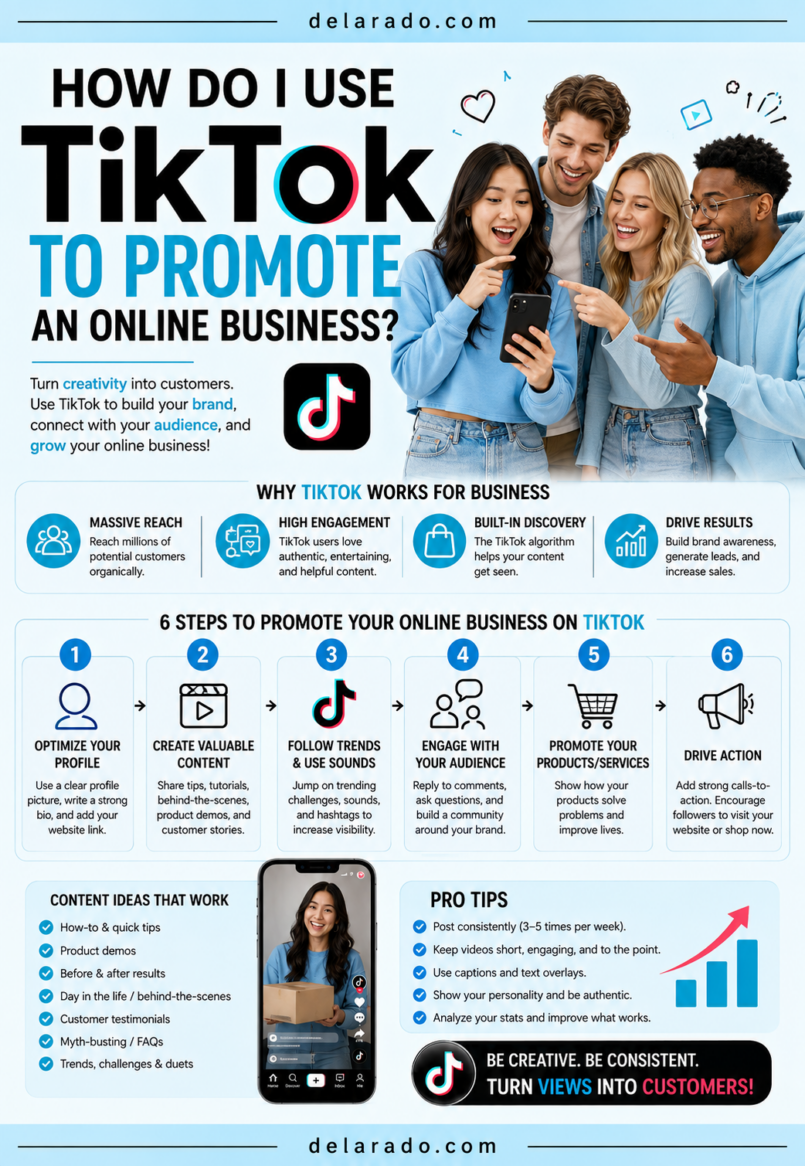
TikTok can help promote an online business by using short videos to answer customer questions, demonstrate products, teach useful skills, show behind-the-scenes processes, build brand awareness, and direct interested viewers to a website, email list, product page, consultation form, or other relevant resource.
The most effective TikTok strategy is not to copy every trend or create videos only to chase viral views. It is to make short, useful, authentic content for a specific audience, test different formats consistently, and connect that attention to a clear business next step.
TikTok’s small-business guidance recommends building a TikTok-first strategy around consistent posting, creator or user-generated content, trend participation when appropriate, and ongoing testing with tools such as TikTok Creative Center, Creator Marketplace, CapCut, and Ads Manager. [950]
Who Is This Topic For?
This guide is for bloggers, affiliate marketers, eCommerce sellers, freelancers, consultants, local businesses, course creators, coaches, service providers, creators, and online entrepreneurs who want to use TikTok as a marketing channel.
TikTok May Be Useful If You Want To:
- Reach new audiences with short videos
- Promote an online store or digital product
- Drive website traffic
- Grow an email list
- Demonstrate products or services
- Answer customer questions
- Build a personal or business brand
- Promote blog posts and useful guides
- Generate leads or consultation requests
- Create content without relying only on paid ads
What Is TikTok Marketing?
TikTok marketing is the use of TikTok videos, live content, community interaction, creator partnerships, ads, and TikTok search behavior to help people discover and engage with a business.
TikTok can support awareness, education, product discovery, customer support, lead generation, traffic, and sales. It is especially useful for businesses that can explain, demonstrate, compare, teach, or show something visually in a short video format.
TikTok Marketing Can Include:
- Organic short-form videos
- Educational tutorials
- Product demonstrations
- Behind-the-scenes content
- Customer FAQ videos
- Live streams
- Creator partnerships
- User-generated content
- Paid TikTok ads
- Trend-based content
- Search-focused videos
- Link-in-bio traffic campaigns
Simple Example
A beginner blogging website creates short videos such as “Three Things to Check Before Choosing WordPress Hosting,” “How to Find Blog Topics People Search For,” and “The Biggest WordPress Mistake New Bloggers Make.” Each video directs viewers to a free Website Launch Checklist through the profile link.
The TikTok videos create awareness and provide immediate value. The free checklist gives interested viewers a reason to visit the website and join the email list.
Benefits of TikTok for an Online Business
Can Reach New People
TikTok can help businesses reach people who do not already follow them. A useful video may be shown to viewers interested in the topic, format, or conversation.
Works Well for Education and Demonstration
Short videos can explain a common problem, show a product feature, demonstrate a process, compare options, or teach a quick skill.
Can Build Trust Quickly
Video can help people see your expertise, voice, product knowledge, and business personality. Behind-the-scenes videos, honest explanations, and practical demonstrations can make a business feel more approachable.
Creates Customer Insights
Comments, direct messages, video questions, and audience responses can reveal what people want to know. These insights can become future TikToks, blog articles, FAQs, lead magnets, product improvements, and email content.
Can Support Website Traffic and Email Growth
TikTok content can direct people to a profile link, landing page, blog article, product collection, booking page, or free lead magnet.
Content Can Be Repurposed
A TikTok video can often become an Instagram Reel, YouTube Short, Facebook Reel, Pinterest video Pin, LinkedIn post, blog section, or email newsletter.
Organic Content Can Test Marketing Ideas
Organic TikTok content can help test topics, hooks, product explanations, offers, and creative formats before investing in paid advertising.
Risks and Limitations
Virality Is Not a Strategy
Views can be unpredictable. One viral video may not lead to a long-term audience, traffic, or sales. Focus on helpful repeatable content rather than relying on one viral moment.
Views Do Not Guarantee Business Results
A video can receive thousands of views but generate no website clicks, email signups, leads, or sales. Use clear calls to action and track business outcomes.
Trends Can Distract From Your Brand
Not every trend is appropriate for every business. Use trends only when they help communicate a relevant message and fit your audience.
Content Creation Takes Time
Creating videos, writing scripts, filming, adding captions, editing, responding to comments, and reviewing analytics requires time. Use a sustainable schedule and reusable content system.
Platform Rules Can Change
Music rights, platform features, account requirements, advertising policies, and available link options can change. Review TikTok’s current rules before launching campaigns or using commercial content.
Automated or Fake Engagement Can Harm Trust
Do not buy views, followers, likes, or comments. Avoid bots, fake accounts, copied testimonials, deceptive editing, and artificial engagement tactics.
Disclosure Requirements Apply
If you promote a brand in exchange for payment, free products, affiliate commissions, discounts, employment, or another material connection, disclose the relationship clearly in the post. Disclosure should be difficult to miss and easy to understand. [951][952]
Step-by-Step TikTok Marketing Strategy
Step 1: Define a Clear Goal
Start with one main business goal. Do not use TikTok only because other businesses are using it.
Possible Goals
- Build brand awareness
- Drive website traffic
- Grow an email list
- Promote a lead magnet
- Generate consultation requests
- Sell products
- Promote a course or digital download
- Support local business awareness
- Answer customer questions
- Build a personal brand
Goal Template
Use TikTok to help [specific audience] solve [problem] and encourage them to [primary action].
Example
Use TikTok to help beginner bloggers understand how to start a WordPress website and encourage them to download a free Website Launch Checklist through the profile link.
Step 2: Define Your Target Audience
Successful TikTok content is made for a specific viewer. Know who you want to reach and what they need.
Audience Questions
- Who is my ideal customer or reader?
- What are they trying to achieve?
- What problems do they have?
- What questions do they ask?
- What mistakes are they trying to avoid?
- What content would they save or share?
- What words do they use to describe the problem?
- What action should they take after watching?
Example Audience
A beginner blogger who wants to create a WordPress website, has a limited budget, does not understand hosting or SEO, and wants simple step-by-step information without hype or complicated jargon.
TikTok recommends that businesses understand their audience, including demographic information, interests, trends, and behavior, before building a content approach. [866]
Step 3: Set Up a Professional Profile
Your TikTok profile should explain what you do, who you help, and where an interested person should go next.
Profile Setup Checklist
- Use a clear account name
- Choose a recognizable username
- Use a professional profile photo or logo
- Write a short audience-focused bio
- State the main topic, service, or benefit
- Add a website or landing-page link if available
- Use a business account if appropriate for your needs
- Use consistent branding across platforms
- Enable two-factor authentication
- Review permissions and connected apps regularly
Bio Formula
I help [audience] achieve [outcome] with [topic, product, or service]. Get [resource] below.
Example Bio
I help beginner bloggers build WordPress websites with simple tutorials, practical SEO tips, and honest tool guides. Get the free Website Launch Checklist below.
Step 4: Create Content Pillars
Content pillars are repeatable themes that help you plan content and make it clear why people should follow your account.
Example Content Pillars for a Blogging Business
- WordPress setup tutorials
- SEO and keyword research
- Blogging and content planning
- Email list building
- Website tools and product reviews
- Beginner mistakes and troubleshooting
Example Content Pillars for an eCommerce Business
- Product demonstrations
- How to use products
- Product care tips
- Customer questions
- Behind-the-scenes packaging
- Gift ideas and seasonal content
Example Content Pillars for a Service Business
- Customer education
- Common problems and solutions
- Service process explanations
- Behind-the-scenes work
- Local business and community content
- Frequently asked questions
Choose three to six pillars that connect to audience needs and your business goals. Avoid posting unrelated content simply because it is trending.
Step 5: Choose One Topic Per Video
Each TikTok should focus on one main question, problem, lesson, product feature, or benefit.
Weak Topic
Everything you need to know about building a website, starting a blog, SEO, email marketing, social media, and affiliate marketing.
Stronger Topic
Three things beginners should check before choosing WordPress hosting.
Good TikTok Topic Ideas
- How to solve a specific problem
- Three mistakes to avoid
- Before you buy [product], check this
- What customers ask most
- How to compare two options
- One beginner lesson
- Behind-the-scenes explanation
- Myth versus fact
- Quick checklist
- Product demonstration
Step 6: Start With a Strong Hook
The first seconds of a TikTok should make the topic clear and give the viewer a reason to keep watching.
Hook Formulas
- Before you buy [product], check this.
- Three mistakes beginners make when…
- Stop doing this if you want to…
- How to [desired outcome] without [common problem].
- The reason your [result] is not improving may be…
- I wish I knew this before…
- Most people forget this step when…
- Here is a simple way to…
- Do not hire a [professional] before asking this.
- Save this before you…
Hook Examples
- “Before you buy WordPress hosting, check these three things.”
- “Your website may not be getting leads because of this one mistake.”
- “Three product review mistakes that make people stop trusting your recommendations.”
- “Do not start an email list before you create this one thing.”
- “Here is how to choose a web designer without overpaying.”
TikTok’s creative guidance emphasizes using platform-native, engaging content formats and testing creative approaches to see what holds audience attention. [950]
Step 7: Deliver Useful Value Quickly
After the hook, provide the promised answer, demonstration, or lesson. Avoid long introductions, unrelated stories, and vague statements.
Useful Value Formats
- Three practical tips
- Step-by-step demonstration
- Simple comparison
- Quick checklist
- Myth correction
- Product use case
- Customer FAQ answer
- Behind-the-scenes explanation
- Before-and-after process
- Short story with a practical lesson
Example Script
Hook: “Before you buy WordPress hosting, check these three things.”
Point 1: “Look for support that can help beginners when something breaks.”
Point 2: “Check the backup policy and whether you can restore your site easily.”
Point 3: “Choose a plan that can grow with your website instead of only choosing the lowest price.”
Close: “Save this for later, then get the free Website Launch Checklist from the link in our profile.”
One useful idea per video is often enough. Turn larger topics into a series.
Step 8: Use a TikTok-First Format
Create videos that are easy to watch on a phone and feel natural for TikTok. You do not need expensive production equipment, but viewers should be able to see, hear, and understand your content.
TikTok Video Checklist
- Use vertical video
- Use clear lighting
- Use understandable audio or voiceover
- Show the main topic early
- Use large readable text
- Add captions
- Keep scenes visually clear
- Use quick cuts only when they help understanding
- Keep the video focused on one idea
- Check the finished video on a phone
TikTok’s business guidance recommends a TikTok-first approach built around consistent content, creator-style or user-generated creative, trend participation where appropriate, and ongoing testing. [950]
Step 9: Add Captions and On-Screen Text
Captions and on-screen text make videos easier to understand, especially for viewers watching without sound or in a noisy environment.
Caption Best Practices
- Show the main topic early
- Use short readable phrases
- Use high-contrast colors
- Use a large font
- Keep text away from platform buttons
- Check spelling and grammar
- Do not overload the screen with paragraphs
- Make sure text matches what you say
Text Overlay Example
“3 WordPress Hosting Mistakes Beginners Make”
“1. Choosing price only”
“2. Ignoring backups”
“3. Not checking support”
Use captions to make content more accessible, but also make sure spoken audio and on-screen text are accurate and easy to understand.
Step 10: Use Trends With Purpose
Trends can help content feel timely, but not every trend fits every business. Use trends only if they support your message and provide value to your intended audience.
Use a Trend If:
- It fits your business personality
- It can explain a real customer problem
- It makes the content easier to understand
- It is appropriate for your audience
- You can add an original point of view
- It does not make misleading claims
Do Not Use a Trend If:
- It has no connection to your business
- It could offend or confuse your audience
- It requires you to make false claims
- It creates a safety or privacy concern
- It overshadows the actual message
- You are copying another creator’s work too closely
Example
Instead of copying a trending video exactly, adapt the format to your niche: “Things I wish I knew before starting a WordPress blog,” “Three questions to ask before hiring a web designer,” or “What I would do differently when starting an online store.”
Step 11: Use Relevant Calls to Action
Give viewers a next step that fits the video. Not every video needs to sell a product.
Engagement Calls to Action
- Save this for later
- Share this with someone who needs it
- Comment with your question
- Which option would you choose?
- Follow for more beginner tips
Traffic Calls to Action
- Read the complete guide from the link in our profile
- Download the free checklist from the link in bio
- See the full comparison on our website
- Watch the full tutorial
Lead and Sales Calls to Action
- Book a consultation
- Request a quote
- Start a free trial
- View the product details
- Join the email list
Make sure the profile link or destination page matches the video. A TikTok about WordPress hosting should lead to a WordPress hosting guide, checklist, or related resource—not a generic unrelated homepage.
Step 12: Use a Website and Email List
TikTok can bring attention, but your website and email list are business assets you control more directly. Give interested people a helpful reason to leave TikTok and join your audience elsewhere.
Lead Magnet Ideas
- Free checklist
- Template
- Beginner guide
- Mini-course
- Worksheet
- Resource list
- Product comparison chart
- Discount code
- Webinar registration
- Email challenge
Example Funnel
TikTok video: “Three WordPress Hosting Mistakes Beginners Make” → Profile link → Free Website Launch Checklist landing page → Email signup → Welcome sequence → Relevant tutorial, product comparison, service, or course offer.
Clearly explain what people will receive when they sign up and provide an easy way to unsubscribe from emails.
Step 13: Engage With the Community
Engagement can help you build trust and understand your audience. Respond to legitimate comments and questions, but establish boundaries around customer service, privacy, and sensitive topics.
Engagement Checklist
- Reply to relevant comments
- Answer common questions
- Thank people for useful feedback
- Save recurring questions for future content
- Moderate spam and harassment
- Move private customer issues to email or direct messages
- Do not argue publicly with customers
- Do not give high-stakes advice outside your expertise
- Engage thoughtfully with relevant creators and businesses
Social media should feel like a real conversation. Do not use automated generic comments, bulk direct messages, or fake interactions to appear more popular.
Step 14: Use Creator and User-Generated Content
Creator partnerships and user-generated content can help businesses reach relevant audiences and create more relatable material. Work with people whose audience and values fit your business.
Creator Partnership Ideas
- Product demonstrations
- Educational collaborations
- Expert interviews
- Local business features
- Unboxing content
- How-to tutorials
- Product comparison videos
- Event promotion
Best Practices
- Choose creators whose audience is relevant
- Use clear written agreements
- Require accurate product claims
- Require clear sponsorship disclosures
- Get permission before reposting content
- Do not demand false positive reviews
- Respect creative independence while protecting accuracy
TikTok identifies its Creator Marketplace as one tool businesses can use when working with creators and creator-style content. [950]
Step 15: Consider Paid TikTok Ads Carefully
Paid TikTok ads can help promote offers, products, lead magnets, and high-performing content to a more targeted audience. Start only after you have a clear goal, a useful landing page, conversion tracking, and a controlled test budget.
Possible Paid TikTok Goals
- Website traffic
- Email signups
- Lead generation
- Product sales
- App installs
- Video views
- Event registrations
- Remarketing
Paid TikTok Checklist
- Choose one campaign goal
- Create a relevant landing page
- Set up conversion tracking
- Use accurate claims and clear pricing
- Start with a controlled test budget
- Test multiple video creatives
- Use audience targeting carefully
- Review lead quality and sales results
- Follow TikTok advertising policies
- Refresh creative when performance declines
Use successful organic content as a source of creative ideas, but do not assume that every popular organic video will become a profitable ad.
Step 16: Track Results and Improve
Measure results based on your business goal. Do not rely only on views or follower growth.
Awareness Metrics
- Video views
- Reach
- Profile views
- Follower growth
- Brand mentions
Engagement Metrics
- Likes
- Comments
- Shares
- Saves or favorites
- Watch time
- Completion rate
- Direct messages
Business Metrics
- Website clicks
- Email signups
- Lead magnet downloads
- Contact form submissions
- Consultation bookings
- Product purchases
- Affiliate link clicks
- Revenue where accurately tracked
- Customer acquisition cost for paid campaigns
Questions to Ask
- Which topics get the most saves or shares?
- Which hooks hold attention?
- Which videos drive profile visits?
- Which videos lead to website clicks?
- Which comments reveal new content ideas?
- Which videos bring qualified leads or customers?
- What should be repeated, improved, or stopped?
Look for patterns across multiple videos. If “three mistakes” videos consistently earn saves and website visits, create more useful mistake-based videos around related topics.
TikTok Content Ideas by Business Type
For Bloggers and Affiliate Marketers
- Quick tutorials
- Product comparison highlights
- Honest pros and cons
- Beginner mistakes
- Tool demonstrations
- Blog post summaries
- Checklist previews
- Affiliate disclosure education
For eCommerce Businesses
- Product demonstrations
- Unboxing videos
- Gift guides
- Product care tips
- How-to-use content
- Customer videos with permission
- Behind-the-scenes fulfillment
- Product comparison videos
For Local Businesses
- Local tips and community content
- Service process explanations
- Common customer questions
- Before-and-after examples with permission
- Seasonal maintenance tips
- Meet the team videos
- Local event content
- How to prepare for an appointment
For Consultants and Freelancers
- Client mistakes to avoid
- Simple professional frameworks
- Behind-the-scenes workflows
- FAQ answers
- Industry myths
- Consultation preparation tips
- Case study lessons with permission
- Service process explanations
For Course Creators and Educators
- Mini lessons
- Student questions
- Learning tips
- Myth-versus-fact videos
- Worksheet previews
- Course topic explanations
- Live-session clips
- Free resource promotions
How to Create TikToks Without Showing Your Face
You do not need to show your face to create useful TikToks. Focus on clear explanations, demonstrations, screen recordings, hands-only visuals, voiceovers, and text-based storytelling.
No-Face TikTok Ideas
- Screen recordings
- Hands-only product demonstrations
- Voiceover tutorials
- Text-based slides
- Website walkthroughs
- Animated graphics
- Product close-ups
- Before-and-after screen recordings
- Workspace clips
- Licensed stock footage with original commentary
Example
Record your screen while showing how to find low-competition keyword ideas in a keyword tool. Add a voiceover explaining the steps, use captions for each step, and direct viewers to a full keyword research guide on your website.
Programs That Can Help
TikTok Business
TikTok Business offers resources, creative guidance, advertising tools, analytics, and business-focused features. TikTok encourages small businesses to build a consistent TikTok-first content strategy and test creative approaches. [950]
TikTok Creative Center
TikTok Creative Center can help explore creative ideas, trends, ad examples, and inspiration. Use it to understand formats, not to copy other creators without adding original value.
TikTok Creator Marketplace
TikTok Creator Marketplace can help businesses explore creator partnerships. Choose creators based on audience relevance, content quality, trust, and clear disclosure practices. [950]
TikTok Ads Manager
TikTok Ads Manager can help businesses create paid campaigns, manage budgets, test video ads, target audiences, and review campaign performance.
CapCut
CapCut can help create short vertical video, captions, voiceovers, text overlays, transitions, video templates, and basic editing workflows.
Canva
Canva can help create video slides, text graphics, checklists, TikTok covers, branded visual assets, product graphics, and social media templates.
Google Analytics
Google Analytics can help track whether TikTok visitors reach your website and take actions such as joining your email list, submitting a form, booking a call, or purchasing a product.
MailerLite, ConvertKit, Brevo, HubSpot, and ActiveCampaign
Email marketing platforms can help create lead magnet landing pages, signup forms, welcome sequences, subscriber segments, and follow-up systems for TikTok visitors.
Common Mistakes
Posting Without a Goal
Every video does not need to sell, but your content strategy should connect to awareness, traffic, email growth, leads, sales, or another clear business purpose.
Copying Every Trend
Use trends only when they fit your brand and help communicate a useful message. Do not create unrelated content just because a sound or format is popular.
Using Weak Hooks
Start with a clear problem, question, benefit, or result. Avoid long intros, vague greetings, and logo animations that delay the main point.
Trying to Explain Too Much
Choose one idea per video. Turn broad topics into a series, blog post, longer tutorial, lead magnet, or playlist.
Posting Only Sales Content
Balance promotions with useful tutorials, FAQs, demonstrations, stories, product education, common mistakes, and audience-focused content.
Buying Followers or Views
Fake engagement can distort metrics and create an audience that does not become customers. Focus on real people and useful content.
Using Misleading Claims
Do not promise guaranteed income, instant growth, sales, rankings, health outcomes, or product results you cannot support.
Hiding Sponsorship or Affiliate Disclosures
Disclose paid, gifted, affiliate, or other material relationships clearly in each post where an endorsement appears. [951][952]
Not Building a Website or Email List
Use TikTok to support business assets you control. Give interested viewers a useful reason to visit your website and join an email list.
Ignoring Analytics
Review watch time, engagement, profile visits, website clicks, leads, sales, and customer quality. Repeat successful patterns instead of guessing what works.
Frequently Asked Questions
Can TikTok help promote an online business?
Yes. TikTok can help businesses reach new audiences, demonstrate products or services, teach useful information, build brand awareness, drive website traffic, and support lead or sales funnels. Results are not guaranteed.
What should a business post on TikTok?
Post useful, audience-focused content such as quick tutorials, product demonstrations, common mistakes, customer FAQs, behind-the-scenes clips, comparisons, myths, checklists, and practical tips.
How often should a business post on TikTok?
Many small businesses can start with three to five useful videos per week. Choose a posting schedule you can sustain while maintaining quality and engaging with your audience.
Do I need to show my face on TikTok?
No. You can create screen recordings, voiceovers, hands-only demonstrations, product videos, text-based slides, animations, website walkthroughs, and other useful content without appearing on camera.
How do I get website traffic from TikTok?
Use a clear profile link, create content connected to a helpful website resource, explain what people will get by clicking, promote lead magnets or guides, and track traffic with analytics.
Can I use TikTok for affiliate marketing?
Yes, if TikTok and the affiliate program allow it. Use clear disclosures, recommend products honestly, avoid unsupported claims, and send people to useful review or comparison content where appropriate.
Should I use trending audio?
Use trending audio only when it fits your content and is appropriate for commercial use. It should support your message, not make the video confusing or less helpful.
Should I use paid TikTok ads?
Paid ads can be useful for promoting products, lead magnets, services, and high-performing creative. Start with a clear goal, conversion tracking, a relevant landing page, accurate claims, and a controlled test budget.
How do I know if TikTok is working for my business?
Track video reach, watch time, saves, shares, comments, profile visits, website clicks, email signups, leads, bookings, sales, and customer quality. Focus on the metrics that match your business goal.
What is the best first TikTok video for a business?
Start with a simple video that answers one common customer question. For example: “Three things to check before choosing WordPress hosting,” “How to prepare for a website consultation,” or “What customers should know before buying [product].”