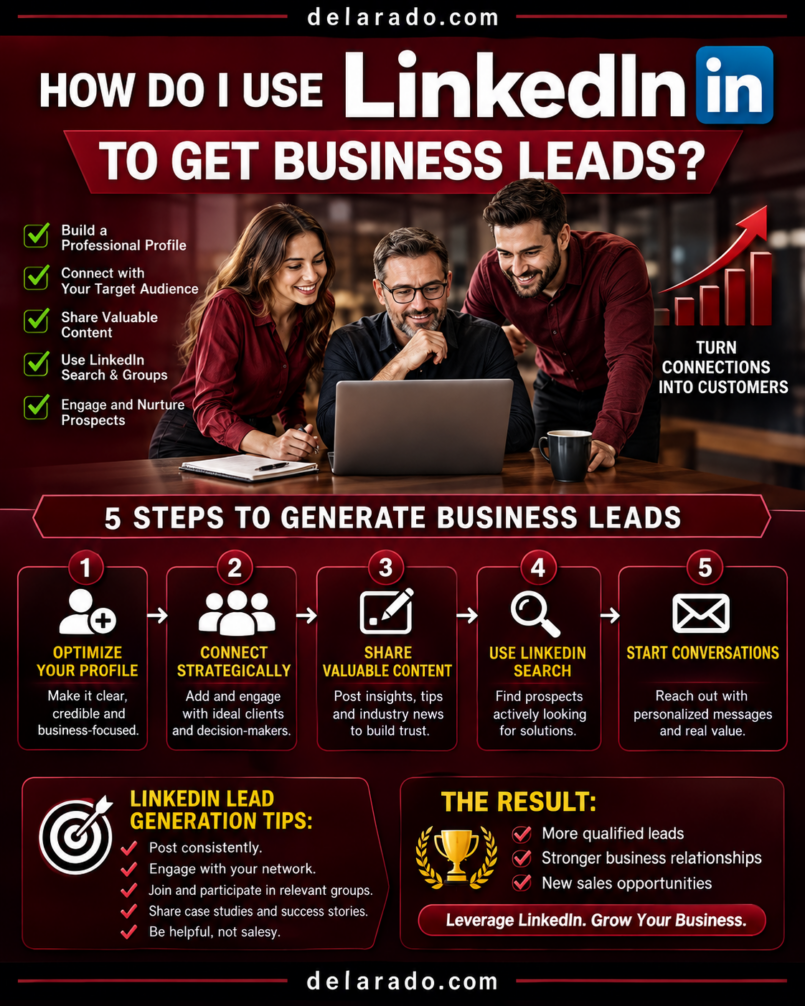
LinkedIn can help you get business leads by making your profile and company presence clear, publishing useful professional content, engaging with the right people, building genuine relationships, offering relevant resources, and guiding interested prospects to a consultation, lead magnet, service page, or other clear next step.
The goal is not to connect with thousands of strangers and immediately pitch them. LinkedIn lead generation works best when you identify a defined audience, demonstrate that you understand their problems, share useful expertise, start relevant conversations, and follow up professionally.
LinkedIn describes effective lead generation as a process involving prospect data, analysis, tracking, and lead qualification. [968]
Who Is This Topic For?
This guide is for B2B businesses, consultants, freelancers, agencies, recruiters, coaches, service providers, SaaS companies, professional firms, local businesses serving other businesses, and personal brands that want to generate professional leads through LinkedIn.
LinkedIn May Be Useful If You Want To:
- Generate B2B leads
- Book consultations or discovery calls
- Build a professional personal brand
- Find referral partners
- Reach decision-makers
- Promote consulting or professional services
- Share case studies and expertise
- Grow an email list
- Promote webinars or events
- Build authority in a professional niche
What Is a LinkedIn Lead?
A LinkedIn lead is a person or business contact who may be interested in your product, service, expertise, or offer. A lead may begin as someone who follows you, comments on a post, downloads a resource, accepts a connection request, attends a webinar, sends a message, submits a form, books a meeting, or requests more information.
Examples of LinkedIn Leads
- A small business owner who downloads your website audit checklist
- A marketing manager who comments on your SEO post
- A founder who connects after reading your case study
- A local business owner who requests a consultation
- A professional who attends your webinar
- A company that asks about your services through LinkedIn messaging
- A prospect who submits a Lead Gen Form from a sponsored post
Not every connection is a lead, and not every lead is ready to buy. Your goal is to build a process that turns relevant attention into useful conversations and qualified opportunities.
Benefits of LinkedIn Lead Generation
Professional Audience
LinkedIn is built around professional identities, companies, industries, job functions, and business relationships. This can make it useful for B2B services, consulting, professional education, recruiting, software, and business partnerships.
Builds Trust Before the Pitch
Helpful posts, thoughtful comments, case studies, professional insights, recommendations, and clear service information can help potential clients understand your expertise before they contact you.
Supports Personal Branding
For consultants, freelancers, founders, sales professionals, and agency owners, a strong personal profile can become a lead-generation asset that shows who you help and how you solve problems.
Creates Relationship Opportunities
LinkedIn can help you connect with prospects, industry peers, partners, event organizers, referral sources, podcast hosts, and complementary service providers.
Supports Content Marketing
You can share short posts, documents, videos, articles, checklists, webinars, case studies, and customer insights that lead people to deeper resources on your website.
Can Support Paid Lead Generation
LinkedIn Lead Gen Forms allow advertisers to collect pre-filled lead information from sponsored content in the LinkedIn feed. LinkedIn recommends using three to four fields as a best practice for its forms. [966][969]
Risks and Limitations
LinkedIn Is Not an Instant Lead Machine
Building trust and relationships takes time. A new profile or company page may need weeks or months of useful activity before producing meaningful conversations or leads.
Spam Can Damage Your Reputation
Generic connection requests, instant sales pitches, copy-and-paste DMs, mass automation, and pressure tactics can make people ignore, block, or report your account.
Not Every Connection Is a Customer
Connections may be peers, competitors, students, recruiters, vendors, or people outside your target market. Qualify leads before spending significant sales time.
Content Does Not Guarantee Leads
A helpful post may earn views and comments without generating clients. You also need clear positioning, relevant offers, effective follow-up, and a service or product that fits the audience.
Paid Campaigns Can Be Expensive
LinkedIn advertising can cost more than other social platforms for some audiences. If you run paid campaigns, start with a clear offer, a defined audience, conversion tracking, and a controlled budget.
Privacy and Consent Matter
Collect only the information you need, store it securely, make your privacy practices clear, and respect opt-out or unsubscribe requests. Do not add people to marketing lists without appropriate permission.
Automation Requires Caution
Tools that mass-send connection requests or messages can create account and reputation risk. Use automation only for permitted administrative tasks and keep relationship-building personal.
Step-by-Step LinkedIn Lead Strategy
Step 1: Define Your Ideal Client
Before optimizing your profile or posting content, decide who you want to attract. LinkedIn lead generation works better when you focus on a defined audience.
Ideal Client Questions
- What industry are they in?
- What size company do they work for?
- What role or job title do they have?
- What problem are they trying to solve?
- What outcome do they want?
- What budget or decision authority may they have?
- What objections might they have?
- What kind of content would help them?
- What action do you want them to take?
Example Ideal Client
A local service business owner with 5 to 25 employees who needs a clearer website, wants more qualified customer inquiries, and does not have an internal marketing team.
The more clearly you understand your audience, the easier it becomes to write your profile, create content, identify prospects, and offer useful resources.
Step 2: Define Your Offer
People need to understand what you do and how it helps them. Avoid vague phrases such as “I help businesses grow” unless you explain how.
Clear Offer Formula
I help [specific audience] solve [specific problem] so they can [desired outcome].
Examples
- I help local service businesses create mobile-friendly websites that make it easier for customers to request quotes.
- I help B2B SaaS teams improve SEO content so they can attract more qualified organic traffic.
- I help freelance designers organize client projects so they can reduce administrative work.
- I help beginner bloggers build WordPress websites and create search-focused content.
Offer Clarity Checklist
- Who do you help?
- What problem do you solve?
- What service, product, or process do you provide?
- What makes your approach useful or different?
- What proof can you show?
- What should someone do next?
Step 3: Optimize Your Personal Profile
Your personal LinkedIn profile is often more important than a company page for relationship-based lead generation. Make it easy for a visitor to understand who you help, what you do, and how to contact you.
Profile Optimization Checklist
- Use a professional, current profile photo
- Create a clear background banner
- Write a benefit-focused headline
- Write an audience-focused About section
- Add your current role and services
- Include relevant experience and results
- Add skills and recommendations where appropriate
- Use the Featured section for proof and resources
- Add a clear contact method
- Customize your public profile URL if available
- Review privacy and contact settings
Weak Headline
Founder and CEO
Stronger Headline
Website Designer for Local Service Businesses | Clear, Mobile-Friendly Sites That Help Turn Visitors Into Inquiries
About Section Formula
I help [audience] solve [problem] through [service, product, or method]. My approach focuses on [key benefit or process]. If you need help with [specific need], you can [call to action].
Featured Section Ideas
- Free checklist or lead magnet
- Case study
- Portfolio page
- Service page
- Customer testimonial
- Webinar registration
- Helpful article
- Book a consultation link
A clear headline, benefit-led description, proof, and an easy website path can help prospects understand your services and decide whether to start a conversation. [971]
Step 4: Optimize Your Company Page
A Company Page can support credibility, employer branding, business information, employee association, ads, and company updates. It should reinforce the same positioning as your personal profile.
Company Page Checklist
- Use your correct company name
- Use a recognizable logo
- Create a clear banner image
- Write a benefit-focused company description
- Add your website URL
- Add correct industry and company details
- Add business location or service area where appropriate
- List products and services clearly
- Add a clear custom button if available
- Encourage team members to associate with the Page
- Keep contact information current
Company Description Example
We help local service businesses improve their online presence through clear website design, practical SEO foundations, and lead-focused customer journeys.
Use the Company Page to support your professional credibility, but do not rely on it alone. Personal interaction and useful individual posts often play an important role in relationship-based LinkedIn marketing.
Step 5: Build a Relevant Network
Connect with people who are relevant to your business, including potential clients, referral partners, industry peers, local business owners, event organizers, journalists, creators, and complementary service providers.
People to Consider Connecting With
- Ideal clients
- Decision-makers in target companies
- Local business owners
- Industry peers
- Referral partners
- Current and former clients
- Event organizers
- Podcast hosts
- Professional association members
- Complementary service providers
Connection Request Example
Hello [Name], I enjoyed your post about [specific topic] and noticed we both work with [industry or audience]. I would be glad to connect and follow your work.
What to Avoid
- Generic “I would like to add you to my network” messages
- Connection requests followed immediately by a sales pitch
- Mass connection requests with no context
- Misrepresenting why you want to connect
- Adding people outside your target market without reason
- Using automated bulk outreach
Personalize your outreach and build relationships before asking for a meeting or making an offer.
Step 6: Publish Helpful Professional Content
LinkedIn content can help potential clients understand your expertise, approach, and point of view. Focus on useful insight, not generic motivational posts or constant sales messaging.
LinkedIn Content Ideas
- Common client questions
- Industry lessons
- Practical checklists
- Short professional tips
- Case studies with permission
- Before-and-after process explanations
- Common mistakes
- Myth versus fact posts
- Document posts and frameworks
- Relevant industry commentary
- Customer pain point explanations
- Behind-the-scenes process lessons
- Webinar or event invitations
Post Formula
Hook: Identify a problem or insight.
Value: Explain the lesson, example, or framework.
Next step: Invite a relevant action, such as saving, commenting, reading a guide, or booking a conversation.
Example Post
Many local business websites do not generate inquiries because visitors cannot tell what service the business offers in the first few seconds.
A clearer headline, a short service summary, and one visible contact button can make the next step easier.
I created a free Small Business Website Checklist for owners who want to review their current site. You can find it in the Featured section of my profile.
Lead-generation guidance commonly recommends sharing useful, audience-relevant expertise, case studies, and proof rather than posting high volumes of low-value content. [971]
Step 7: Use Documents, Videos, and Visual Proof
Not every LinkedIn post needs to be plain text. Documents, images, videos, screenshots, checklists, and case-study visuals can make information easier to understand.
Useful Visual Content
- PDF checklists
- Slide decks
- Framework diagrams
- Short videos
- Screen recordings
- Before-and-after examples with permission
- Case study summaries
- Charts and data visualizations
- Customer testimonials with permission
- Webinar clips
Example Document Post
“7 Things Every Local Service Business Website Needs”
Slide 1: Clear service headline
Slide 2: Mobile-friendly design
Slide 3: Contact button
Slide 4: Service area details
Slide 5: Customer proof
Slide 6: FAQ section
Slide 7: Website audit checklist call to action
Use visuals to clarify real ideas. Do not use fake screenshots, fabricated case studies, or misleading results.
Step 8: Engage Before You Pitch
Engaging with relevant people’s posts can help you build visibility and trust before sending a connection request or message. Add useful comments rather than generic reactions.
Good Comment Types
- Add a practical example
- Share a relevant experience
- Ask a thoughtful follow-up question
- Clarify a useful point
- Share a respectful alternative perspective
- Thank the author for a specific insight
Weak Comment
Great post!
Stronger Comment
Your point about explaining services clearly is important. Many local websites list several services but do not tell visitors which problem each one solves. A short “who this is for” section can make the page much easier to understand.
Thoughtful engagement can lead to profile visits, conversations, and connections without requiring an immediate sales message.
Step 9: Start Conversations Carefully
When someone engages with your content, views your profile, accepts a connection request, or downloads a resource, you may have an opportunity to start a relevant conversation. Keep it personal, respectful, and low-pressure.
Conversation Starter Examples
Thanks for connecting, [Name]. I noticed you work with [industry]. I share practical website and SEO tips for local service businesses—what part of your online presence is most important for your team this year?
Thanks for commenting on my post about website inquiries. Are you currently focused more on improving traffic, clarifying your services, or making it easier for visitors to contact you?
Conversation Best Practices
- Use the person’s name
- Reference a real context
- Ask one relevant question
- Do not pitch immediately
- Listen to the response
- Offer a useful resource if appropriate
- Respect a lack of response
- Do not pressure people into calls
LinkedIn cautions against lead-generation practices that lack professional context. Keep interactions respectful and relevant to the person and their business needs. [976]
Step 10: Create a Lead Magnet
A lead magnet is a useful resource offered in exchange for a person’s email address or other appropriate contact information. It should solve a small, relevant problem for your target audience.
Lead Magnet Ideas
- Website audit checklist
- SEO checklist
- Content calendar template
- Service pricing guide
- Consultation preparation worksheet
- Buyer’s guide
- Industry benchmark report
- Template pack
- Mini-course
- Webinar registration
Example
A website designer offers a free “Small Business Website Audit Checklist” that helps business owners review their service pages, contact buttons, mobile design, trust signals, and local information.
Lead Magnet Landing Page Checklist
- Clear headline
- Explanation of what the resource includes
- Who it is for
- Simple signup form
- Privacy Policy link
- Clear consent language where needed
- Thank-you page or delivery email
- Relevant next step
Do not use a lead magnet as an excuse to collect excessive personal data. Ask only for the information you need.
Step 11: Build a Simple Lead Nurture Process
Not every lead is ready to buy immediately. After someone downloads a resource, attends a webinar, or starts a conversation, provide useful follow-up rather than sending constant sales messages.
Simple Follow-Up Sequence
- Deliver the promised resource
- Share a useful related tip
- Explain a common mistake
- Link to a helpful article or case example
- Offer a relevant consultation, service, or product
Example Email Sequence
- Email 1: Deliver the Small Business Website Audit Checklist
- Email 2: Explain three website mistakes that reduce customer inquiries
- Email 3: Share a short website improvement case example
- Email 4: Offer a website consultation for businesses that want help implementing changes
Keep your promises, use a clear unsubscribe option, and do not overwhelm people with unnecessary promotional emails.
Step 12: Ask for a Meeting at the Right Time
A meeting request should be relevant to a stated need or demonstrated interest. Do not ask every new connection for 30 minutes of their time.
Good Times to Suggest a Call
- They ask about your service
- They reply with a relevant problem
- They download a resource and request help
- They engage repeatedly with your content
- They ask for a recommendation or quote
- They mention an upcoming project you can help with
Meeting Request Example
Based on what you shared about your website inquiry process, a short consultation may help clarify the highest-priority changes. If it would be useful, you can choose a time here: [booking link]. No pressure if you prefer to review the checklist first.
Make it easy to decline. A respectful low-pressure invitation protects your reputation and often creates better conversations.
Step 13: Use LinkedIn Events and Webinars
LinkedIn Events, live sessions, webinars, and educational presentations can help you attract leads by offering useful information around a relevant problem.
Event Ideas
- Beginner SEO workshop
- Small business website audit session
- LinkedIn profile optimization webinar
- Local business marketing panel
- Product demonstration
- Industry Q&A session
- Expert interview
- Customer education session
Event Promotion Checklist
- Choose a specific audience problem
- Create a clear event title
- Explain what attendees will learn
- Use a simple registration process
- Promote the event through posts and direct outreach
- Send reminders where appropriate
- Provide a useful replay or resource
- Follow up with attendees respectfully
Educational events work best when the information is useful even if someone does not buy from you immediately.
Step 14: Consider LinkedIn Lead Gen Forms
LinkedIn Lead Gen Forms are a paid advertising feature that lets people submit a pre-filled form from sponsored content. They can reduce friction because some information may be filled from a member’s LinkedIn profile.
Lead Gen Forms May Be Useful For:
- Webinar registration
- Checklist downloads
- Industry reports
- Demo requests
- Event signups
- Consultation requests
- Newsletter subscriptions
- Product information requests
Lead Gen Form Best Practices
- Offer something useful and relevant
- Ask only for needed information
- Use a clear headline
- Include a Privacy Policy link
- Explain what happens after submission
- Send a useful confirmation message
- Connect leads to a secure CRM or follow-up process
- Respond quickly to high-intent leads
LinkedIn recommends three to four form fields as a best practice for Lead Gen Forms, though available fields and requirements can change. [969]
Lead Gen Forms require a paid LinkedIn campaign. LinkedIn says that they are created through Campaign Manager under a Lead Generation campaign objective. [978]
Step 15: Track Lead Quality and Results
Do not judge LinkedIn lead generation only by connection count, post impressions, or form submissions. Track whether leads are relevant and whether they move toward meaningful business outcomes.
Organic Metrics to Track
- Profile views
- Search appearances
- Connection acceptance rate
- Post impressions
- Comments and shares
- Featured section clicks
- Website visits from LinkedIn
- Direct-message conversations
- Lead magnet downloads
Business Metrics to Track
- Qualified leads
- Consultation bookings
- Sales conversations
- Proposal requests
- Deals won
- Revenue
- Customer lifetime value
- Cost per lead for paid campaigns
- Lead-to-customer conversion rate
Simple Lead Qualification Questions
- Does this person fit our target audience?
- Do they have a relevant need?
- Do they have decision authority or influence?
- Is there a realistic budget or timeline?
- Can we genuinely help them?
- What is the most useful next step?
LinkedIn’s sales guidance recommends analyzing customer data and developing a lead-scoring process to prioritize the prospects most likely to become valuable customers. [968]
Programs That Can Help
LinkedIn Personal Profile
Your personal profile can be a key lead-generation asset. Use it to explain who you help, demonstrate expertise, share helpful content, and make it easy for prospects to contact you.
LinkedIn Company Page
A Company Page can support credibility, company information, employee associations, business content, recruiting, and paid advertising campaigns.
LinkedIn Sales Navigator
LinkedIn Sales Navigator can help identify prospects, save leads, organize account research, and support professional outreach. Review current plans, privacy requirements, and messaging practices before subscribing.
LinkedIn Campaign Manager
LinkedIn Campaign Manager can help create paid advertising campaigns, including Sponsored Content and Lead Gen Forms. Use it only with a clear offer, tracking, privacy policy, and controlled budget.
LinkedIn Lead Gen Forms
LinkedIn Lead Gen Forms can help advertisers collect pre-filled lead details from sponsored content. LinkedIn reports on form performance, including cost per lead, form fill rate, and conversion rate. [966][978]
Canva
Canva can help create LinkedIn document posts, checklists, visual frameworks, presentation slides, webinar graphics, case-study images, and branded content.
Google Analytics
Google Analytics can help track LinkedIn visitors to your website and measure email signups, form submissions, bookings, purchases, and other conversion actions.
CRM Tools
CRM tools such as HubSpot, Pipedrive, Salesforce, and other customer relationship management platforms can help organize leads, track conversations, schedule follow-up, manage deals, and measure sales outcomes.
Email Marketing Tools
MailerLite, ConvertKit, Brevo, HubSpot, ActiveCampaign, and similar platforms can help deliver lead magnets, create welcome sequences, segment subscribers, and follow up with leads who choose to subscribe.
Common Mistakes
Pitching Immediately After Connecting
Do not send a sales message the moment someone accepts a connection request. Build context, engage thoughtfully, and start a relevant conversation first.
Using a Vague Profile
A profile that only lists a job title may not explain how you help people. Use a clear headline, benefit-focused About section, proof, and relevant calls to action.
Posting Generic Content
Generic motivation and broad business advice may not attract the right people. Create content around real customer questions, pain points, decisions, and professional challenges.
Using Mass Automated Outreach
Automated connection requests and messages can feel impersonal and spammy. Personalize outreach, respect platform limits, and focus on relationship-building.
Not Offering a Clear Next Step
Helpful content should guide interested people to a relevant action, such as a checklist, article, webinar, consultation, product page, or email signup form.
Ignoring Lead Quality
Many low-quality leads may be less valuable than a few qualified leads. Track fit, need, authority, timing, and potential value.
Not Following Up
Leads may need time and useful information before they are ready to buy. Use respectful follow-up through email, LinkedIn, or other consent-based channels.
Hiding Commercial Relationships
Disclose paid partnerships, affiliate relationships, sponsorships, or material connections clearly when promoting products or services.
Not Measuring Results
Track profile views, website visits, lead magnet downloads, conversations, meetings, qualified leads, proposals, and revenue—not only followers and post impressions.
Frequently Asked Questions
Can LinkedIn generate business leads?
Yes. LinkedIn can help businesses generate leads through profile optimization, professional content, thoughtful engagement, relationship building, lead magnets, direct conversations, events, and paid Lead Gen Forms. Results are not guaranteed.
How do I get leads on LinkedIn without paying for ads?
Optimize your personal profile, define your ideal client, connect with relevant people, publish useful content, engage with prospects before pitching, offer a relevant lead magnet, start respectful conversations, and guide interested people to a consultation or service page.
What should I post on LinkedIn to get clients?
Post useful professional content such as customer FAQs, case studies with permission, industry insights, checklists, common mistakes, frameworks, process explanations, myth-versus-fact posts, and lessons that help your target audience solve a real problem.
How often should I post on LinkedIn?
Many professionals can begin with two to four useful posts per week. Consistency and quality matter more than posting large volumes of low-value content.
Should I use my personal profile or Company Page for lead generation?
Use both. Personal profiles often support relationship-building and professional conversations, while Company Pages support business credibility, company information, team visibility, and paid advertising. For many service businesses, the personal profile is especially important.
How do I send LinkedIn connection requests without being spammy?
Personalize requests, mention a genuine point of context, explain why connecting makes sense, and do not pitch immediately. For example, reference a post, shared industry, event, or mutual professional interest.
What is a LinkedIn Lead Gen Form?
A LinkedIn Lead Gen Form is a paid advertising feature that lets people submit pre-filled contact information from sponsored content. LinkedIn recommends three to four fields as a best practice for many forms. [966][969]
Do I need LinkedIn Sales Navigator?
Not necessarily. You can begin with a strong profile, organic content, search, networking, and careful prospect research. Sales Navigator may be useful when you need more advanced prospecting and account-research capabilities.
Can I automate LinkedIn messages?
Be cautious. Automated mass messages can feel spammy and may create platform or reputation risks. Use personal, relevant outreach and reserve automation for permitted administrative tasks or CRM organization.
How do I know if LinkedIn is working for my business?
Track profile views, connection quality, post engagement, website visits, lead magnet downloads, direct-message conversations, qualified leads, consultation bookings, proposals, sales, and revenue where accurately measured.