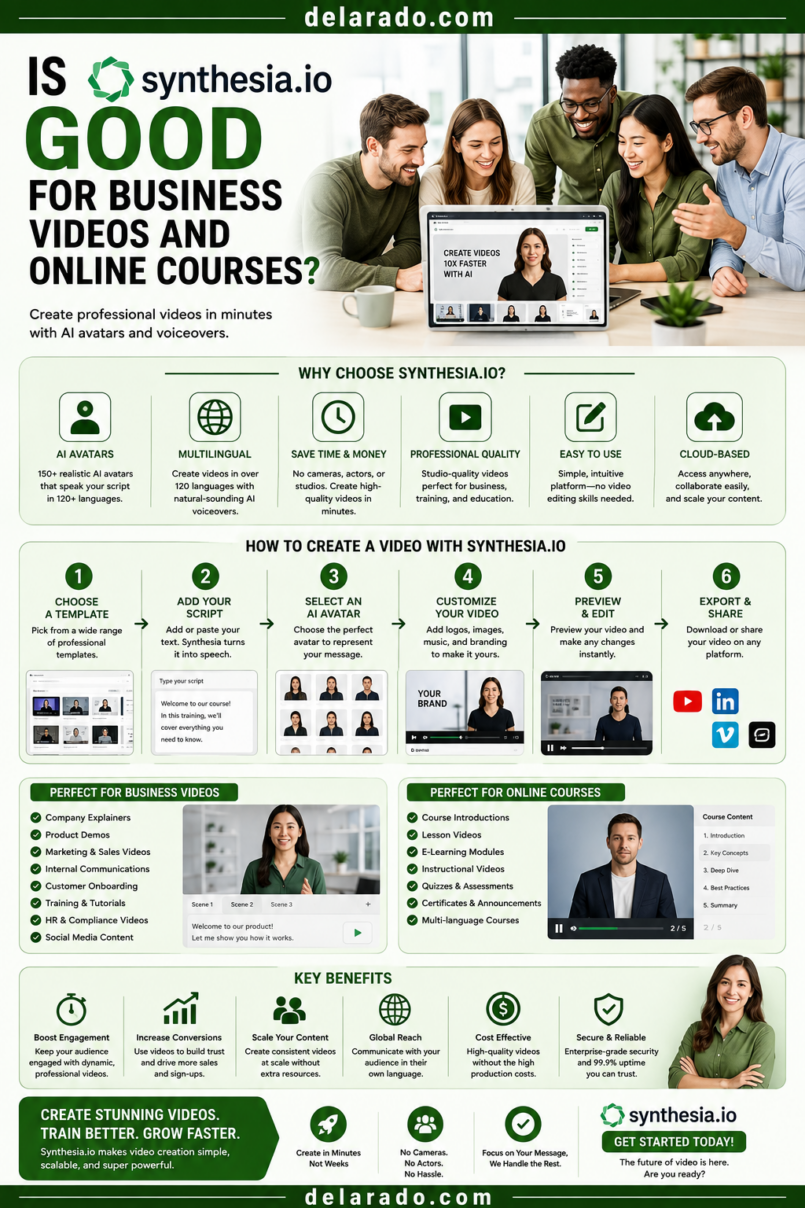
Synthesia can be a good option for business videos and online courses when you need consistent presenter-style videos without filming a person each time. It is particularly useful for internal training, onboarding, software tutorials, customer education, multilingual explainers, product walkthroughs, standard operating procedures, and repeatable course lessons.
It may be less suitable when your content depends heavily on real human connection, hands-on product demonstrations, emotional storytelling, detailed live teaching, customer proof, or a personal brand built around your own face and voice. In those cases, a real presenter, screen recording, product footage, interview, or hybrid format may be stronger.
Synthesia describes its platform as an AI video generator for businesses that creates videos with AI avatars and voiceovers in more than 160 languages. It also offers a free plan with limited monthly video minutes and a small selection of stock avatars. [1158]
Who Is This Topic For?
This guide is for small businesses, agencies, educators, course creators, HR teams, consultants, software companies, internal training teams, customer-success teams, eCommerce sellers, and creators considering Synthesia for video production.
Synthesia May Be Useful If You Want To:
- Create internal training videos
- Create employee onboarding videos
- Build online course lessons
- Create multilingual video content
- Make software tutorials and explainers
- Create product walkthroughs
- Create customer support videos
- Standardize recurring business communication
- Create videos without cameras, studios, or actors
- Turn scripts or presentations into video lessons
Synthesia May Not Be the Best Fit If You Need To:
- Show real product use in the physical world
- Build a personal creator brand around your own presence
- Film customer testimonials
- Create emotionally expressive storytelling videos
- Capture spontaneous live demonstrations
- Show real events, locations, employees, or clients
- Create highly cinematic video content
- Run paid advertising without confirming the license terms
What Is Synthesia?
Synthesia is an AI video platform that turns written scripts, templates, presentations, and other inputs into presenter-style videos. Users can choose stock AI avatars, AI voices, languages, templates, visual layouts, backgrounds, and branding elements.
Instead of filming a person with a camera, users can create a video where an AI avatar presents an approved script. This can make it faster to create standardized educational, training, support, and explainer content.
Features Synthesia Says It Offers
- AI avatars
- AI voiceovers
- Text-to-video creation
- Video templates
- Multilingual video creation
- Personal avatars with consent workflows
- Screen recording support
- Slide and presentation import
- Captions and subtitles
- Brand customization
- Training and onboarding templates
- Video sharing and embedding options
Synthesia’s documentation says users can create videos from templates, a chat-based AI Video Assistant, or imported PowerPoint slides. [1170]
Benefits of Synthesia for Business Videos
Can Reduce Filming Time
Businesses can create presenter-style videos without booking a studio, coordinating a camera crew, setting up lights, or repeatedly recording the same script.
Useful for Standardized Training
Training videos often need consistent information. Synthesia can help create repeatable onboarding, compliance, process, safety, software, and customer-support videos from approved scripts.
Supports Multiple Languages
Businesses that serve international audiences may use AI voice and language options to create localized versions of the same training or customer education video. Synthesia states that it supports AI avatars and voiceovers in more than 160 languages. [1158]
Easy to Update
If a policy, software interface, process, product feature, or onboarding step changes, editing a script and regenerating a video may be faster than filming the entire presentation again.
Useful for Screen-Based Tutorials
Software businesses, agencies, course creators, and consultants can combine an AI presenter with screen recordings, slides, diagrams, checklists, and on-screen instructions.
Can Support Brand Consistency
Using consistent colors, fonts, templates, wording, and voice styles can help standardize business videos across departments, courses, and customer support resources.
May Be Accessible for Small Teams
A solo creator or small team can create basic educational videos without needing advanced filming skills, on-camera confidence, or a large production budget.
Benefits for Online Courses
Creates Consistent Lessons
Course creators can use a repeatable template for introductions, lessons, recaps, quizzes, module overviews, and next-step instructions.
Supports Lesson Updates
When course content changes, AI-generated video may be easier to revise than a fully filmed lesson. This can be useful for software tutorials, procedures, pricing models, and fast-changing tools.
Can Support Multilingual Learning
Courses may be easier to localize when video scripts can be translated and presented with different language voiceovers or avatars. Always review translations for accuracy and cultural appropriateness.
Helps Explain Concepts Visually
Course lessons can combine an AI presenter with slides, diagrams, screen recordings, worksheets, checklists, and examples.
Useful for Microlearning
Short, focused videos can explain one concept, one step, one policy, one tool feature, or one activity at a time.
Can Help Maintain a Course Library
When your teaching format, style, and template are consistent, it can be easier to build and update a larger collection of course lessons.
Synthesia markets its training workflow around creating learning and development videos, using stock avatars, templates, and language options for scalable training content. [1164]
Risks and Limitations
AI Avatars May Feel Less Personal
Some viewers prefer learning from a real person, especially when the subject depends on trust, personal experience, emotional connection, coaching, storytelling, or a recognizable personal brand.
Not Ideal for Real-World Demonstrations
An AI presenter cannot replace real footage when viewers need to see a physical product, real workplace, real repair process, actual customer result, or hands-on procedure.
Scripts Still Need Human Review
AI can help draft a script, but it can make factual mistakes, use generic language, misstate product details, or omit important limitations. Every script should be reviewed before video generation.
Licensing May Limit Paid Advertising
Synthesia’s licensing information states that certain standard uses, such as training videos, FAQ videos, product videos on a website, YouTube videos, and organic social media sharing may be allowed, while paid promotion on platforms such as Facebook, Instagram, YouTube, TikTok, and programmatic advertising may not be allowed without additional permission. Verify current terms directly before using any video commercially. [1160]
Avatar Use Requires Ethical Care
Do not create or use an avatar to misrepresent a real employee, customer, expert, or spokesperson. Do not use a person’s likeness without explicit permission.
Realistic Synthetic Content May Need Disclosure
When a realistic AI avatar or altered video could cause viewers to believe they are seeing a real person or real event, use clear disclosure and follow the publishing platform’s current rules.
AI Is Not a Substitute for a Good Course
A polished avatar video cannot fix a confusing curriculum, weak examples, poor learning structure, outdated material, unsupported claims, or lack of student support.
Synthesia vs. Traditional Video
| Synthesia AI Video | Traditional Filmed Video |
|---|---|
| Can be created without cameras, studios, or actors | Requires filming equipment, a presenter, and production setup |
| Useful for repeatable training and standardized scripts | Useful for personal storytelling and real demonstrations |
| Can be updated by editing a script | May require reshooting sections when information changes |
| Can support multilingual versions efficiently | May require new recording or voiceover work for each language |
| Uses AI avatars and synthetic voices | Uses real people and authentic environments |
| May feel less personal or emotionally expressive | Can build stronger personal connection and trust |
| Best for explainers, onboarding, and internal training | Best for testimonials, product demos, personal brands, and real events |
Many businesses can use a hybrid approach: real video for customer stories, product demonstrations, leadership messages, and important brand moments; AI video for standardized training, recurring explainers, internal communication, and updated tutorials.
Synthesia vs. Other AI Video Tools
| Tool Type | Best Use | Possible Limitation |
|---|---|---|
| Synthesia | Business training, onboarding, explainers, avatar-led lessons | May feel less personal than real video |
| CapCut | Short-form editing, captions, Reels, TikToks, Shorts | Requires you to create or source visual footage |
| Descript | Transcript-based editing, podcasts, webinars, video clips | Better for editing existing footage than avatar presentation |
| Canva | Slides, simple video, graphics, social assets, templates | Less focused on advanced avatar-led business training |
| InVideo | Template-based marketing videos and text-to-video drafts | May rely heavily on stock visuals without customization |
| ElevenLabs | AI narration and voiceover production | Does not create full presenter-style video by itself |
| Kling AI | Creative AI-generated video clips and concepts | Not primarily built for standardized training workflows |
The right tool depends on whether you need a presenter, an editor, a voiceover, a creative video generator, or a simple visual design system.
Step-by-Step: Create a Business Video With Synthesia
Step 1: Choose a Clear Video Goal
Start with one purpose. Do not create an avatar video simply because the tool is available.
Good Business Video Goals
- Onboard new employees
- Explain a company policy
- Demonstrate software
- Introduce a product feature
- Answer a customer FAQ
- Explain how to use a service
- Teach a course lesson
- Share internal announcements
- Explain a standard process
- Create multilingual customer education
Example Goal
Create a three-minute onboarding video that teaches new clients how to submit website content, review design drafts, and request changes during a website project.
Step 2: Define the Audience
Know who will watch the video and what they need to understand by the end.
Audience Questions
- Who is the viewer?
- What do they already know?
- What do they need to do after the video?
- What terms might confuse them?
- What concerns might they have?
- What language should the video use?
- Do they need captions, transcript, or translated versions?
Example
The audience is new website design clients who are not familiar with design tools or web-development terms. The video should use simple language and show where they can submit content and feedback.
Step 3: Write a Short, Accurate Script
AI video works best with a clear script. Keep it focused on one process, concept, or outcome.
Script Structure
- Welcome and purpose
- What the viewer will learn
- Main steps or explanation
- Example or visual demonstration
- Summary
- Clear next step
Example Script
Welcome to the website project onboarding guide. In the next few minutes, you will learn how to submit your website content, review your design draft, and send feedback to our team.
First, use the shared content worksheet to provide your services, contact details, and brand information. Next, review the design draft through the project link. Finally, add feedback directly in the document so our team can keep revisions organized.
If you have questions, reply to the project email or use the support form linked below.
Script Checklist
- Is every statement accurate?
- Does the script match the current process?
- Are technical terms explained?
- Are steps in the correct order?
- Does it avoid unsupported claims?
- Does it include a useful next step?
- Is it short enough to hold attention?
Update the script whenever your process, product, software, price, policy, or workflow changes.
Step 4: Choose an Avatar Responsibly
Choose an avatar that fits the tone of the video, but do not imply the avatar is a real employee, customer, expert, or spokesperson if it is not.
Avatar Selection Guidelines
- Choose a professional, clear presentation style
- Match the visual tone to your brand
- Use inclusive representation thoughtfully
- Do not make false claims about the avatar’s identity
- Do not create a personal avatar of someone without permission
- Use an authorized avatar for customer-facing content
- Consider whether a real presenter would be more appropriate
Synthesia states that it creates personal AI avatars only with explicit consent and requires a consent video to verify identity and permission. [1157][1159]
Disclosure Example
This training video is presented by an AI-generated avatar using an approved script.
A disclosure may be especially helpful when the video is customer-facing, highly realistic, or could otherwise cause viewers to believe the avatar is a real person.
Step 5: Add Meaningful Visuals
An avatar should not simply read text for several minutes with no visual support. Add screenshots, diagrams, screen recordings, slides, checklists, product images, or process visuals.
Useful Visuals for Business Videos
- Screen recordings
- Process diagrams
- Checklists
- Step numbers
- Presentation slides
- Product screenshots
- Original photos
- Brand graphics
- Comparison tables
- Callout text
Example
For a software onboarding video, show the AI avatar only briefly at the beginning, then transition to a real screen recording of the software interface. Use arrows and captions to show exactly where viewers should click.
Visuals should match the narration and reflect the real product, process, or workflow being taught.
Step 6: Add Brand Elements Carefully
Use consistent brand colors, logos, fonts, and layout styles, but do not make the video so heavily branded that it distracts from the lesson.
Branding Checklist
- Use correct logo files
- Use approved colors
- Use readable fonts
- Use consistent visual layouts
- Keep text readable on mobile
- Use a consistent intro and outro style
- Include contact or support information where relevant
- Avoid excessive animation or clutter
For internal training, consistent branding can help employees recognize official materials. For customer content, clarity should remain more important than decoration.
Step 7: Add Captions and Translations
Captions help people understand the video in sound-off environments and improve accessibility. If you create multilingual versions, review every translated script for accuracy, tone, names, product terms, and cultural appropriateness.
Caption Checklist
- Review automatic captions
- Correct technical terms and names
- Check timing and line breaks
- Use high-contrast readable text
- Keep captions visible long enough to read
- Provide a transcript when useful
Translation Checklist
- Review the translated script
- Verify product names and terminology
- Check localized dates, numbers, and currencies
- Review tone and cultural context
- Make sure links and calls to action work in each market
- Do not assume machine translation is final
Synthesia states that it can create localized training videos using avatar and voice options in multiple languages, but translations still need human review before publication. [1164]
Step 8: Review Licensing Before Publishing
Check the current Synthesia licensing and plan rules before publishing a video, especially if you intend to use it in advertising, paid campaigns, television, or broad commercial promotion.
Questions to Ask
- Does my plan allow this publishing use?
- Can I publish on my website?
- Can I publish on YouTube?
- Can I share on organic social media?
- Can I use this video in paid advertising?
- Can I use this video in paid social promotion?
- Can I use this video in a course I sell?
- Can I use this video in a client project?
- Does the video include a watermark or branding?
- Are there restrictions on stock avatars, voices, or templates?
Synthesia’s published licensing page distinguishes between permitted uses such as organic website, YouTube, and social video uses and disallowed paid promotion uses under its standard licensing, so confirm current rights before using a video in ads. [1160]
Step 9: Publish With Transparency
When the video uses an AI avatar, AI voice, or realistic synthetic media, consider what a reasonable viewer would assume. Use clear disclosure if the content could mislead people about who is speaking or what is real.
Possible Disclosure Language
- This video uses an AI-generated avatar to present an approved training script.
- This course lesson includes an AI-generated presenter and synthetic voiceover.
- This video includes AI-generated visual elements used for illustration.
- This avatar does not represent a real employee, customer, or spokesperson.
Transparency is especially important for customer-facing videos, product claims, financial topics, health content, legal content, and anything involving realistic people or events.
Step 10: Measure Viewer Results
Do not judge a business video only by how polished it looks. Measure whether viewers understand the content and take the intended next step.
Training Video Metrics
- Completion rate
- Quiz or assessment results
- Support ticket reduction
- Time to complete onboarding
- Employee feedback
- Process error reduction
- Repeat viewing or resource usage
Course Video Metrics
- Lesson completion rate
- Student engagement
- Student questions
- Course progress
- Module drop-off points
- Worksheet downloads
- Course feedback
- Refund or support patterns
Marketing Video Metrics
- Views
- Watch time
- Completion rate
- Website clicks
- Email signups
- Lead magnet downloads
- Consultation bookings
- Product sales
Use the data to improve the script, pacing, visuals, captions, call to action, and content topic—not only to produce more videos.
Best Uses for Synthesia
Employee Onboarding
Create consistent introductions to company policies, communication tools, work processes, benefits information, technology setup, and team expectations.
Customer Onboarding
Create videos explaining how customers begin using your service, set up an account, access support, complete a checklist, or understand the next steps after purchase.
Software Tutorials
Use an avatar introduction followed by real screen recordings. Show the actual software interface and update videos when the product changes.
Internal Process Documentation
Create repeatable videos for standard operating procedures, internal tools, HR processes, customer service policies, and team workflows.
Course Lesson Summaries
Use short avatar-led videos to introduce modules, explain key concepts, summarize lessons, and direct students to worksheets or assignments.
Multilingual Business Communication
Create localized versions of approved announcements, onboarding materials, support content, and tutorials—but review every translation before release.
FAQ Videos
Answer recurring questions about products, services, account setup, returns, booking, billing, software features, or customer processes.
When to Use Real Video Instead
Customer Testimonials
Use real customers, with permission, for testimonials. Do not use an AI avatar to simulate a customer review.
Physical Product Demonstrations
Use real footage when showing how a product looks, feels, fits, operates, assembles, or performs.
Personal Brand Content
Real video may be better when the value comes from your personality, experience, trust, leadership, coaching, or relationship with the audience.
Leadership Messages
Major company announcements, apologies, sensitive communication, and high-trust messages may be more credible when delivered by a real authorized leader.
Emotional or Sensitive Topics
Real human communication is often more appropriate for sensitive subjects, serious customer concerns, layoffs, crises, safety issues, health topics, or difficult personal stories.
Programs That Can Help
Synthesia
Synthesia can create business videos using AI avatars, voiceovers, templates, scripts, and presentation workflows. It is useful for training, onboarding, explainers, and multilingual video content. [1158][1170]
Canva
Canva can help create slides, checklists, course graphics, visual worksheets, thumbnails, social clips, and presentation assets to include in videos.
CapCut
CapCut can help edit video clips, add captions, create Shorts, add text overlays, and repurpose longer business videos for social media.
Descript
Descript can help edit transcripts, create captions, make short clips from longer training videos, and create readable transcripts for courses and tutorials.
ElevenLabs and Voice Tools
AI voice tools can create narration when appropriate. Do not use voice cloning or imitation without explicit permission.
Learning Management Systems
Platforms such as TalentLMS, Thinkific, Teachable, Kajabi, LearnWorlds, and other LMS tools can host course videos, organize lessons, track learner progress, and deliver worksheets or assessments.
Google Analytics and LMS Reporting
Analytics tools can help measure website visits, lead generation, course progress, video completion, and conversions connected to business videos.
Common Mistakes
Using an Avatar for Everything
AI presenters are useful for standardized content, but real video may be better for testimonials, product demos, personal branding, emotional communication, and sensitive topics.
Publishing Unreviewed Scripts
Review every script for accuracy, current information, product details, pricing, policy statements, and realistic claims before generating a video.
Using AI Avatars as Fake Employees or Customers
Do not present an AI avatar as a real employee, satisfied customer, expert, or spokesperson when that is not true.
Ignoring Licensing Restrictions
Check whether the plan allows website use, organic social sharing, YouTube publication, course use, client work, or paid advertising before publishing.
Using Synthetic Videos Without Disclosure
Use clear disclosures when a reasonable viewer could mistake an AI-generated avatar, voice, or scene for a real person or real event.
Creating Long, Unfocused Videos
Focus each video on one main outcome. Break larger topics into modules, chapters, or short lessons.
Using Only an Avatar With No Supporting Visuals
Add screen recordings, diagrams, checklists, slides, and product images to support learning and maintain viewer attention.
Ignoring Accessibility
Add accurate captions, transcripts, readable visual text, and appropriate pacing. Review automated captions before publishing.
Not Updating Videos
Update training and course videos when software, policies, workflows, prices, or product features change.
Measuring Only Views
Track completion rate, learning outcomes, support questions, website clicks, email signups, leads, and sales based on the video’s purpose.
Frequently Asked Questions
Is Synthesia good for business videos?
Synthesia can be a good fit for standardized business videos such as onboarding, training, product explainers, customer support, software tutorials, and multilingual communications. It may be less effective for real product demos, customer testimonials, personal branding, or sensitive leadership messages.
Is Synthesia good for online courses?
It can be useful for structured lessons, module introductions, FAQs, summaries, multilingual course versions, and screen-recorded tutorials. Course quality still depends on curriculum design, examples, worksheets, learner interaction, and accurate current information.
Can I create a personal AI avatar with Synthesia?
Synthesia says personal avatars require explicit consent and a consent video to verify identity and permission. Review the current requirements and terms before creating one. [1157][1159]
Can I use Synthesia videos on YouTube?
Synthesia’s licensing information indicates that YouTube publishing can be permitted under standard licensing, but terms can change. Check your current plan and licensing rules before publishing. [1160]
Can I use Synthesia videos in paid ads?
Standard licensing restrictions listed by Synthesia indicate that use in paid promotion, including paid Facebook, Instagram, YouTube, TikTok, and programmatic ads, may not be allowed without additional permission. Verify current terms before using videos in paid campaigns. [1160]
Do I need to disclose that a Synthesia presenter is AI-generated?
Disclosure is recommended when a viewer could reasonably mistake the avatar for a real person, employee, customer, or expert. Follow the current disclosure rules of each platform where you publish.
Can an AI avatar replace a real instructor?
It can deliver standardized information efficiently, but it may not replace the trust, responsiveness, personal stories, emotional connection, and real-time teaching strengths of a human instructor.
How much does Synthesia cost?
Pricing and features change. Synthesia currently advertises a limited free plan and paid plans with different video-minute limits, avatar options, and features. Review the official pricing page before making a decision. [1158]
What is the best use case for Synthesia?
It is especially suited to repeatable, script-based business content: employee training, client onboarding, software tutorials, product explainers, internal communications, customer FAQs, and multilingual educational videos.
What should I avoid using Synthesia for?
Avoid using it to create fake customer testimonials, fake employees, false expert endorsements, misleading product demonstrations, impersonations, or realistic synthetic content that could deceive viewers.