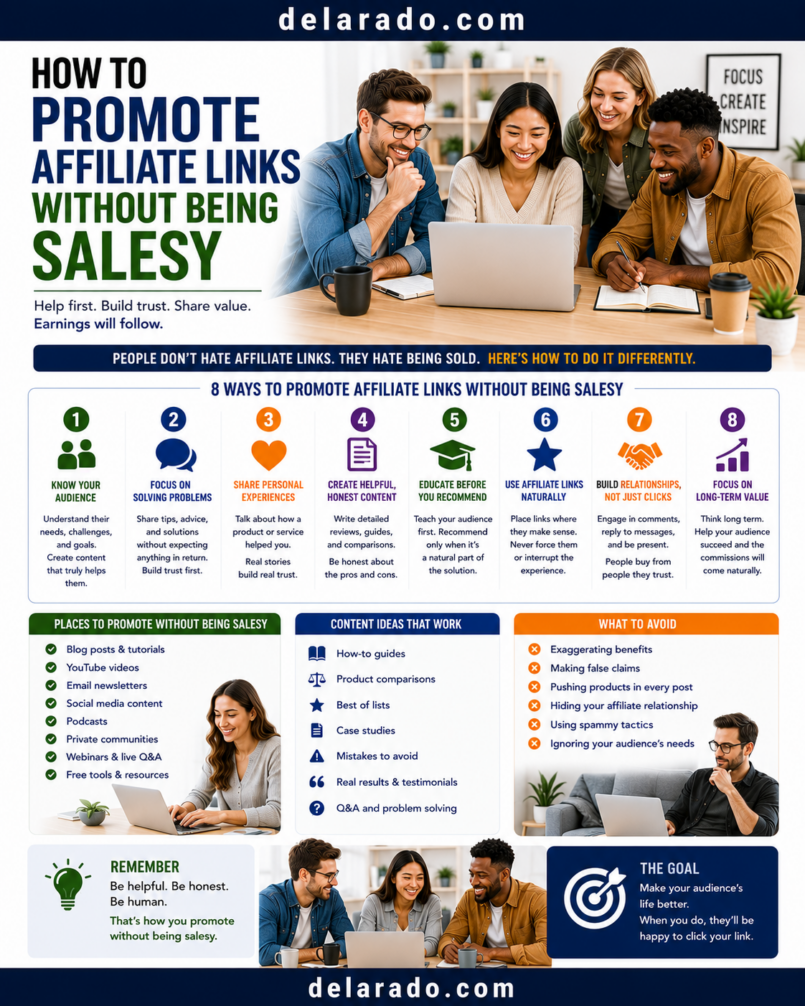
You can promote affiliate links without sounding salesy by leading with useful information, recommending products only when they solve a relevant problem, explaining limitations honestly, using clear disclosures, and giving people space to decide. The goal is to help someone make a better decision—not pressure them into a purchase.
The most effective affiliate promotion often feels like education. A tutorial, buyer guide, review, comparison, checklist, or demonstration can help a person understand what they need. The affiliate link becomes a transparent optional next step for people who decide the product fits.
Who Is This Topic For?
This guide is for bloggers, YouTubers, social-media creators, newsletter writers, affiliate marketers, course creators, consultants, niche website owners, and anyone who wants to recommend affiliate products without damaging audience trust.
This Article Is Helpful If You Want To:
- Promote affiliate links ethically
- Write affiliate articles that feel helpful
- Create non-pushy affiliate videos
- Use affiliate links in email
- Promote affiliate products on social media
- Create product comparisons
- Write honest reviews
- Build audience trust
- Use affiliate disclosures clearly
- Avoid aggressive sales tactics
What Does “Salesy” Mean?
“Salesy” usually describes content that feels pushy, exaggerated, manipulative, repetitive, or more focused on earning a commission than helping the audience.
Salesy Affiliate Content Often:
- Promotes a product before explaining the problem
- Uses exaggerated claims
- Creates false urgency
- Uses fake scarcity
- Hides affiliate relationships
- Claims every product is the “best”
- Ignores product limitations
- Uses fake testimonials
- Repeats links excessively
- Uses guilt-based calls to action
- Promotes products unrelated to the content
- Pressures people to buy immediately
Helpful Affiliate Content Usually:
- Starts with a real audience question
- Explains the problem clearly
- Provides useful information before linking
- Recommends products only when relevant
- Explains benefits and limitations
- Includes alternatives when helpful
- Uses clear disclosures
- Uses accurate product information
- Gives the audience control over the decision
- Provides a useful next step whether or not someone buys
Example
Salesy: “This is the only tool you need. Buy it today before the deal disappears forever.”
Helpful: “This tool may suit beginners who want simple templates and basic automation. Compare its pricing, support, and available features with alternatives before deciding. If you use a qualifying link, I may earn a commission.”
Why a Helpful Approach Works Better
Builds Trust
People are more likely to trust you when you provide useful information, acknowledge limitations, disclose commissions, and do not pressure them into buying.
Attracts the Right Customers
Clear content helps people decide whether a product fits their needs. This can lead to more relevant clicks and fewer disappointed buyers.
Creates Long-Term Value
A useful guide, tutorial, review, or comparison can continue helping people over time when you keep it accurate and updated.
Protects Your Reputation
One misleading recommendation can damage the trust you have built. Honest product fit and transparent disclosure are more valuable than a short-term commission.
Encourages Better Engagement
Helpful content can lead to more questions, comments, replies, saves, shares, email signups, and repeat visits.
Supports Better Product Fit
Explaining who a product is and is not for helps the audience choose more appropriate options.
Benefits of Non-Salesy Affiliate Promotion
Creates More Trustworthy Recommendations
When you lead with value, people are more likely to view the recommendation as useful rather than as a hidden advertisement.
Can Improve Content Quality
Focusing on the audience problem encourages better articles, videos, checklists, tutorials, product comparisons, and resource pages.
Can Reduce Refunds and Complaints
Clear explanations, realistic expectations, and honest limitations may help people avoid buying products that are not a good fit.
Can Support Audience Growth
People may be more likely to follow, subscribe, join an email list, or return to a site when they consistently receive useful information.
Creates More Sustainable Income Potential
Long-term affiliate marketing depends on credibility. Helpful content can build an audience relationship that lasts longer than a one-time promotional campaign.
Works Across Platforms
The same approach works in blog posts, YouTube videos, email newsletters, podcasts, social-media content, comparison pages, and resource libraries.
Risks and Limitations
Helpful Content Takes More Time
Researching products, writing accurate explanations, creating tutorials, reviewing alternatives, checking current pricing, and updating old content takes more effort than simply posting a link.
Not Every Reader Will Buy
Some people will use your information and choose another product, wait to buy, or decide they do not need the product. That is normal.
Product Details Can Change
Prices, features, trials, support, refund policies, affiliate terms, and product availability can change after you publish content.
Personal Experience Is Limited
Your experience may not match someone else’s needs, budget, technical skill, or situation. Explain your use case instead of presenting it as universal proof.
Disclosure Is Still Required
Being helpful does not remove the need to disclose that you may earn a commission from qualifying purchases.
Some Niches Require Extra Care
Health, finance, legal services, insurance, supplements, safety, gambling, children’s products, and other sensitive categories may require more expertise, verification, disclaimers, and compliance review.
Lead With the Problem, Not the Product
Start content with the audience’s question or need. The product should appear only after you explain the problem, decision factors, and possible solutions.
Product-First Approach
Buy this email marketing tool because it has great features.
Problem-First Approach
If you are starting an email list, begin by deciding whether you need signup forms, landing pages, basic automation, tagging, course delivery, or advanced CRM features. The best tool depends on your audience size, budget, and workflow.
After explaining the decision factors, you can recommend one or more relevant tools with clear disclosure.
Questions to Start With
- What is the audience trying to accomplish?
- What problem are they trying to solve?
- What does a beginner need to understand first?
- What features matter most?
- What common mistakes should they avoid?
- What budget or technical limits do they have?
- What alternatives should they consider?
Use Education Before Promotion
Teach something useful before recommending a product. This can be a concept, process, checklist, comparison point, common mistake, tutorial, or practical framework.
Education-First Content Ideas
- What is web hosting and why do you need it?
- How to choose a domain name for a new website
- What should beginners compare before choosing email software?
- How to create a simple website backup process
- How to choose a project management tool for a small team
- What features should beginners look for in a camera?
- How to create a social media content calendar
- What should a small-business website include?
Example Content Flow
Explain the problem → Teach the key decision factors → Compare options → Recommend a relevant product → Disclose affiliate relationship → Offer a clear next step
Example
Before choosing WordPress hosting, compare customer support, backups, renewal pricing, website growth options, and ease of use. If you want to review one option that may suit beginner users, you can check its current plans here. Disclosure: I may earn a commission if you make a qualifying purchase through this link.
The product recommendation appears as a relevant next step rather than an interruption.
Step-by-Step Process
Step 1: Choose One Audience Problem
Start with one specific problem rather than trying to promote a product category broadly.
Weak Topic
The Best Online Business Tools
Stronger Topics
- How to Choose WordPress Hosting for a New Website
- What Should Beginners Compare Before Choosing an Email Tool?
- How to Create a Simple Website Backup Process
- How to Choose a Project Management Tool for Freelancers
- What Is the Difference Between a Domain Name and Web Hosting?
A focused topic helps you create content that feels practical rather than promotional.
Step 2: Explain the Decision Factors
Teach readers or viewers what to consider before choosing a product. This gives them useful information whether or not they buy from your recommendation.
Example: Hosting Decision Factors
- Customer support availability
- Backups and restoration process
- Pricing and renewal costs
- Ease of setup
- Website speed features
- Security options
- Migration support
- Room to grow
Example: Email Tool Decision Factors
- Contact limits
- Signup forms
- Landing pages
- Email automation
- Tags and segmentation
- Deliverability tools
- Pricing structure
- Integrations
- Support and documentation
Explaining decision factors shows that your content is designed to help the audience choose—not simply push one product.
Step 3: Recommend Only Relevant Products
Recommend a product only when it fits the topic, audience, and problem being discussed.
Relevant Recommendation
In an article about setting up a WordPress website, a hosting provider, theme, backup tool, or email platform may be relevant.
Irrelevant Recommendation
In the same article, adding unrelated links for fitness equipment, cryptocurrency tools, kitchen appliances, or vacation packages would likely confuse the reader.
Before Adding a Link, Ask:
- Does this product solve the problem discussed?
- Would the audience expect this recommendation here?
- Can I explain who it is for?
- Can I explain its limitations?
- Would I still include it if no commission existed?
- Is the link allowed under the affiliate program rules?
Relevance matters more than the number of links on a page.
Step 4: Be Honest About Product Fit
Explain who a product is for, who it may not suit, and what the buyer should consider before purchasing.
Example
This email platform may suit a beginner who needs basic signup forms, simple campaigns, and a small email list. It may not fit a larger company that needs advanced CRM features, detailed lead scoring, or complex integrations.
Helpful Product-Fit Categories
- Best for beginners
- Best for a limited budget
- Best for visual creators
- Best for small teams
- Best for advanced users
- Best for simple workflows
- Best for a specific use case
- Not ideal for certain needs
Do not call every product “best.” Explain what each option may be best for.
Step 5: Include Limitations
Limitations make content more trustworthy. Every product has trade-offs, pricing considerations, feature gaps, learning curves, or use cases where another option may work better.
Useful Limitations to Discuss
- Price or renewal costs
- Limited free plan
- Learning curve
- Limited integrations
- Limited customer support
- Limited customization
- Limited export options
- Device compatibility
- Not suitable for advanced users
- Not suitable for beginners
- Regional availability
- Subscription requirements
Example
This website builder may be useful for someone who wants a quick template-based site. It may be less suitable for a business that needs extensive custom development, advanced database features, or a large content-focused website.
Including limitations helps people decide whether the product is right for them and may reduce regret, refunds, and customer frustration.
Step 6: Include Alternatives
Alternatives can make your affiliate content more useful because different audiences have different needs, budgets, skill levels, and priorities.
Reasons to Include Alternatives
- A lower-cost option may suit beginners
- A simpler option may suit people with limited technical skills
- An advanced option may suit larger teams
- A self-hosted option may suit users who want more control
- A different product may have stronger support
- A competitor may offer required integrations
- A different pricing model may fit the customer better
Example
This project management tool may work well for a small team that wants simple boards and task lists. If you need detailed reporting, complex permissions, or enterprise workflows, compare it with more advanced project management platforms before choosing.
Including alternatives does not weaken your recommendation. It demonstrates that you are helping people choose the right solution.
Step 7: Use Clear Affiliate Disclosures
Affiliate disclosures should be direct, visible, and understandable. They should appear before or near the recommendation or affiliate link.
Disclosure Examples
- Disclosure: This article contains affiliate links. If you purchase through a qualifying link, I may earn a commission at no additional cost to you.
- Some links below are affiliate links, which means I may earn a commission if you make a qualifying purchase.
- This video includes affiliate links. I may earn a commission if you buy through a qualifying link.
- Some links in this email are affiliate links. I may earn a commission if you make a qualifying purchase.
Where to Place Disclosure
- Near the beginning of a review or comparison article
- Before affiliate links
- In YouTube descriptions
- In video content where appropriate
- In social captions
- In emails that contain affiliate links
- On resource pages and buyer guides
What to Avoid
- Hiding disclosure in the footer
- Using vague wording
- Putting disclosure only on a separate legal page
- Using tiny text
- Using low-contrast text
- Placing disclosure after the affiliate link
- Assuming viewers understand the relationship automatically
Step 8: Use Natural Calls to Action
A clear call to action tells the audience what they can do next without pressure or exaggerated promises.
Helpful Calls to Action
- Check Current Pricing
- View Product Details
- Compare Available Plans
- Visit the Official Website
- Start a Free Trial
- Read the Product Documentation
- See the Full Feature List
- Compare This Option With Alternatives
Salesy Calls to Action to Avoid
- Buy Now Before It Is Too Late
- Get Rich With This Tool
- Guaranteed Results
- Only One Chance
- Secret Offer
- Act Now or Miss Out Forever
- Instant Success
Example
If this option fits your needs, review the current plans and features directly on the official website. Disclosure: I may earn a commission if you make a qualifying purchase through this link.
Give people information and control. Do not use pressure to make a recommendation seem more persuasive.
Step 9: Limit Link Repetition
Use affiliate links where they are relevant, not in every sentence. Repeated links can make content hard to read and may create a pushy impression.
Useful Link Locations
- After explaining product fit
- In a comparison table
- Near a product recommendation summary
- After discussing important features
- In a resource section
- At the end of a buyer guide
- In a video description after disclosure
Example Article Flow
Explain the problem → Explain decision criteria → Compare products → Explain product fit and limitations → Add one clear affiliate recommendation → Include a transparent call to action
The link should support the content rather than take over the content.
Step 10: Use Helpful Email Promotion
Email can be an effective affiliate channel when subscribers have chosen to receive your messages and the affiliate program allows email promotion.
Useful Affiliate Email Types
- Buyer checklist email
- Tool comparison email
- Beginner tutorial email
- Resource roundup
- Product update email
- Frequently asked questions email
- Case-study lesson with permission
- Relevant product recommendation
Example Email Structure
Subject: Three Things to Compare Before Choosing Website Hosting
Before choosing hosting, compare support, backup options, and renewal pricing.
If you are looking for a beginner-friendly option, here is one platform you may want to research further: [Affiliate Link].
Disclosure: I may earn a commission if you make a qualifying purchase through this link.
Email Guidelines
- Use permission-based lists
- Send relevant content
- Use clear affiliate disclosures
- Use accurate subject lines
- Do not over-email promotions
- Include an unsubscribe option where required
- Check program rules before using affiliate links in email
Do not build an email list with one promise and then send unrelated affiliate promotions.
Step 11: Use Non-Salesy Social Media Content
Social media works well for quick tips, short tutorials, product-use examples, comparisons, checklists, and resource previews. Use content to teach first, then direct people to a relevant next step.
Useful Social Content Ideas
- Three features beginners should compare
- One common buying mistake
- Short software tutorial
- Product feature explanation
- Before-and-after workflow explanation
- Checklist preview
- Myth versus fact
- Tool comparison tip
- Frequently asked question answer
- Resource guide preview
Example Social Post
Before you choose an email marketing tool, compare these three things: signup forms, automation options, and how pricing changes as your list grows.
I created a beginner comparison guide with more details. The link in my profile may include affiliate links, which means I may earn a commission if you make a qualifying purchase.
Do not post affiliate links repeatedly with no context. Give people useful content that earns their attention.
Step 12: Create Non-Salesy YouTube Content
YouTube can be useful for tutorials, product demonstrations, screen recordings, comparisons, and visual buyer guides.
Helpful Video Formats
- How-to tutorial
- Beginner guide
- Tool comparison
- Feature walkthrough
- Product setup guide
- Pros and cons review
- Alternatives video
- Common mistakes video
- Buyer checklist video
Example Video Structure
- State the audience problem
- Explain what the viewer will learn
- Teach the decision factors
- Show useful examples or a demonstration
- Explain relevant product options
- Disclose affiliate links
- Give a clear optional next step
Example Disclosure
This video includes affiliate links. If you purchase through a qualifying link in the description, I may earn a commission at no additional cost to you. Please review current product details directly before purchasing.
Do not use misleading thumbnails, fake results, exaggerated earnings claims, fake reviews, or titles that promise something the video does not deliver.
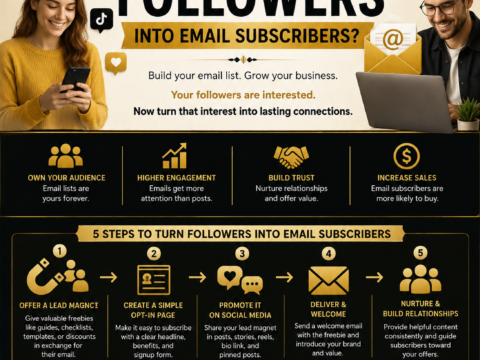
Step 13: Build an Email List Instead of Pushing Every Click
Not every person is ready to buy immediately. A lead magnet can give people a useful next step while allowing you to build a relationship through educational email content.
Lead Magnet Ideas
- Buyer comparison checklist
- Website launch checklist
- Tool selection worksheet
- Beginner setup guide
- Product comparison template
- Resource library
- Mini email course
- Planning worksheet
Example Funnel
Helpful article → Free website checklist → Email series about hosting, domains, and WordPress → Product comparison guide → Transparent affiliate recommendation
A lead magnet gives people value before asking them to make a purchase decision.
Step 14: Update Your Content
Affiliate content can become salesy or misleading when prices, product features, terms, and availability change but the recommendation remains online unchanged.
Update Checklist
- Check current pricing
- Check product features
- Check free plan or trial details
- Check affiliate links
- Check support information
- Check refund and cancellation terms
- Check alternatives
- Update screenshots
- Review disclosures
- Remove products you no longer recommend
Update Note Example
Last reviewed: [Month and Year]. Pricing, features, and affiliate program terms can change. Review the official website for current details before purchasing.
Keeping content current is one of the strongest ways to show that your recommendations are based on audience value rather than one-time commissions.
Examples of Non-Salesy Promotion
Blog Article Example
Before choosing WordPress hosting, compare customer support, backups, renewal pricing, and room to grow. If you want to review one option that may fit beginner website owners, you can see its current plans here. Disclosure: I may earn a commission if you make a qualifying purchase.
YouTube Example
In this video, I will show you the three features I would compare before choosing a video editor: captions, export controls, and how easy it is to create vertical clips. I included a few relevant tools in the description. Some links are affiliate links, which means I may earn a commission if you purchase through a qualifying link.
Email Example
If you are choosing an email marketing platform, begin by comparing signup forms, list limits, automation, and pricing changes as your list grows. Here is one option you may want to research further. Disclosure: I may earn a commission if you make a qualifying purchase through this link.
Social Media Example
Before buying a new camera, compare lens availability, battery life, weight, video features, and your actual travel needs. I added a beginner buying guide in my profile. It may include affiliate links, which means I may earn a commission if you buy through a qualifying link.
Programs That Can Help
WordPress
WordPress can help create helpful affiliate content through articles, reviews, comparison guides, tutorials, resource libraries, disclosure pages, lead magnet pages, and email signup forms.
Google Search Console
Google Search Console can help identify search queries, content opportunities, pages that need updating, and audience questions related to your niche.
Google Analytics
Google Analytics can help measure website traffic, audience engagement, traffic sources, email signups, and outbound affiliate-link activity when configured appropriately.
Canva
Canva can help create buyer checklists, comparison graphics, lead magnets, blog visuals, social content, video thumbnails, worksheets, and resource guides.
YouTube Studio
YouTube Studio can help publish tutorials and reviews, add descriptions, manage captions, review audience retention, and understand video performance.
Email Marketing Tools
MailerLite, ConvertKit, Brevo, Mailchimp, and similar platforms can help create signup forms, deliver lead magnets, send useful newsletters, and build educational email sequences.
Affiliate Program Dashboards
Affiliate dashboards can provide approved tracking links, program rules, product information, reporting, payment details, and notices about program changes.
Link Management Tools
Link management tools can help organize affiliate links, update destination URLs, identify broken links, and maintain records of where affiliate links appear. Use only tools permitted by your affiliate programs.
Common Mistakes
Leading With the Affiliate Link
Start with the audience problem, useful information, and decision factors. Introduce a product link only when it helps the person take a relevant next step.
Using Fake Urgency
Do not use resettable countdown timers, false scarcity, fabricated low-stock notices, or misleading “last chance” language.
Hiding Affiliate Disclosures
Disclose affiliate relationships clearly near relevant recommendations and links. Do not hide disclosure in a footer or separate legal page.
Claiming Every Product Is the Best
Explain what each product may be best for. Different audiences have different budgets, skill levels, needs, and priorities.
Ignoring Product Limitations
Explain limitations, pricing concerns, learning curves, support considerations, and situations where another product may be a better fit.
Using Too Many Links
Do not add affiliate links repeatedly throughout every paragraph. Use links where they naturally support a recommendation.
Making Unsupported Claims
Do not promise guaranteed income, traffic, sales, rankings, health outcomes, business growth, or product performance.
Using Fake Testimonials
Do not create fake reviews, invented customer stories, AI-generated testimonials, fabricated screenshots, false ratings, or misleading results.
Promoting Irrelevant Products
Only recommend products that fit the audience question and content topic. Unrelated links make content feel promotional and reduce trust.
Not Updating Content
Review product prices, features, availability, links, policies, alternatives, and disclosures regularly.
Sending Too Many Promotional Emails
Balance product recommendations with education, tutorials, resources, and helpful content. Subscribers should receive what they expected when they joined your list.
Frequently Asked Questions
How do I promote affiliate links without sounding salesy?
Lead with useful content, start with the audience problem, explain decision factors, recommend only relevant products, disclose affiliate relationships clearly, include limitations and alternatives, and use calm, accurate calls to action.
Should I put affiliate links in every blog post?
No. Add affiliate links only when they are relevant to the topic and genuinely helpful to the reader. Some content may be purely educational and not need any affiliate links.
How many affiliate links should I use in an article?
Use only the number needed to help the reader take a relevant next step. Avoid turning every sentence or heading into an affiliate link.
How do I write a non-pushy affiliate call to action?
Use clear language such as “Check Current Pricing,” “View Product Details,” “Compare Plans,” or “Visit the Official Website.” Avoid pressure, exaggerated claims, false urgency, and promises of guaranteed results.
Should I include product limitations?
Yes. Explaining limitations helps readers decide whether the product fits their needs and makes your recommendation more trustworthy.
Do I need to include alternatives?
Alternatives are useful when different products may fit different budgets, needs, skill levels, or use cases. They show that your content is designed to help people choose rather than force one recommendation.
Can I promote affiliate links in email?
Possibly, if the affiliate program allows email promotion and your subscribers agreed to receive your messages. Use clear disclosure, relevant content, accurate subject lines, and appropriate unsubscribe options.
Can I promote affiliate links on social media?
Yes, if the affiliate program and social platform allow it. Use clear disclosures near the recommendation, provide useful context, and avoid repeated link-only posts.
Can I use AI to write affiliate content?
AI can help brainstorm ideas and organize drafts, but you should verify facts, add original context, remove generic wording, review product information, disclose affiliate relationships, and never publish fake reviews or unsupported claims.
What should I avoid when promoting affiliate links?
Avoid hidden disclosures, fake urgency, fake reviews, unsupported claims, excessive links, irrelevant products, misleading titles, deceptive emails, purchased email lists, copied content, and pressure-based marketing.