Disclosure: This article is for educational purposes only and does not guarantee reach, followers, engagement, website traffic, leads, sales, income, or business growth. Repurposed content should remain accurate, relevant, original, and appropriate for each platform. Review dates, product information, pricing, affiliate disclosures, sponsorship disclosures, images, links, and claims before publishing adapted content.
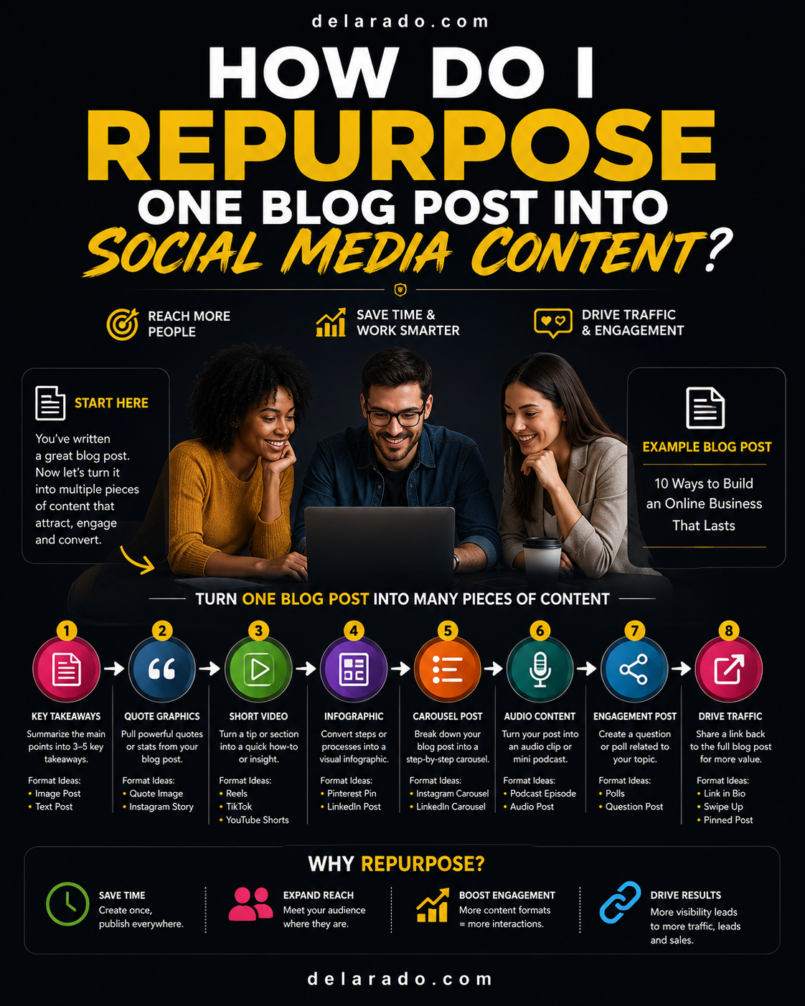
You can repurpose one blog post into social media content by extracting its strongest ideas—such as the main answer, steps, mistakes, examples, quotes, statistics, questions, checklist items, and call to action—then adapting those ideas into platform-specific formats such as Reels, TikToks, carousels, Pins, LinkedIn posts, Facebook posts, Stories, Shorts, and email content.
The goal is not to copy and paste the full blog post everywhere. The goal is to turn one useful long-form resource into several smaller pieces of content that help people in the format they prefer and guide interested viewers back to the full article, lead magnet, product page, service page, or email list.
HubSpot’s Content Remix tool is designed to turn a source asset, such as a blog post, into other formats including social posts, emails, images, and more, while allowing users to review and edit the outputs. [1009]
Who Is This Topic For?
This guide is for bloggers, affiliate marketers, small businesses, freelancers, consultants, local businesses, eCommerce sellers, course creators, agencies, creators, and anyone who wants to get more value from the content they already publish.
This Article Is Helpful If You Want To:
- Save time creating social media posts
- Promote blog content more effectively
- Create Reels, TikToks, carousels, Pins, and Stories from one article
- Drive visitors back to your website
- Grow an email list with existing content
- Build a repeatable content system
- Use social media without starting from a blank page
- Turn customer questions into multiple posts
- Support SEO and content marketing
- Maintain a consistent publishing schedule
What Does Content Repurposing Mean?
Content repurposing means taking an existing piece of content and adapting it into another format, platform, or audience-friendly version. The source content might be a blog post, video, webinar, email, podcast, checklist, product page, customer question, or case study.
Examples of Content Repurposing
- Turn a blog post into an Instagram carousel
- Turn a tutorial into a TikTok video series
- Turn a product review into several short videos
- Turn a checklist into a Pinterest Pin
- Turn a case study into a LinkedIn document post
- Turn an article section into a Facebook post
- Turn a webinar into YouTube Shorts
- Turn customer FAQs into Stories
- Turn a guide into an email sequence
- Turn several articles into a lead magnet
Simple Example
Blog post: “How to Start a WordPress Blog”
Repurposed content: Instagram carousel about setup mistakes, TikTok on choosing hosting, Pinterest Pin with a launch checklist, LinkedIn post about business website ownership, Facebook post with beginner tips, YouTube Short about domains, and an email promoting a free Website Launch Checklist.
Each piece uses the same core topic but presents it in a format that fits the platform and audience.
Benefits of Repurposing Blog Content
Saves Time
You do not need to invent every social media post from scratch. One detailed article can provide multiple weeks of content ideas.
Creates Consistency
Repurposing helps you maintain a posting schedule because your blog posts become a source of planned content.
Reaches Different Audiences
Some people prefer reading detailed blog posts, while others prefer short videos, carousels, Pins, infographics, podcasts, or short text posts.
Drives Traffic Back to Your Website
Social posts can give people a useful preview and direct them to the full article, product guide, service page, lead magnet, or other destination.
Reinforces Key Messages
People often need to see an idea more than once before taking action. Sharing the same core lesson in several formats can improve understanding without being repetitive.
Helps You Identify Strong Topics
If one blog topic creates saves, shares, comments, website clicks, or leads across multiple platforms, it may be a valuable topic to expand into videos, email content, products, or a deeper topic cluster.
Supports a Scalable Content System
Repurposing helps a solo creator or small business create more useful marketing content without needing a large production team.
HubSpot describes content repurposing as a way to transform existing materials into formats such as social posts, emails, and other content assets, reducing the need to begin every piece from scratch. [1009][1010]
Risks and Limitations
Do Not Copy and Paste Everything
Each platform has different audience expectations, content sizes, visual formats, and user behavior. A long blog introduction may not work as a TikTok script, and a short Reel may not be enough for a LinkedIn professional audience.
Outdated Content Can Spread Incorrect Information
Before repurposing, check whether the blog post has current facts, prices, features, links, screenshots, dates, and recommendations.
Do Not Repurpose Weak Content
Not every article deserves more promotion. Start with posts that are useful, accurate, relevant, well-structured, and connected to your business goals.
Too Much Repetition Can Fatigue Audiences
Use different angles, examples, hooks, visuals, and formats. Do not publish the same message word-for-word on every platform at the same time.
AI Outputs Need Review
AI tools can help generate drafts, but they may create generic, inaccurate, repetitive, misleading, or off-brand content. Review everything before publishing.
Disclosures Must Carry Over
If the source article contains affiliate recommendations, sponsored information, gifted products, or other commercial relationships, disclosures may also be necessary in the social content.
Visual Rights Matter
Use original images, licensed visuals, approved screenshots, or material you have permission to use. Do not repurpose copyrighted images from other sources without permission.
Choose the Right Blog Post
Start with a blog post that provides real value and can be broken into smaller useful ideas.
Strong Posts to Repurpose
- Evergreen guides
- How-to tutorials
- Checklists
- Product reviews
- Comparison articles
- Frequently asked question articles
- Case studies
- Problem-solving guides
- Resource lists
- Beginner guides
- Seasonal articles
- High-traffic or high-converting posts
Choose a Blog Post That:
- Answers a real audience question
- Has a clear main topic
- Includes useful steps or examples
- Is accurate and updated
- Has a relevant call to action
- Links to a good landing page, service page, or product page
- Fits your current business goals
- Can be explained visually or in short sections
Example
A detailed guide titled “How to Find Low-Competition Keywords” is a strong repurposing source because it can become a Reel, TikTok, carousel, Pinterest graphic, LinkedIn checklist, Facebook question post, email tip, and downloadable worksheet.
A common repurposing approach is to choose a strong source article, identify its central idea, outline the main points, and highlight sections that can stand alone as short social content. [1011]
Step-by-Step Repurposing Process
Step 1: Review and Update the Source Article
Before creating social content, review the blog post carefully. You do not want to promote old information or send new visitors to a weak page.
Review:
- Facts and statistics
- Product features and pricing
- Affiliate links
- External links
- Internal links
- Screenshots and images
- Dates and examples
- Calls to action
- Affiliate or sponsorship disclosures
- Mobile usability
Ask:
- Does this article still answer the topic correctly?
- Would I be comfortable sending a new visitor to this page?
- Does the page load quickly and work on mobile?
- Is the offer or next step relevant?
- Are all commercial relationships disclosed properly?
Update the article before promoting it if the information is inaccurate, unclear, or outdated.
Step 2: Find the Core Message
Every blog post should have one main idea. Identify the clearest takeaway before creating social content.
Core Message Formula
This article helps [audience] solve [specific problem] so they can [desired outcome].
Example
This article helps beginner bloggers find low-competition keyword ideas so they can create more realistic SEO content for a new website.
Why This Matters
A social post needs one clear point. If you do not know the central idea of the blog post, it will be difficult to create concise Reels, Pins, captions, carousels, or email messages.
Step 3: Extract Content Pieces
Read through the blog post and pull out sections that can stand alone as short content.
Look for:
- Main answer or definition
- Step-by-step instructions
- Checklists
- Common mistakes
- Frequently asked questions
- Statistics or data points
- Quotes or key sentences
- Examples
- Product pros and cons
- Comparison table points
- Myths and corrections
- Customer questions
- Calls to action
Example: Blog Post on Keyword Research
- Definition: What is a low-competition keyword?
- Step: Start with customer questions.
- Step: Use Google autocomplete.
- Step: Review People Also Ask questions.
- Mistake: Choosing keywords only by volume.
- FAQ: Can you rank for keywords with zero volume?
- Checklist: Four questions to ask before targeting a keyword.
Each of these sections can become a separate social post.
Step 4: Match Each Idea to a Platform
Do not use the same format everywhere. Match the idea to the platform and the way people use it.
| Blog Post Element | Best Social Formats |
|---|---|
| Quick definition | Reel, TikTok, Story, LinkedIn short post |
| Step-by-step process | Carousel, Reel, TikTok, YouTube Short, Pinterest infographic |
| Checklist | Carousel, Pinterest Pin, LinkedIn document, downloadable lead magnet |
| Common mistakes | Reel, TikTok, Facebook post, LinkedIn post |
| Comparison table | Carousel, infographic, Pinterest Pin, LinkedIn document |
| FAQ answer | Story, Reel, TikTok, Facebook post, short video |
| Case study or example | LinkedIn post, carousel, video, Facebook post |
| Product review takeaway | Reel, TikTok, YouTube Short, Pinterest Pin |
| Statistic or quote | Graphic, carousel slide, LinkedIn post, Story |
Repurpose the core idea, but adapt the hook, visual, caption, length, call to action, and tone for each platform.
Step 5: Create a Reel or TikTok
Short videos work well for quick tips, mistakes, myths, demonstrations, and one-step explanations from a blog post.
Short Video Structure
Hook: State a clear problem, question, or benefit.
Value: Explain one idea from the article.
Call to action: Invite viewers to save, share, comment, or read the full guide.
Example: Blog Post to Reel
Blog post: “How to Find Low-Competition Keywords”
Hook: “Do not choose keywords only because they have high search volume.”
Value: “For a new site, look for specific phrases that match a real customer question, have clear search intent, and have results you can improve on.”
Call to action: “Save this tip, then read the full keyword research guide from the link in our profile.”
No-Face Video Options
- Screen recording
- Text-based video slides
- Voiceover over relevant visuals
- Hands-only demonstration
- Animated graphics
- Website walkthrough
- Slides made in Canva
One long blog article can often provide several short videos. Each video should cover one useful point, not summarize the entire article in a rushed way.
Step 6: Create an Instagram Carousel
Carousels are useful for step-by-step content, checklists, comparisons, mistakes, myths, and visual explanations.
Carousel Structure
- Slide 1: Strong headline or hook
- Slides 2–7: Tips, steps, examples, or key points
- Final slide: Summary and relevant call to action
Example Carousel
Blog post: “How to Optimize an Old Blog Post for Better Rankings”
- Slide 1: “7 Ways to Improve an Old Blog Post”
- Slide 2: Check Search Console queries
- Slide 3: Update outdated facts and screenshots
- Slide 4: Improve the title and introduction
- Slide 5: Add missing FAQs
- Slide 6: Fix broken links
- Slide 7: Add internal links
- Slide 8: “Save this checklist and read the full guide from the link in our profile.”
Use one key idea per slide, readable text, clean visuals, and a clear final action.
Step 7: Create Pinterest Pins
Pinterest works well for blog articles, checklists, guides, product resources, tutorials, printable content, and evergreen visual topics.
Pin Elements
- Vertical image
- Clear headline
- Relevant visual or illustration
- Readable text
- Accurate destination link
- Keyword-focused title and description
- Relevant board
Example Pinterest Pin
Blog post: “How to Start a WordPress Blog”
Pin headline: How to Start a WordPress Blog: Beginner Setup Checklist
Description: Learn how to choose a domain, select hosting, install WordPress, create essential pages, and publish your first blog post with this beginner-friendly guide.
Destination: The complete WordPress blog setup article or related checklist landing page.
Create multiple original Pin designs from one strong article. Use different visual angles and headlines, but make sure each Pin accurately represents the destination page.
Step 8: Create LinkedIn Posts
LinkedIn works well for professional lessons, B2B insights, case studies, frameworks, checklists, customer problems, and industry commentary.
LinkedIn Post Structure
- Opening insight or problem
- Short explanation or example
- Practical takeaway
- Relevant question or call to action
Example LinkedIn Post
Blog post: “How Do I Get My Website on the First Page of Google?”
Many small businesses focus on ranking for broad keywords while ignoring the questions their customers actually ask.
A more practical approach is to create useful pages around specific customer needs, such as pricing questions, service comparisons, common mistakes, and local search terms.
One useful question to ask: What would a potential customer search before they are ready to contact us?
I shared a complete beginner guide to improving Google visibility in the Featured section of my profile.
Adapt the content for a professional audience. Avoid copying a blog introduction word-for-word.
Step 9: Create Facebook Posts
Facebook can be useful for local communities, customer education, Groups, events, short videos, helpful articles, and conversations.
Facebook Post Formula
Problem: State a common customer challenge.
Value: Give a useful tip or answer.
Resource: Invite people to read the full guide or download a relevant checklist.
Example Facebook Post
Blog post: “How Do I Secure a Website From Hackers?”
One of the easiest website security mistakes is using the same password for WordPress, hosting, email, and your domain account.
If one account is compromised, other business systems may be at risk. Use unique passwords, enable two-factor authentication, keep WordPress updated, and maintain reliable backups.
Read the complete WordPress security checklist here: [link]
Use Facebook content to start helpful conversations, not only to paste links.
Step 10: Create Stories and Polls
Stories can turn blog post topics into quick interaction opportunities. Use polls, questions, short tips, and link stickers where available.
Story Ideas From a Blog Post
- Poll about a common problem
- One quick tip
- Question sticker
- Blog post preview
- Checklist slide
- Before-and-after process example
- Myth-versus-fact slide
- Link to the full guide
Example
Blog post: “How Often Should I Publish Blog Posts for SEO?”
- Story 1: “How often do you publish content?”
- Poll: “Weekly / Monthly / When I remember”
- Story 2: “Consistency matters more than publishing every day.”
- Story 3: “Get the full content schedule guide from the link in our profile.”
Story responses can also create future blog and social content ideas.
Step 11: Create an Email Newsletter
One blog post can become an email newsletter that summarizes the most useful point and links subscribers to the full article.
Email Structure
- Clear subject line
- Short opening problem or question
- One useful takeaway
- Link to the full article
- Relevant next step
Example Email
Subject: A simple way to improve an old blog post
Many old blog posts already receive impressions in Google but do not earn many clicks. Before publishing another article, check Search Console to see what people are already searching for.
Then update the article with clearer answers, current information, better internal links, and a stronger title.
Read the complete guide to optimizing old blog posts here: [link]
Do not send the full blog post word-for-word in every email. Give subscribers a useful reason to click through to the website.
Step 12: Create a Lead Magnet
Some blog posts can become a downloadable lead magnet. This works best when the article contains a process, checklist, framework, template, or useful collection of resources.
Lead Magnet Examples
- Turn “How to Start a WordPress Blog” into a Website Launch Checklist
- Turn “How to Find Low-Competition Keywords” into a Keyword Research Worksheet
- Turn “How to Create a Social Media Content Calendar” into a calendar template
- Turn “How to Secure a WordPress Website” into a website security checklist
- Turn “How to Use SEO to Get Free Traffic” into a beginner SEO checklist
Lead Magnet Process
- Choose a useful section of the blog post
- Turn steps into a checklist, template, or worksheet
- Create a simple PDF or downloadable resource
- Create a landing page
- Add an email signup form
- Promote the resource through social posts
- Deliver it immediately through email or a thank-you page
Turning related articles into a downloadable ebook, worksheet, or other resource is a common content-repurposing method that can support lead generation. [1012]
Step 13: Create a Webinar or Live Session
A detailed blog post can provide the outline for a webinar, live video, workshop, podcast episode, or Q&A session.
Webinar Structure
- Introduce the audience problem
- Explain the main framework from the article
- Walk through examples
- Answer common questions
- Offer a helpful next step
Example
Blog post: “How Do I Use Google Search Console for SEO?”
Webinar: “A Beginner’s Walkthrough of Google Search Console: Find Queries, Fix Indexing Problems, and Improve Existing Content.”
Record the session, then repurpose it again into clips, quotes, email content, blog updates, and FAQ posts.
Step 14: Use AI as an Assistant, Not an Autopilot
AI tools can help turn a blog outline into a content plan, draft captions, generate hooks, summarize sections, create video scripts, and organize platform variations. However, AI should not publish on your behalf without human review.
Useful AI Tasks
- Generate post ideas from article headings
- Create Reel hooks
- Draft short video scripts
- Outline carousel slides
- Create Pin title variations
- Summarize an article into a LinkedIn post
- Suggest email subject lines
- Organize a content calendar
- Find potential FAQs within your article
Always Review AI Output For:
- Accuracy
- Originality
- Brand voice
- Current information
- Product and pricing details
- Affiliate or sponsorship disclosures
- Copyright and image permissions
- Misleading claims
- Platform suitability
HubSpot’s Content Remix workflow allows users to adjust generated content and save it for further editing and review before publication. [1009]
Step 15: Create a Repurposing Workflow
Create a repeatable checklist so every blog post can become social content without starting from scratch.
Repurposing Workflow Checklist
- Select a useful, current blog post
- Identify the main message
- Pull out steps, mistakes, FAQs, examples, and checklists
- Choose appropriate social formats
- Write platform-specific hooks
- Create visuals or video scripts
- Add calls to action and links
- Add disclosures when needed
- Review accuracy and brand voice
- Schedule content in a calendar
- Publish and engage with responses
- Track results
- Repeat successful content patterns
Simple Content Repurposing Map
| Source Content | Repurposed Content |
|---|---|
| One pillar blog post | 3–5 Reels or TikToks |
| One checklist section | Instagram carousel |
| One main article topic | 2–4 Pinterest Pins |
| One professional insight | LinkedIn post or document |
| One customer question | Facebook post or Story poll |
| One key lesson | Email newsletter |
| One process or checklist | Lead magnet or webinar outline |
Example: One Blog Post, 15 Social Posts
Source blog post: How Do I Find Low-Competition Keywords?
| Platform | Repurposed Post Idea |
|---|---|
| Instagram Reel | “Do not choose keywords only by search volume” |
| Instagram Carousel | “Five Ways to Find Low-Competition Keywords” |
| Instagram Story | Poll: “What is harder: finding keywords or writing content?” |
| TikTok | “One free way to find blog topics people search for” |
| TikTok | “Can you rank for keywords with zero volume?” |
| YouTube Short | “Keyword difficulty explained in 30 seconds” |
| Pinterest Pin | “Low-Competition Keyword Research Checklist” |
| Pinterest Pin | “How to Find Blog Topics People Search For” |
| LinkedIn post | “Why high-volume keywords are not always the best business opportunity” |
| LinkedIn document | “Four Questions to Ask Before Targeting a Keyword” |
| Facebook post | “What customers search before they contact your business” |
| Facebook Reel | “The easiest keyword research mistake to avoid” |
| Email newsletter | “A simple way to find your next blog topic” |
| Lead magnet | “Beginner Keyword Research Worksheet” |
| Live session | “Ask Me Anything: Keyword Research for Beginners” |
One detailed article can create a full content campaign when you break it into clear useful ideas.
Programs That Can Help
Canva
Canva can help create Instagram carousels, Pinterest Pins, short video slides, checklists, infographics, Reel covers, story graphics, and branded templates. Canva also offers a Content Planner for planning, scheduling, and publishing social content. [1008]
CapCut and Adobe Express
CapCut and Adobe Express can help turn blog points into short vertical videos with captions, voiceovers, text overlays, templates, transitions, and platform-friendly formatting.
HubSpot Content Remix
HubSpot Content Remix can help transform a source piece of content into social posts, emails, images, and other formats. Review and edit all generated output before publishing. [1009]
Google Sheets or Notion
Google Sheets and Notion can help map article sections to social formats, store hooks and captions, organize assets, track content status, and plan a repurposing calendar.
Meta Business Suite
Meta Business Suite can help schedule and manage Facebook and Instagram content, review insights, and organize posts after creating repurposed assets.
TikTok Creative Center
TikTok Creative Center can help research trends, content patterns, audio, and creative inspiration. Use it to adapt relevant ideas, not copy other creators directly.
Tailwind
Tailwind can help schedule Pins, plan Pinterest content, organize visual assets, and manage a repeatable Pinterest workflow.
Google Analytics
Google Analytics can help track which repurposed social posts drive website visitors, email signups, leads, bookings, purchases, and other useful outcomes.
Common Mistakes
Copying the Blog Post Word for Word
Adapt the message to the platform. Use short hooks and visuals for Reels, detailed slides for carousels, professional context for LinkedIn, and visual headlines for Pinterest.
Repurposing Outdated Content
Review the article before promoting it. Update inaccurate product information, broken links, old screenshots, expired offers, and outdated recommendations.
Trying to Cover the Entire Article in One Post
Choose one main idea per social post. Turn the full article into a series of short posts rather than rushing through every detail.
Using the Same Caption Everywhere
Repurpose the idea, but adapt captions, visuals, calls to action, hashtags, and tone for each social platform.
Skipping the Call to Action
Tell people what to do next: save, share, comment, read the full guide, download a resource, join the email list, or book a consultation.
Ignoring Disclosures
If an article or post includes affiliate links, sponsored content, gifted products, or paid relationships, disclose them clearly where needed.
Using AI Without Review
AI can help with drafts and organization, but it can create errors or generic content. Add human editing, fact-checking, brand voice, and original insight.
Not Measuring Results
Track which repurposed formats create saves, shares, website clicks, email signups, leads, and sales. Use data to decide which article topics are worth repurposing again.
Forgetting the Destination Page
Make sure the social post leads to a relevant, working, mobile-friendly page that matches the post promise.
Frequently Asked Questions
What does it mean to repurpose a blog post?
Repurposing a blog post means adapting its ideas into other formats, such as Reels, TikToks, carousels, Pinterest Pins, LinkedIn posts, Facebook posts, emails, webinars, checklists, or lead magnets.
How many social media posts can I create from one blog post?
A detailed blog post can often produce 5 to 15 or more social content pieces, depending on how many useful steps, FAQs, examples, mistakes, statistics, and checklists it includes.
What type of blog post is easiest to repurpose?
How-to guides, checklists, beginner tutorials, product reviews, comparisons, FAQ articles, case studies, and problem-solving posts are often easiest because they contain clear sections that can stand alone.
How do I turn a blog post into an Instagram carousel?
Use the article title or main benefit as Slide 1, turn major steps or tips into individual slides, and end with a summary and relevant call to action. Keep each slide simple and readable on mobile.
How do I turn a blog post into a Reel or TikTok?
Choose one small lesson, mistake, tip, or FAQ from the article. Start with a strong hook, explain the point quickly, add captions, and direct viewers to the full guide or relevant resource.
Can I use AI to repurpose blog posts?
Yes. AI can help create outlines, captions, scripts, and platform variations. Review every output for accuracy, originality, brand voice, disclosures, claims, and current information before publishing. [1009]
Should I post the same content on every platform?
Use the same core idea, but adapt it. A TikTok should be short and visual, a LinkedIn post should add professional context, a Pinterest Pin needs a visual headline, and a Facebook post can encourage conversation.
How do I know which blog posts to repurpose first?
Start with useful evergreen posts, articles with strong search traffic, posts that generate leads or sales, common customer questions, important pillar pages, and content that already has clear steps or examples.
Can repurposing content help SEO?
Repurposing can support SEO indirectly by driving visitors to useful articles, encouraging links and brand awareness, and helping you identify topics worth expanding. It does not guarantee rankings.
How often should I repurpose old blog posts?
Repurpose content regularly, especially evergreen articles that are current and useful. Refresh old posts before promoting them if information, links, visuals, or recommendations have changed.