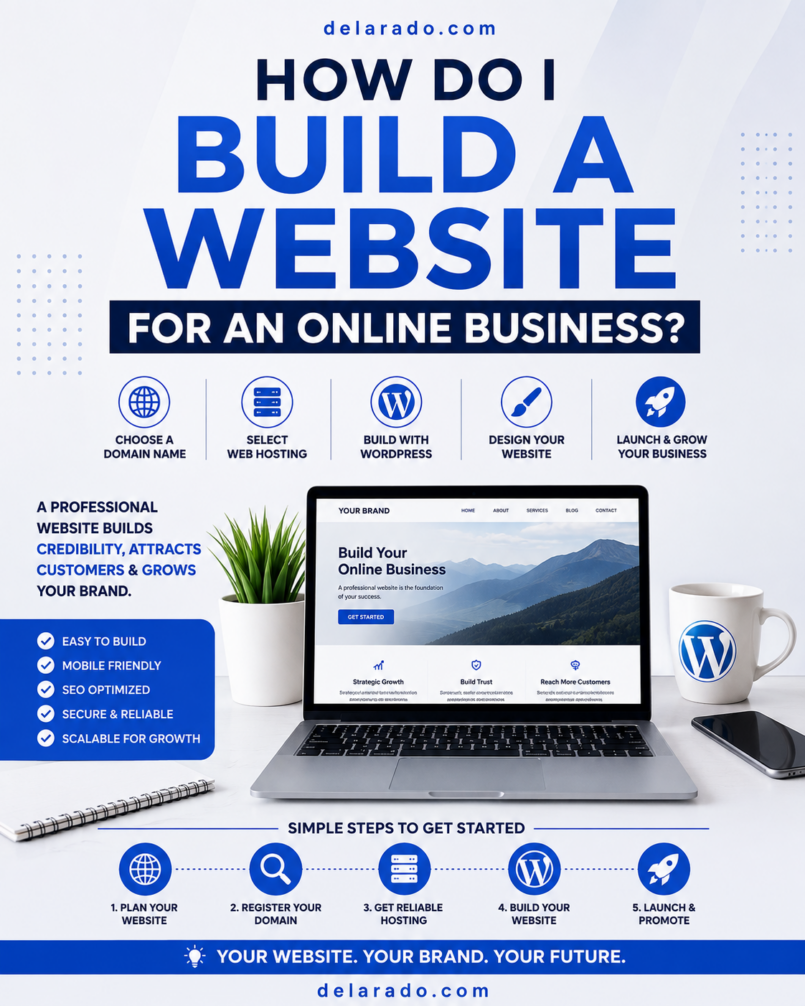
Building a website for an online business does not require advanced coding or an expensive custom design. You need a clear business goal, a domain name, reliable hosting, a website platform such as WordPress, essential pages, helpful content, and a simple way for visitors to take the next step.
Your website can become the online home of your business. It can explain what you do, publish educational content, collect email subscribers, sell products, book consultations, promote services, support affiliate recommendations, and help customers find answers before they contact or purchase from you.
The goal is not to create the most complicated website. The goal is to create a trustworthy, mobile-friendly, secure, and useful website that helps a specific audience solve a problem.
Who Is This For?
This guide is for beginners, small business owners, freelancers, creators, affiliate marketers, consultants, digital-product sellers, coaches, local businesses, and anyone who wants to build a website for an online business.
This Type of Website Can Support:
- Freelance and consulting services
- Affiliate marketing websites
- Blogs and niche content websites
- Local service businesses
- Online coaching businesses
- Digital product stores
- eCommerce stores
- Online courses and memberships
- Personal brands and portfolios
- Email newsletters and lead generation
You May Need a Website If You Want To:
- Build a brand beyond social media
- Publish content that can attract search traffic
- Collect email subscribers
- Show your services or portfolio
- Sell products or accept payments online
- Give customers a clear way to contact you
- Publish reviews, comparisons, and educational resources
- Build trust with policies, support information, and FAQs
- Create a business asset you control
Benefits of Building Your Own Website
A website gives your business more control than relying only on social media, a marketplace profile, or a third-party platform. It can become the central place where your content, offers, email list, and customer experience connect.
You Control the Experience
Your website lets you decide how pages are organized, what information visitors see, how your business is presented, and which actions visitors can take. You are not entirely dependent on an algorithm or platform policy to reach your audience.
You Can Build Search Visibility
Articles, tutorials, product pages, service pages, reviews, FAQs, and guides can help people discover your business through search engines. Search visibility takes time and is never guaranteed, but helpful content can become a long-term traffic source.
You Can Build an Email List
A website can include email signup forms, lead magnets, landing pages, and automated welcome sequences. This lets you communicate directly with people who voluntarily subscribe for useful information.
You Can Sell Products and Services
You can use a website to promote consulting, book appointments, sell digital downloads, offer courses, collect leads, recommend affiliate products, sell physical goods, or create membership areas.
You Can Build Trust
Visitors can learn who you are, what you offer, how to contact you, what your policies are, and whether your business is a good fit for their needs. Clear information, useful resources, visible support options, and professional design can all support trust.
You Can Build a Long-Term Asset
Helpful articles, internal links, email subscribers, service pages, reviews, and resources can continue to create value after publication. A website requires maintenance, but it can become more useful as your content library and customer relationships grow.
Risks and Responsibilities
A website is a valuable business asset, but it is not a shortcut to automatic sales or traffic. It needs ongoing care and a clear strategy.
A Website Does Not Guarantee Income
Launching a website does not guarantee traffic, rankings, leads, sales, or profit. Results depend on customer demand, content quality, competition, the offer, traffic strategy, customer experience, and consistency.
You Need to Maintain It
Self-hosted websites need regular updates, backups, security checks, content updates, form testing, and broken-link reviews. A neglected website can become slow, insecure, confusing, or outdated.
You Need to Protect Customer Data
If you collect contact details, email addresses, payments, customer messages, or other data, you may have privacy and security responsibilities. Use reputable tools, strong passwords, HTTPS, appropriate policies, and professional guidance when necessary.
You Need to Keep Costs Under Control
Possible costs include a domain name, hosting, email marketing software, premium plugins, payment processing, design tools, security, backups, and professional help. Start with the minimum tools needed to launch and improve gradually.
Step 1: Define the Website Goal
Before choosing a domain name, theme, or hosting provider, decide what the website is meant to do. Your goal will guide your pages, design, content, and calls to action.
Common Website Goals
- Generate freelance or consulting leads
- Build an email list
- Publish educational blog content
- Promote affiliate products
- Sell digital products
- Sell physical products
- Book appointments or consultations
- Build local business visibility
- Display a portfolio
- Host a course or membership
Use This Website Statement
This website helps [specific audience] solve [specific problem] and encourages them to [main next step].
Examples
- This website helps beginner bloggers build WordPress websites and encourages them to download a Website Launch Checklist.
- This website helps local service businesses improve their online presence and encourages them to request a website consultation.
- This website helps freelance creators organize content planning and encourages them to purchase a digital template bundle.
A clear purpose keeps you from adding unnecessary pages, features, and tools that do not help visitors or support your business.
Step 2: Choose a Domain Name
A domain name is your website address, such as yourbusiness.com. It should be easy to spell, easy to remember, relevant to your business, and suitable for long-term use.
Domain Name Guidelines
- Choose a name that is simple and readable
- Avoid confusing spelling, numbers, and unnecessary hyphens
- Choose a name that can grow with your business
- Check for possible trademark conflicts
- Check whether matching social-media usernames are available
- Use a professional email address connected to the domain
- Keep domain ownership and renewal access under your control
Example Domain Name Ideas
- ClearPathWeb.com
- BeginnerSiteGuide.com
- CreatorWorkflow.com
- LocalLeadStudio.com
Do not try to put every keyword into the domain name. A clear, brandable domain is often more valuable than a long phrase that is difficult to remember.
Step 3: Choose Website Hosting
Web hosting is the service that stores your website files and makes the site available online. For a self-hosted WordPress website, hosting is required.
DreamHost and SiteGround are examples of providers that offer WordPress-compatible hosting. Compare current features, pricing, renewal terms, SSL certificates, backups, support, security tools, and upgrade paths before selecting a plan.
Beginner Hosting Features to Look For
- Easy WordPress installation
- HTTPS and SSL certificate support
- Automatic backups or easy backup tools
- Security monitoring and account protection
- Helpful customer support
- Clear renewal pricing
- Reliable uptime and performance tools
- Simple domain connection process
- Ability to upgrade as traffic grows
WordPress recommends a modern hosting environment that supports PHP 8.3 or greater, MariaDB 10.11 or greater or MySQL 8.0 or greater, an appropriate web server environment, and HTTPS for every WordPress installation. [474]
Choose the Right Hosting Type
| Hosting Type | Usually Best For | Main Consideration |
|---|---|---|
| Shared hosting | New blogs, portfolios, affiliate sites, and small business websites | Usually affordable but may have fewer resources as traffic grows |
| Managed WordPress hosting | Users who want WordPress-focused support and maintenance tools | Can cost more but may simplify backups, updates, security, and performance |
| VPS hosting | Growing sites with more traffic or technical needs | Provides more control but can require more technical management |
| Dedicated hosting | Large, high-traffic, complex websites | Often costly and unnecessary for new businesses |
For most beginner websites, shared hosting or beginner-friendly managed WordPress hosting is enough to start.
Step 4: Install WordPress
Most hosting providers offer a one-click WordPress installation process. You usually select the domain, set an administrator account, create a strong password, and complete the installation from the hosting dashboard.
Basic WordPress Installation Steps
- Log in to your hosting account
- Find the WordPress installation option
- Select the domain for your website
- Create an administrator email address
- Create a strong username and password
- Avoid using “admin” as your username
- Complete installation
- Log in to your dashboard at yourdomain.com/wp-admin
- Confirm that the website loads properly
WordPress documentation outlines a practical process: learn the basics, make a plan, install WordPress, and set up the site for its intended purpose. [426]
Step 5: Activate HTTPS and Secure the Site
HTTPS encrypts information sent between a visitor’s browser and your website. It is especially important if your site includes contact forms, email signups, user accounts, checkout pages, or payments.
HTTPS Setup Checklist
- Activate the SSL certificate through your hosting provider
- Confirm the site uses https://
- Update WordPress site URLs if necessary
- Test the homepage, login page, forms, and checkout pages
- Check for browser warnings or mixed-content errors
- Use strong unique passwords for hosting and WordPress accounts
- Enable two-factor authentication where available
HTTPS is part of WordPress’s current recommended hosting environment and is a basic trust signal for visitors. [474]
Step 6: Set Up Basic WordPress Settings
Before you create a large amount of content, set up the basic website settings.
General Settings
- Set the site title
- Add a short tagline if useful
- Use a professional business email address
- Set the correct time zone
- Confirm that website URLs use HTTPS
- Set the site language
Permalinks
Permalinks are the URLs for posts and pages. Use clear, readable URLs that describe the page topic.
yourwebsite.com/how-to-build-an-online-business-website/
Readable URLs help visitors understand what a page is about and can support a more organized website structure.
Discussion Settings
Decide whether to allow comments on blog posts. Comments can encourage conversation but also require spam moderation. Many service and business websites disable comments unless community discussion is part of the strategy.
Step 7: Choose a Theme
A WordPress theme controls the website’s layout, typography, colors, menus, and general design. Choose a lightweight, responsive, regularly updated theme that supports a clear user experience.
Theme Selection Checklist
- Mobile-friendly design
- Readable typography
- Fast loading performance
- Regular updates
- Compatibility with WordPress blocks
- Clear documentation
- Simple navigation options
- Accessibility support where possible
- Minimal unnecessary animations and features
A simple, clean theme is often a better choice than one with many effects, sliders, and complicated layout features that can slow down the site or confuse visitors.
Step 8: Install Essential Plugins
Plugins add functionality to WordPress. They can be useful for contact forms, SEO, backups, security, caching, email marketing, eCommerce, analytics, and other features.
Useful Plugin Categories
- Security
- Backups
- SEO
- Caching and performance
- Contact forms
- Email marketing integrations
- Spam protection
- Image optimization
- Analytics
- eCommerce, membership, or course tools if needed
Plugin Best Practices
- Install plugins only from reputable sources
- Check reviews, support information, and update history
- Use only plugins you genuinely need
- Delete inactive plugins you no longer use
- Keep WordPress, plugins, and themes updated
- Back up the site before major changes
- Do not install several plugins that perform the same function
More plugins do not automatically make a site better. Start with the minimum needed to support your website goal.
Step 9: Build Essential Pages
Your site should make it easy for visitors to understand your business, find answers, contact you, and take the next step.
Homepage
Your homepage should explain what your business does, who it helps, and what visitors should do next.
Homepage Structure
- Clear main headline
- Short explanation of the audience you help
- Main benefit or problem you solve
- Primary call to action
- Overview of products, services, or resources
- Trust signals or useful content links
About Page
Your About page should explain who is behind the business, why it exists, who it helps, relevant experience, and how visitors can contact you or explore your offers.
Contact Page
Include a legitimate contact form, business email address, expected response time, and other relevant contact information. Do not make customers search for a way to reach you.
Product or Service Pages
Each important product or service should have a dedicated page explaining who it is for, what it includes, the problem it solves, how it works, pricing or quote information, and the next step.
Blog or Resource Hub
A blog or resource hub lets you publish helpful tutorials, reviews, comparisons, FAQs, buyer guides, checklists, case studies, and articles.
Legal and Trust Pages
Depending on your business, create suitable Privacy Policy, Terms of Use, affiliate disclosure, refund policy, return policy, shipping policy, cancellation policy, and cookie-related notices. Requirements vary, so seek qualified guidance when needed.
Step 10: Create a Clear Navigation Menu
Navigation should help visitors find the most important information quickly. Keep the main menu simple and organized.
Simple Business Website Menu
- Home
- About
- Services or Shop
- Blog or Resources
- Contact
Example Content Website Menu
- Home
- Start Here
- Website Building
- SEO
- Email Marketing
- Tools
- Resources
- About
Google’s SEO guidance recommends organizing website content logically and making it easy for visitors and search engines to find important pages. [344]
Step 11: Set Up Basic SEO
SEO helps search engines understand your pages and can help relevant content appear when people search for answers, products, or services. SEO does not guarantee rankings, but good structure and useful content can build a strong foundation.
Basic SEO Checklist
- Create unique, descriptive page titles
- Use clear headings
- Write readable URLs
- Add useful meta descriptions
- Use descriptive alt text on meaningful images
- Link related pages together internally
- Create an XML sitemap
- Set up Google Search Console
- Set up Google Analytics
- Publish helpful content for your intended audience
Google recommends submitting a sitemap if appropriate. A sitemap is a file that lists the URLs on your site that you want search engines to discover. [344]
Step 12: Publish Helpful Content
Content can help potential customers find your site and understand your expertise. Start by publishing content that answers real audience questions.
Content Ideas for a Service Business
- What services do you offer?
- How does your process work?
- What should clients expect before hiring you?
- What common problems do you solve?
- How should customers prepare for a consultation?
- Frequently asked questions
- Case studies or portfolio examples
Content Ideas for an Affiliate or Niche Website
- Beginner guides
- Step-by-step tutorials
- Product reviews
- Product comparisons
- Buying guides
- Tool alternatives
- Checklists and templates
- Frequently asked questions
Content Ideas for a Digital Product Business
- How-to guides related to your product
- Free resources and lead magnets
- Product walkthroughs
- Template use cases
- Customer onboarding articles
- Frequently asked questions
Create content for people first. Useful, accurate, well-organized content is more valuable than publishing large amounts of generic material only to target keywords.
Step 13: Build an Email List
An email list helps you continue the relationship with visitors who choose to subscribe. Offer a useful resource that solves a small problem and use a signup form on relevant pages.
Lead Magnet Ideas
- Website Launch Checklist
- Beginner SEO Checklist
- Content Calendar Template
- Affiliate Niche Research Worksheet
- Small Business Website Audit Checklist
- Email Welcome Sequence Template
- Online Business Tool Comparison Chart
Simple Email Process
- Create a useful lead magnet
- Add a signup form to relevant pages
- Deliver the resource immediately
- Send a welcome email
- Create two to four helpful follow-up emails
- Continue sending useful content consistently
- Promote relevant offers honestly
Tools such as MailerLite, HubSpot, ConvertKit, Brevo, ActiveCampaign, and Systeme.io can support forms, landing pages, email automation, and subscriber management.
Step 14: Test Before Launching
Before sharing your website publicly, test the visitor experience. A small number of preventable errors can reduce trust and cause missed leads or sales.
Pre-Launch Checklist
- Confirm that HTTPS is active
- Test the website on desktop and mobile
- Review main navigation links
- Test all contact forms
- Test email signup forms
- Test checkout pages if applicable
- Check affiliate links and disclosures if applicable
- Proofread key pages
- Review privacy, terms, and policy pages
- Confirm backups are active
- Set up Google Search Console and Analytics
- Check loading speed and image sizes
Ask someone unfamiliar with your business to visit the site and explain what they think you offer. If they cannot tell quickly, simplify the homepage message and navigation.
Programs That Can Help
WordPress
WordPress can help you build and manage pages, blog posts, menus, media, themes, plugins, categories, and website content. It is flexible enough for blogs, portfolios, affiliate sites, service businesses, digital products, memberships, and eCommerce.
DreamHost and SiteGround
DreamHost and SiteGround provide WordPress-compatible hosting options. Review their current plan features, support, security tools, backups, SSL options, renewal pricing, and limits before selecting a provider.
Wegic
Wegic is an AI-assisted website-building option that may help beginners create landing pages, portfolios, website concepts, and early business websites through conversational prompts. Review all generated content, images, mobile layouts, legal pages, and business claims before publishing.
Google Search Console
Google Search Console can help monitor indexing, search impressions, clicks, technical issues, search queries, and sitemap information.
Google Analytics
Google Analytics can help measure traffic sources, visitor engagement, top landing pages, email signups, contact submissions, purchases, and other important website actions.
SE Ranking
SE Ranking can support keyword research, website audits, rank tracking, competitor analysis, backlink monitoring, local SEO, and reporting. Use the data to identify helpful content opportunities and technical improvements.
Canva
Canva can help create website graphics, featured images, Pinterest Pins, lead magnet PDFs, product mockups, presentations, social-media graphics, and brand assets.
WooCommerce
WooCommerce can help WordPress users sell physical products, digital downloads, services, subscriptions, and other offers. Use secure payment processing, clear checkout details, transparent policies, and reliable customer support.
Common Mistakes
Starting Without a Clear Goal
A website becomes confusing when there is no clear audience, problem, or call to action. Define what the site should help visitors do before choosing design features.
Choosing Hosting Only by Price
Low introductory pricing can be appealing, but renewal costs, backup tools, support quality, security, limits, and upgrade options matter too. Compare the full cost and features before purchasing.
Installing Too Many Plugins
Too many plugins can slow down the site, create conflicts, increase maintenance, and introduce security risks. Install only what you need.
Using a Complicated Theme
A heavily animated or cluttered theme can confuse visitors, slow down mobile pages, and make future updates harder. Prioritize readability and usability.
Ignoring Mobile Visitors
Many visitors will use phones. Test every key page, form, button, menu, and checkout process on mobile devices.
Launching Without HTTPS
HTTPS is essential for a modern website, especially when you collect email addresses, contact messages, account details, or payments.
Publishing Content Only for Keywords
Content should help an actual audience. Do not create shallow pages, copied articles, or unreviewed AI content simply to target search terms.
Forgetting Trust Pages
Contact details, privacy information, policies, disclosures, refund terms, FAQs, and support information help visitors understand that your business is real and accountable.
Frequently Asked Questions
Can I build a business website without coding?
Yes. WordPress and other website platforms allow beginners to create pages, blog posts, menus, forms, and basic layouts without writing code. Coding can help with advanced customization, but it is not required for a functional business website.
How much does it cost to build an online business website?
Costs vary by domain, hosting, design needs, plugins, email tools, payment processing, and business model. A simple site can begin with a domain name, beginner hosting, WordPress, a free theme, and basic tools. More complex stores, courses, memberships, or custom designs may cost more.
How long does it take to build a website?
A simple website can be created in a few days or weeks, depending on your experience, content, design, and number of pages. More complex websites with eCommerce, memberships, custom features, or large content libraries can take longer.
Do I need WordPress for an online business website?
No. WordPress is a flexible and popular option, but other website builders and hosted platforms can also work. Choose the platform that fits your budget, technical comfort, business model, and need for control.
What pages should every online business website have?
Most online business websites need a homepage, About page, Contact page, product or service pages, Privacy Policy, Terms of Use, and a blog or resource section. Add affiliate disclosures, refund policies, shipping policies, and FAQs where relevant.
How do I get traffic to a new website?
You can build traffic through SEO, helpful content, YouTube, Pinterest, email marketing, social media, local search, partnerships, referrals, communities, direct outreach, and paid advertising after validating your offer.
Should I use a website builder or WordPress?
A website builder may be easier for a simple early site, while self-hosted WordPress can offer more flexibility and control for content marketing, SEO, affiliate sites, eCommerce, and long-term growth. Choose based on your needs and willingness to learn.