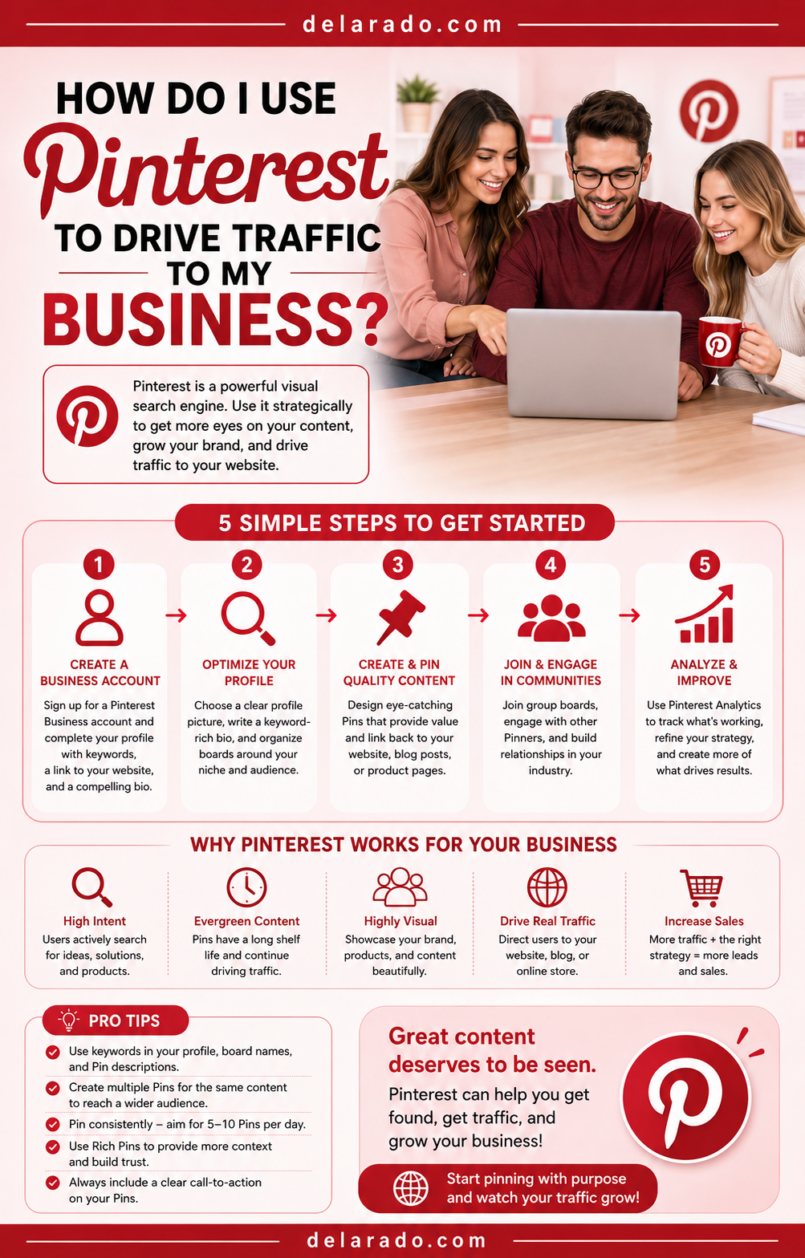
Pinterest can drive traffic to your business when you create useful, visually clear Pins that link to relevant pages on your website. Unlike many social platforms, Pinterest often works more like a visual search and discovery engine: people search for ideas, products, guides, checklists, inspiration, and solutions, then save or click Pins that help them.
The strongest Pinterest strategy starts with a business profile, a claimed website, keyword-focused boards, useful content on your website, original Pin designs, accurate titles and descriptions, and a clear call to action. Your goal is not only to get impressions. It is to earn outbound clicks from Pinterest to a page that actually helps the visitor.
Pinterest Pins typically include an image and can also include a title, description, and destination link, allowing them to send people to blog posts, product pages, landing pages, and other website resources. [487]
Who Is This Topic For?
This guide is for bloggers, affiliate marketers, eCommerce sellers, creators, local businesses, service providers, course creators, coaches, Etsy sellers, recipe publishers, travel businesses, home and lifestyle brands, and anyone with useful visual website content.
Pinterest May Be Useful If You Want To:
- Drive visitors to blog posts
- Grow an email list
- Promote lead magnets
- Send traffic to product pages
- Promote digital products
- Share tutorials and guides
- Promote recipes, travel content, home content, or lifestyle content
- Build evergreen website traffic
- Promote affiliate content transparently
- Turn visual content into leads or sales
What Makes Pinterest Different?
Pinterest is a visual discovery platform where people search for ideas, inspiration, products, tutorials, and solutions. A Pin can continue being discovered after it is published, especially when it leads to useful evergreen content.
While platforms such as Instagram or TikTok often focus on real-time feeds and short-lived trends, Pinterest content can have a longer discovery window. A useful Pin about “How to Start a WordPress Blog,” “Small Business Website Checklist,” “Easy Meal Prep Ideas,” or “Living Room Organization Ideas” may continue appearing when people search for related topics.
Pinterest Can Support:
- Blog traffic
- Product discovery
- Email list growth
- Lead magnet downloads
- Digital product sales
- Affiliate article traffic
- Local business inspiration content
- Seasonal promotions
- Evergreen content marketing
Simple Example
A beginner blogging website publishes a detailed article called “How to Start a WordPress Blog.” It creates several Pins with different visual headlines, such as “WordPress Blog Setup Checklist,” “How to Start a Blog in 10 Steps,” and “Beginner WordPress Launch Guide.” Each Pin links to the same helpful article or a related lead magnet page.
The Pins are not copies of the article. They are visual entry points that give a Pinterest user a reason to click for the complete guide.
Benefits of Pinterest Traffic
Can Drive Website Visits
Pinterest Pins can link directly to blog posts, product pages, service pages, lead magnet landing pages, and other useful website destinations. This can help turn visual discovery into website traffic.
Works Well With Evergreen Content
Helpful Pins can continue being discovered over time. This makes Pinterest useful for checklists, tutorials, recipes, product guides, home ideas, travel guides, printable resources, and other long-lasting content.
Supports Visual Search
People often use Pinterest to search visually for ideas and solutions. Clear images, readable headlines, useful descriptions, and relevant keywords can help people understand what your content offers.
Can Help Grow an Email List
Pinterest can send people to a lead magnet landing page, such as a free checklist, template, worksheet, mini-course, printable, guide, or email challenge.
Can Support Product Discovery
eCommerce businesses can use product images, tutorials, gift guides, collections, comparison content, and lifestyle images to help people discover products.
Can Be Efficient to Repurpose Content
One useful blog post can become several Pins with different headlines, designs, formats, and seasonal angles. This makes Pinterest a practical extension of content marketing.
Provides Useful Analytics
Pinterest analytics can help you review impressions, saves, Pin clicks, outbound clicks, and other signals. Outbound clicks are particularly important because they represent actions that take people from Pinterest to your website. [937]
Risks and Limitations
Pinterest Does Not Guarantee Traffic
Even a well-designed Pin may not receive significant impressions or clicks. Results depend on topic demand, search competition, visual quality, keywords, landing-page relevance, seasonality, and platform changes.
Impressions Are Not the Same as Website Traffic
A Pin can receive many impressions or saves without generating outbound clicks. Track the actions that matter to your business, including website visits, email signups, leads, and sales.
Bad Links Can Damage Trust
Do not link Pins to broken pages, unrelated pages, misleading offers, login walls, slow pages, spam pages, or pages that do not deliver what the Pin promised.
Copyright and Licensing Matter
Use images you created, licensed images, or visuals you have permission to use. Do not take images from Google, other Pinterest accounts, competitors, or creators without permission.
Affiliate and Sponsored Content Need Transparency
If a Pin or destination page includes affiliate links, sponsorships, gifted products, or paid relationships, use clear disclosures that reflect your actual relationship.
Overposting Similar Pins Can Look Spammy
Do not publish many nearly identical Pins to the same URL in a short period. Create genuinely different, useful visuals and spread them out over time.
Pinterest Is Not Ideal for Every Business
Businesses with no visual content, no useful website destination, no educational resources, and no clear product or service pages may have difficulty turning Pinterest activity into meaningful results.
Step-by-Step Pinterest Traffic Strategy
Step 1: Define Your Pinterest Goal
Start with a clear goal. Do not use Pinterest only to chase followers or impressions.
Possible Pinterest Goals
- Drive traffic to blog posts
- Grow an email list
- Promote a lead magnet
- Generate product sales
- Promote digital downloads
- Get consultation requests
- Promote local services
- Build awareness for a visual brand
- Support affiliate content
- Promote seasonal offers
Goal Example
Use Pinterest to drive visitors to beginner WordPress tutorials and grow an email list through a free Website Launch Checklist.
Your goal will determine the Pins you create, the landing pages you link to, and the metrics you monitor.
Step 2: Create or Convert to a Business Account
A Pinterest business account can provide business tools, analytics, advertising options, and a more professional profile setup.
Business Profile Checklist
- Use your business or brand name
- Use a recognizable profile photo or logo
- Write a clear profile description
- Include relevant keywords naturally
- State who you help or what you offer
- Add your website link
- Use a consistent brand style
- Enable two-factor authentication where available
- Review account permissions regularly
Profile Description Formula
Helping [audience] with [topic, product, or service]. Find [useful content type], [resource type], and [main benefit].
Example
Helping beginner bloggers build WordPress websites with practical tutorials, SEO checklists, blogging tips, and honest website tool guides.
Business account setup, website claiming, profile descriptions, and Rich Pins are commonly recommended building blocks for Pinterest business use. [487]
Step 3: Claim Your Website
Claiming your website connects your Pinterest account to your domain and can help you access richer analytics and business features associated with your website content.
Why Claim Your Website?
- Shows a connection between your brand and website
- Helps consolidate Pins linked to your domain
- Can provide website-related analytics
- Can help establish a more professional presence
- May support Rich Pins and website tools
- Makes it easier to monitor content from your site
General Claiming Process
- Open Pinterest business settings
- Find the option to claim your website
- Choose the offered verification method
- Add the required HTML tag, file, or DNS record to your website
- Return to Pinterest and confirm verification
- Check that your site is listed as claimed
Website-claiming steps can change, so follow Pinterest’s current instructions inside your business account.
Step 4: Build a Website Worth Clicking To
Pinterest cannot solve a weak website experience. Before creating many Pins, make sure the destination page delivers what the Pin promises.
Good Pinterest Landing Pages Include:
- A clear headline that matches the Pin
- Useful information or a relevant offer
- Fast and mobile-friendly loading
- Readable text and images
- Clear calls to action
- Working links and forms
- Transparent product or service information
- Affiliate disclosure where relevant
- Privacy Policy link for lead-generation pages
- Clear contact information where appropriate
Weak Pinterest Experience
Pin headline: “Free WordPress Website Launch Checklist”
Destination: A generic homepage with no checklist, no signup form, and no explanation.
Stronger Pinterest Experience
Pin headline: “Free WordPress Website Launch Checklist”
Destination: A mobile-friendly landing page that explains the checklist, shows what it includes, offers an email signup form, and delivers the promised resource.
Step 5: Research Pinterest Keywords
Pinterest is a visual search platform, so keyword research helps you understand what people look for. Use natural phrases in your profile, board titles, board descriptions, Pin titles, Pin descriptions, and relevant website pages.
Keyword Research Sources
- Pinterest search suggestions
- Pinterest guided search topics
- Related Pins
- Competitor board titles
- Google Search suggestions
- Google Trends
- Google Search Console
- SE Ranking or other keyword tools
- Customer questions
- Comments and community discussions
Example Keyword Research
Broad topic: WordPress blog
Potential Pinterest terms: WordPress blog for beginners, how to start a WordPress blog, WordPress website checklist, WordPress SEO for beginners, blogging tips for beginners, and blog content ideas.
Adobe’s Pinterest business guidance recommends choosing a few keywords connected to your business, using Pinterest search to explore related terms, and naturally incorporating relevant wording into your content. [487]
Step 6: Create Keyword-Focused Boards
Boards organize Pins around a topic. Use clear, specific board names that help people understand what type of content they will find.
Board Ideas for a Beginner Blogging Website
- WordPress for Beginners
- Blogging Tips and Ideas
- SEO for New Websites
- Content Marketing Tips
- Email Marketing for Bloggers
- Website Design Inspiration
- Affiliate Marketing Basics
Board Ideas for a Local Service Business
- Home Maintenance Tips
- Seasonal Home Checklist
- Local Home Improvement Ideas
- Common Repair Questions
- Kitchen and Bathroom Inspiration
- Before and After Projects
Board Best Practices
- Use clear board names
- Write helpful board descriptions
- Use relevant keywords naturally
- Keep boards related to your brand and audience
- Avoid creating too many nearly identical boards
- Save Pins to the most relevant board first
- Keep outdated or unrelated Pins organized carefully
Boards should help users discover useful topic collections, not simply exist to repeat keywords.
Step 7: Create Click-Worthy Pin Designs
A Pin needs to communicate its value quickly. Use a clear image, readable headline, and visual design that helps people understand what they will get after clicking.
Pin Design Checklist
- Use a vertical image format
- Use a clear, readable headline
- Use high-contrast text
- Use brand colors consistently
- Use a relevant image or illustration
- Make the promised benefit obvious
- Use simple layouts with enough space
- Make text readable on mobile
- Use original, licensed, or permitted visuals
- Use a relevant call to action when appropriate
Pin Headline Examples
- WordPress Website Launch Checklist
- How to Start a Blog: Beginner Guide
- 15 Easy Meal Prep Ideas for Busy Weeks
- Small Business Website Checklist
- How to Organize a Small Closet
- SEO Checklist for New Websites
- Free Content Calendar Template
Weak Pin Headline
Learn More
Stronger Pin Headline
How to Start a WordPress Blog: 10-Step Beginner Checklist
People should understand the topic and benefit without needing to guess.
Step 8: Create Multiple Pin Variations
One article or landing page can support multiple Pin designs. Each design should offer a different visual angle, headline, or benefit while accurately representing the same destination.
Example: One Blog Post, Multiple Pins
Article: “How to Start a WordPress Blog”
- Pin 1: “How to Start a WordPress Blog: Beginner Guide”
- Pin 2: “10-Step WordPress Website Launch Checklist”
- Pin 3: “What You Need to Start a Blog on WordPress”
- Pin 4: “Beginner Blogging Setup: Domain, Hosting, WordPress”
- Pin 5: “Start a Blog Without Coding: WordPress Guide”
Each Pin should be visually distinct and useful. Do not create dozens of almost identical Pins with tiny wording changes just to increase volume.
Step 9: Write Helpful Pin Titles and Descriptions
Titles and descriptions help explain what the Pin is about. Use clear natural language, relevant keywords, and an accurate description of the destination page.
Pin Title Formula
[Topic or outcome]: [specific benefit, guide, checklist, or audience]
Examples
- How to Start a WordPress Blog: Beginner Setup Guide
- Small Business Website Checklist for New Owners
- Easy Meal Prep Ideas for Busy Families
- SEO Checklist for a New WordPress Website
- How to Create a Content Calendar for Bloggers
Pin Description Formula
Learn how to [solve a problem or complete a task] with this [guide, checklist, tutorial, or resource]. Includes [important details] to help [audience] get started.
Example Description
Learn how to start a WordPress blog with this beginner-friendly guide. It covers choosing a domain, selecting hosting, installing WordPress, creating essential pages, and publishing your first blog post.
Do not stuff descriptions with repeated keywords or make promises the destination page cannot support.
Step 10: Link Each Pin to a Relevant Page
Every Pin should link to the most relevant destination. The page should match the Pin title, image, and description.
Good Pin Destinations
- Blog articles
- Product pages
- Category pages
- Lead magnet landing pages
- Email signup pages
- Service pages
- Booking pages
- Digital product pages
- Resource hubs
- Helpful comparison guides
Avoid Linking Pins To:
- Broken pages
- Unrelated homepages
- Login pages
- Spam pages
- Pages filled with intrusive pop-ups
- Misleading offers
- Pages that require payment before showing promised free content
- Outdated pages with incorrect information
Pin links are designed to help people engage more deeply with content from creators, publishers, and merchants and can drive meaningful traffic to destination websites. [936]
Step 11: Use Rich Pins Where Appropriate
Rich Pins can display additional information pulled from your website, depending on your content type and Pinterest’s current feature support. They may be relevant for articles, products, and recipes.
Potential Rich Pin Types
- Article Pins
- Product Pins
- Recipe Pins
Possible Benefits
- Additional context from your website
- Product details where supported
- Article metadata
- Recipe information
- More useful visual discovery information
Check Pinterest’s current documentation and your website’s structured data setup before relying on Rich Pins. Adobe’s business guide notes that Rich Pins can pull additional website information for article, product, and recipe content. [487]
Step 12: Publish Consistently
Pinterest does not require you to publish dozens of Pins every day. A practical approach is to create a consistent flow of fresh, useful Pins connected to quality website content.
Simple Pinterest Schedule
- Create two to three Pin variations for each new blog post
- Create one or two fresh designs for relevant older content each week
- Create Pins for lead magnets, products, and service pages when appropriate
- Create seasonal Pins well before seasonal demand
- Save each Pin to the most relevant board
Practical Starting Frequency
Many small businesses can begin with three to five fresh Pins per week. If you have a large content library and can maintain quality, you may publish more. Focus on new useful designs and relevant destinations rather than volume alone.
Current Pinterest marketing guidance often recommends several original Pins weekly and emphasizes consistent publishing, but your schedule should remain sustainable and based on useful website content. [946][943]
Step 13: Add Pinterest Tools to Your Website
Make it easier for visitors to save your content to Pinterest. This can help your audience share useful pages and may create additional discovery opportunities.
Website Tools to Consider
- Pinterest Save button
- Follow button
- Pin widget
- Board widget
- Profile widget
- Pin-friendly vertical images inside blog posts
- Clear image descriptions and alt text
Example
Add a vertical “WordPress Website Launch Checklist” graphic inside a related blog post and enable a Save button so readers can save it to their own Pinterest boards.
Pinterest-provided website tools can include Save, Follow, Pin, Board, and Profile widgets that help visitors interact with your Pinterest content from your website. [948]
Step 14: Track Outbound Clicks
Outbound clicks are one of the most important Pinterest metrics because they show how often people move from Pinterest to your website.
Important Pinterest Metrics
- Impressions
- Audience reach
- Saves
- Pin clicks
- Outbound clicks
- Outbound click rate
- Profile visits
- Top-performing Pins
- Top boards
- Conversions from Pinterest traffic
Understand the Difference
- Impression: A Pin is shown to someone.
- Pin click: Someone opens or interacts with a Pin on Pinterest.
- Outbound click: Someone clicks from Pinterest to the destination URL on your website.
HubSpot describes outbound clicks as the total number of clicks to the destination URL associated with a Pin, while a Pin click can occur when someone opens the Pin within Pinterest. [937]
Why Outbound Clicks Matter
Impressions can build awareness, but outbound clicks show whether Pinterest is actually sending people to your website. Review both Pinterest Analytics and Google Analytics to see whether those visitors sign up, contact you, or buy.
Step 15: Improve Pins Based on Data
Use your analytics to identify what topics, designs, headlines, and content formats create useful website traffic.
Questions to Ask
- Which Pins get the most outbound clicks?
- Which topics get saves?
- Which boards generate traffic?
- Which designs are easy to understand?
- Which headlines lead to clicks?
- Which landing pages convert Pinterest visitors?
- Which Pins get impressions but no clicks?
- Which older articles deserve new Pin designs?
- What seasonal topics are beginning to grow?
Improve a Low-Click Pin By:
- Using a clearer headline
- Making the benefit more specific
- Improving contrast and readability
- Using a more relevant image
- Creating a new visual variation
- Linking to a better destination page
- Updating an outdated article
- Adding a clearer call to action
When a Pin consistently drives useful clicks or sales, reuse the successful structure for related topics while keeping each design and destination accurate and original. [948]
Pinterest Content Ideas by Business Type
For Bloggers and Affiliate Marketers
- Blog post graphics
- Beginner checklists
- Tool comparisons
- Product buying guides
- How-to tutorials
- Free resource previews
- Content calendar graphics
- SEO checklists
- Affiliate disclosure guides
For eCommerce Businesses
- Product images
- Gift guides
- Product comparison graphics
- How-to-use product tutorials
- Product care tips
- Seasonal collections
- Customer photos with permission
- Style or use-case inspiration
For Local Businesses
- Local home improvement inspiration
- Seasonal maintenance checklists
- Local event content
- Before-and-after projects with permission
- Service preparation guides
- Community resource Pins
- Local gift guides
- FAQ graphics
For Course Creators and Coaches
- Free worksheets
- Mini lesson graphics
- Course topic guides
- Checklists
- Quote graphics with useful context
- Webinar promotion Pins
- Printable previews
- Resource lists
For Food, Home, Travel, and Lifestyle Brands
- Recipe Pins
- Meal plans
- Travel itineraries
- Home organization guides
- Seasonal decor ideas
- DIY tutorials
- Packing checklists
- Gift guides
Programs That Can Help
Pinterest Business
A Pinterest business account can help manage Pins, boards, business information, analytics, website connections, and advertising options.
Pinterest Analytics
Pinterest Analytics can help you monitor impressions, saves, Pin clicks, outbound clicks, top Pins, and top boards. Prioritize outbound clicks and conversion outcomes when your goal is website traffic. [937]
Canva
Canva can help create vertical Pins, infographics, blog graphics, product images, checklists, templates, quote graphics, and branded visual content.
Tailwind
Tailwind can help schedule Pinterest content, organize Pins, create designs, and plan a publishing workflow. Review current features and pricing before subscribing.
WordPress
WordPress can host the blog posts, landing pages, product pages, lead magnets, service pages, and resource hubs that your Pins link to.
Google Analytics
Google Analytics can help measure visitors arriving from Pinterest and whether they complete actions such as email signups, purchases, bookings, quote requests, or downloads.
Google Search Console
Google Search Console can help identify topics that people search for in Google. Those insights may help you create relevant website articles and Pinterest Pins around similar audience needs.
MailerLite, ConvertKit, Brevo, HubSpot, and ActiveCampaign
Email marketing platforms can help create lead magnet landing pages, signup forms, delivery emails, welcome sequences, and subscriber follow-up for Pinterest visitors.
Common Mistakes
Using Pinterest Only for Pretty Images
Visual quality matters, but Pins should have a clear purpose. Create visuals that lead to a helpful article, product, service, or resource.
Linking to the Homepage Repeatedly
Link Pins to the most relevant page. A Pin about a WordPress checklist should lead to that checklist or related guide—not a generic homepage.
Creating Pins Without Keywords
Use clear relevant words in your Pin titles, descriptions, boards, and website pages so users understand what the content is about.
Using Tiny or Hard-to-Read Text
Pinterest is often viewed on mobile devices. Use large readable type, clear contrast, and a simple visual hierarchy.
Publishing Nearly Identical Pins Repeatedly
Create genuine visual variations and spread them out over time. Do not flood Pinterest with almost identical images linking to the same page.
Ignoring Destination Page Quality
A Pin cannot fix a slow, broken, confusing, or misleading landing page. Make sure the website page matches the Pin promise and offers real value.
Using Copyrighted Images Without Permission
Use your own photos, licensed stock images, or graphics you are allowed to use. Do not copy Pins, competitor images, or online photos without permission.
Ignoring Analytics
Do not judge success only by impressions. Review outbound clicks, website sessions, email signups, leads, purchases, and other outcomes that matter to your business.
Hiding Affiliate or Sponsored Relationships
Use clear disclosures when Pins or linked pages include affiliate links, sponsorships, gifted products, or paid relationships. Be transparent about commercial relationships.
Frequently Asked Questions
Can Pinterest drive traffic to my website?
Yes. Pinterest Pins can link to blog posts, landing pages, product pages, service pages, and other website content. Track outbound clicks and website analytics to understand whether Pins are generating meaningful visits. [936][937]
Do I need a Pinterest business account?
A business account is recommended for most businesses because it can provide business tools, analytics, website claiming, advertising options, and a more professional setup.
How often should I post on Pinterest?
Many small businesses can start with three to five fresh Pins per week. Create Pins for new and existing useful content, then adjust based on your content library, capacity, and analytics. [946]
What are outbound clicks on Pinterest?
Outbound clicks are actions that take a person from Pinterest to the destination URL associated with a Pin. They are an important metric when your goal is website traffic. [937]
How do I get more outbound clicks on Pinterest?
Use clear visual headlines, helpful topics, relevant keywords, strong Pin designs, accurate descriptions, a clear call to action, and destination pages that match the Pin promise and provide real value.
Should I create multiple Pins for one blog post?
Yes. You can create several genuinely different Pin designs and headlines for one useful article, as long as each Pin accurately represents the content and you avoid posting nearly identical versions repeatedly.
Do hashtags matter on Pinterest?
Focus first on clear titles, descriptions, relevant keywords, useful boards, strong visuals, and accurate links. Hashtags are generally less important than making the Pin and destination page easy to understand.
Can I use affiliate links on Pinterest?
You may be able to use affiliate links if Pinterest and the affiliate program permit them. Use clear disclosures and ensure the destination, offer, and product claims are accurate. For long-term control, sending users to a helpful review or comparison page on your own website is often a stronger strategy.
How long does Pinterest traffic take?
There is no fixed timeline. Some Pins may receive early engagement, while evergreen content can take weeks or months to gain traction. Results depend on topic demand, visual quality, keywords, competition, and consistency.
What types of businesses work best on Pinterest?
Pinterest often works well for businesses with visual, educational, inspirational, product-focused, or evergreen content, including blogs, eCommerce, recipes, home, travel, fashion, crafts, parenting, education, printables, and tutorials. Other businesses can still use it when they create helpful visual resources for their audience.