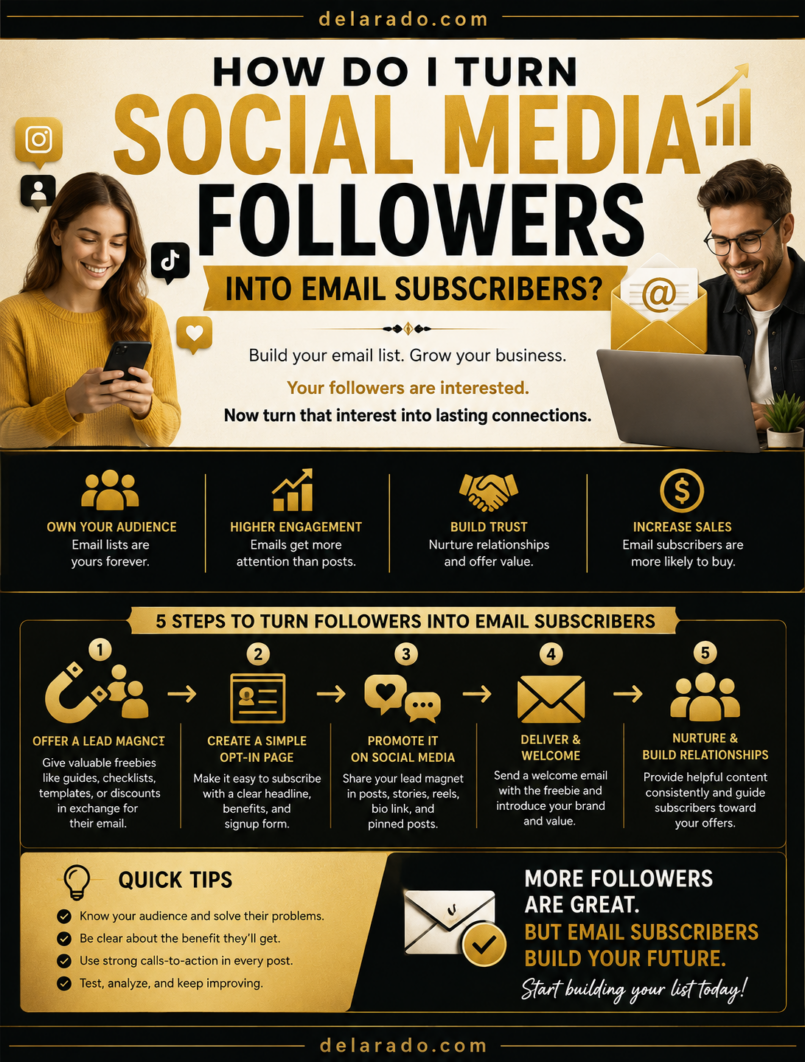
You turn social media followers into email subscribers by giving them a clear reason to join your list, sending them to a simple signup page, delivering the promised resource quickly, and continuing to provide useful emails. The most effective reason is usually a relevant lead magnet: a free checklist, template, guide, worksheet, discount, mini-course, webinar, or resource that solves a small but meaningful problem.
Social followers are valuable, but you do not control the platform. An email list gives you a direct way to communicate with people who choose to hear from you. The goal is not to collect the most email addresses possible. It is to build a permission-based list of people who genuinely want your content, products, services, or help.
Mailchimp recommends identifying your audience, offering value through a lead magnet, using a landing page, sharing the offer across social channels, and setting up automated welcome emails. [982]
Who Is This Topic For?
This guide is for bloggers, affiliate marketers, small businesses, local businesses, freelancers, consultants, eCommerce sellers, course creators, coaches, creators, nonprofit organizations, and anyone who wants to build an email list from social media.
This Article Is Helpful If You Want To:
- Grow an email list from Instagram
- Turn TikTok viewers into subscribers
- Get Facebook followers onto your email list
- Use Pinterest to promote a lead magnet
- Collect LinkedIn leads ethically
- Promote a newsletter
- Generate leads for services or consultations
- Build a more reliable audience than social followers alone
- Sell products, courses, or services through email
- Build a relationship with potential customers over time
Why Build an Email List?
Social media platforms are useful for discovery, but your access to followers can change because of algorithms, account restrictions, platform policies, or declining reach. An email list is a more direct channel because subscribers have given you permission to contact them through email.
Benefits of an Email List
- Communicate directly with subscribers
- Reduce reliance on social media algorithms
- Share useful content consistently
- Promote products, services, events, and offers
- Build trust before asking for a sale
- Segment people based on interests
- Follow up after a lead magnet download
- Support customers and answer questions
- Promote blog posts and resources
- Build a long-term business asset
Simple Example
An Instagram Reel teaches beginner bloggers three things to check before choosing WordPress hosting. The Reel invites viewers to download a free Website Launch Checklist through the profile link. The checklist landing page collects an email address, delivers the resource, and sends a welcome sequence with related tutorials.
Instead of depending on Instagram to show every future post to followers, the business can continue helping subscribers through email.
Benefits of Social-to-Email Marketing
Builds an Audience You Can Contact Directly
Social media platforms decide how many followers see each post. Email gives you a direct channel to communicate with people who have signed up.
Creates Better Follow-Up
A person may not be ready to buy after one post or video. Email lets you provide useful information, answer objections, share case studies, recommend resources, and offer relevant next steps over time.
Improves Lead Quality
A person who chooses to download a relevant resource is often more interested than someone who only viewed or liked a post. The topic they choose can also tell you what they need help with.
Supports Multiple Business Models
Email lists can support affiliate websites, local businesses, consulting services, eCommerce, memberships, digital products, online courses, nonprofit communication, and personal brands.
Can Increase Website Traffic
Email can bring subscribers back to your website to read articles, watch videos, compare products, book appointments, download resources, or buy products.
Can Be More Stable Than Social Reach
Platforms change frequently. An email list does not eliminate platform risk, but it gives you a more stable connection to people who want to hear from you.
Risks and Limitations
People Need a Real Reason to Subscribe
“Join my newsletter” may not be enough for a new visitor. Offer a useful reason, such as a checklist, template, guide, discount, mini-course, or resource that solves a specific problem.
Low-Quality Subscribers Are Not Helpful
Do not use fake giveaways, bought lists, misleading offers, or unrelated prizes to collect email addresses. A small list of interested people is more valuable than a large list that ignores your messages.
You Must Deliver What You Promise
If you offer a free checklist, template, discount, or guide, deliver it quickly. Do not make people subscribe and then send unrelated promotions without the promised resource.
Email Compliance Matters
Commercial email rules can require accurate sender information, an unsubscribe method, and prompt handling of opt-out requests. The FTC states that commercial email must include a way to opt out and that requests must be honored promptly. [981]
Privacy Matters
Collect only information you need, explain how you will use it, protect subscriber data, and follow privacy rules that apply to your business and audience.
Over-Emailing Can Reduce Trust
Sending too many promotions, irrelevant messages, or misleading subject lines can lead to unsubscribes, complaints, and lower engagement.
Social Platforms May Limit Links
Some platforms limit where links can be added or how clickable they are. Use a clear profile link, landing pages, Stories, link tools, pinned content, and platform-appropriate calls to action.
Step-by-Step Subscriber Strategy
Step 1: Define Your Email List Goal
Start by deciding what you want your email list to support. This shapes the type of lead magnet, landing page, content, and follow-up sequence you create.
Possible Email List Goals
- Grow a newsletter audience
- Generate service leads
- Sell digital products
- Promote an online course
- Support eCommerce customers
- Promote affiliate content responsibly
- Build a waitlist for a launch
- Register people for a webinar
- Build a local customer community
- Share helpful educational content
Goal Template
Use social media to help [specific audience] find [useful resource] and encourage them to join an email list for [expected email value].
Example
Use Instagram and Pinterest to help beginner bloggers download a free Website Launch Checklist and join an email list for WordPress, SEO, and blogging tutorials.
Step 2: Define Your Audience Problem
The best lead magnets solve a specific problem for a specific audience. Start with what your followers struggle with, ask about, or want to achieve.
Audience Research Sources
- Social media comments
- Direct messages
- Customer emails
- Sales calls
- Support questions
- Poll responses
- Question stickers
- Google Search Console queries
- Online community discussions
- Product reviews
Ask:
- What problem does my audience want solved quickly?
- What are beginners confused about?
- What mistakes are they trying to avoid?
- What decision are they trying to make?
- What would make their next step easier?
- What would they want to save and use later?
Example
If beginner bloggers keep asking what they need before launching a website, a useful lead magnet could be a “WordPress Website Launch Checklist” covering domains, hosting, setup, essential pages, security, and basic SEO.
Step 3: Create a Useful Lead Magnet
A lead magnet is a free resource offered in exchange for an email address or other appropriate information. It should provide immediate value and connect naturally to your products, services, or content.
Lead Magnet Ideas
- Checklist
- Template
- Worksheet
- Beginner guide
- Mini-course
- Resource list
- Product comparison chart
- Industry report
- Webinar registration
- Email challenge
- Calculator
- Discount code
- Printable
- Quiz results
Good Lead Magnet Characteristics
- Solves a specific problem
- Matches your target audience
- Is useful immediately
- Is easy to understand
- Is accurate and current
- Connects naturally to your business
- Is honestly described
- Does not require excessive personal information
Lead Magnet Examples by Business Type
| Business Type | Lead Magnet Idea |
|---|---|
| Website designer | Small Business Website Audit Checklist |
| SEO consultant | Beginner SEO Checklist |
| Affiliate blogger | WordPress Website Launch Checklist |
| eCommerce store | First-order discount or buyer’s guide |
| Course creator | Free mini lesson or workbook |
| Local service business | Seasonal maintenance checklist |
| Financial professional | Budget planning worksheet with appropriate disclaimers |
Mailchimp recommends offering something of value and using a lead magnet to encourage people to subscribe through a landing page. [982]
Step 4: Create a Focused Landing Page
A landing page is a focused page designed around one action: joining your email list. Do not send social media followers to a generic homepage and expect them to search for the signup form.
Landing Page Essentials
- Clear headline
- Short explanation of the offer
- Who the resource is for
- List of what it includes
- Simple signup form
- Clear submit button
- Privacy Policy link
- Consent language where needed
- Relevant testimonial or preview if available
- Mobile-friendly layout
- Fast load time
- Thank-you page or delivery confirmation
Landing Page Formula
Headline: Get the Free [Resource Name]
Supporting copy: This [checklist, template, guide, or resource] helps [audience] [solve a specific problem] without [common obstacle].
Call to action: Send Me the Free [Resource]
Example
Headline: Get the Free WordPress Website Launch Checklist
Supporting copy: This beginner-friendly checklist helps you choose a domain, select hosting, install WordPress, create essential pages, and set up basic SEO without missing important setup steps.
Call to action: Send Me the Checklist
Mailchimp notes that landing pages can include signup forms and tags that organize contacts based on the offer or audience segment. [983]
Step 5: Make Signup Easy
Do not make people complete a long form to receive a simple free resource. Ask only for the information you need.
Simple Signup Form
- First name, optional
- Email address
- Clear consent language where required
- Clear call-to-action button
- Privacy Policy link
When to Ask for More Information
Ask for additional information only when it is necessary. For example, a local service consultation may require location, business type, or service need. A simple checklist download usually needs only an email address.
Weak Button Text
Submit
Stronger Button Text
Send Me the Free Checklist
Make it obvious what will happen after someone enters their email address.
Step 6: Add the Link to Your Social Profiles
Make your lead magnet easy to find from every social profile you use. If a person enjoys your content, they should not have to search for a way to join your email list.
Places to Add Your Signup Link
- Instagram profile link
- TikTok profile link
- Facebook Page action button
- Facebook Page About section
- Pinterest profile website link
- LinkedIn Featured section
- LinkedIn personal profile contact section
- YouTube video descriptions
- YouTube channel links
- Link-in-bio page
- Pinned social media posts
Profile Call-to-Action Example
Get the free Website Launch Checklist ↓
Use a link that leads directly to the relevant landing page, not to a general homepage with many competing options.
Step 7: Promote the Lead Magnet Regularly
Do not add a lead magnet once and assume followers will find it. Promote it regularly through useful content that naturally relates to the offer.
Ways to Promote a Lead Magnet
- Create a Reel or TikTok around one checklist item
- Share a carousel with a preview of the resource
- Create a Pinterest Pin that links to the landing page
- Pin a Facebook post about the resource
- Add it to Instagram Stories and Highlights
- Include it in LinkedIn posts
- Mention it during a live video or webinar
- Share it in relevant Groups when allowed
- Use it as a call to action in YouTube videos
- Link it from related blog posts
Example Instagram Reel
Hook: “Starting a WordPress site? These three steps are easy to forget.”
Value: Explain backups, essential pages, and an email signup form.
Call to action: “Save this Reel and get the complete Website Launch Checklist from the link in our profile.”
Promote the resource in a way that adds value to the post. Do not post only “Download my free guide” without explaining why the guide is useful.
Step 8: Create Platform-Specific Promotions
Adapt the same lead magnet to the platform rather than copying one caption everywhere.
- Reels with a useful tip from the lead magnet
- Carousel previews
- Stories with polls and link stickers where available
- Highlight for the free resource
- Profile bio call to action
TikTok
- Short tutorial videos
- “Three mistakes” videos
- Quick checklist previews
- Customer FAQ videos
- Profile-link call to action
- Helpful posts with direct links
- Facebook Reels
- Page action button
- Stories
- Relevant Group discussions when allowed
- Pinned lead magnet post
- Document post with a checklist preview
- Professional insight post
- Featured profile link
- Relevant direct follow-up after a person requests help
- Webinar or report promotion
- Vertical Pin linking directly to the landing page
- Checklist graphic
- Template or printable preview
- Keyword-focused Pin titles and descriptions
- Relevant board placement
YouTube
- Mention the resource in the video
- Add a link in the description
- Add the offer to a pinned comment where appropriate
- Create a Short around one tip
- Add the resource to channel links
Step 9: Use a Clear Call to Action
Tell followers exactly what to do and what they will receive. Vague calls to action create confusion.
Weak Calls to Action
- Click the link
- Learn more
- Check it out
- Sign up now
Stronger Calls to Action
- Download the free WordPress Website Launch Checklist from the link in our profile.
- Get the Small Business Website Audit Checklist and find three improvements you can make this week.
- Join the free email series for beginner-friendly SEO and website tips.
- Get the product comparison chart before choosing an email marketing tool.
- Register for the free webinar on building a local business website that converts visitors into inquiries.
Explain the benefit. People are more likely to subscribe when they understand how the resource helps them.
Step 10: Deliver the Resource Immediately
After someone subscribes, deliver the promised resource right away through a thank-you page, email, or both.
Immediate Delivery Options
- Link on a thank-you page
- Delivery email
- Download button after confirmation
- Private resource page
- Automated email sequence
Thank-You Page Example
Thank you. Your Website Launch Checklist is on its way to your inbox. Check your email in the next few minutes, then read our beginner guide to choosing WordPress hosting.
Delivery Email Example
Subject: Your WordPress Website Launch Checklist
Thanks for signing up. Here is your checklist: [download link]. It will help you plan your domain, hosting, WordPress setup, essential pages, and basic website launch steps.
Do not delay delivery unnecessarily. The new subscriber is most engaged immediately after signing up.
Step 11: Create a Welcome Email Sequence
A welcome sequence introduces your business, delivers useful information, and explains what subscribers can expect. It should build trust before making a sales offer.
Simple Welcome Sequence
- Deliver the lead magnet
- Explain who you are and what subscribers can expect
- Share a useful related tip
- Explain a common mistake
- Link to a relevant article, product, or service
Example Sequence for a Beginner Blogging Website
- Email 1: Deliver the Website Launch Checklist
- Email 2: Three WordPress hosting mistakes beginners make
- Email 3: How to choose a domain name
- Email 4: Beginner SEO tips for a new website
- Email 5: Honest comparison of relevant website tools
Mailchimp recommends setting up automated welcome emails after publishing a landing page and sharing it through social media. [982]
Step 12: Segment Subscribers by Interest
Segmentation means organizing subscribers based on what they are interested in, how they joined, or what action they took. This can help you send more relevant emails.
Useful Segments
- Lead magnet downloaded
- Social platform source
- Topic interest
- Product interest
- Local service area
- Customer versus prospect
- Webinar attendee
- Course student
- Affiliate content reader
Example
A subscriber who downloads a WordPress Website Launch Checklist may be interested in WordPress setup, hosting, and beginner SEO. A subscriber who downloads an email marketing template may be more interested in newsletters, automations, and lead generation.
Mailchimp landing pages can apply tags to people who subscribe, helping organize contacts according to the landing page or offer they used. [983]
Step 13: Protect Subscriber Trust
Every email you send affects the relationship with your subscribers. Protect trust by sending useful information, being transparent, and making it easy for people to control their subscriptions.
Email Trust Checklist
- Use an honest sender name
- Use accurate subject lines
- Deliver what you promised
- Use clear affiliate disclosures where needed
- Include an unsubscribe option
- Honor opt-out requests promptly
- Do not sell or misuse subscriber data
- Use a Privacy Policy
- Do not overwhelm subscribers with promotions
- Keep contact information accurate
The FTC says commercial email must provide a way for recipients to opt out of future messages and that senders must honor opt-out requests promptly. [981]
Step 14: Track Subscriber Conversion
Track how many social media visitors become subscribers and what happens afterward. This helps you decide which platforms, posts, lead magnets, and landing pages are worth improving.
Track Social Media Metrics
- Profile link clicks
- Story link clicks
- Video views
- Saves and shares
- Pinterest outbound clicks
- LinkedIn Featured link clicks
- Facebook link clicks
Track Landing Page Metrics
- Landing page visits
- Form submissions
- Signup conversion rate
- Traffic source
- Mobile versus desktop performance
Track Email Metrics
- Delivery rate
- Open rate
- Click rate
- Unsubscribe rate
- Spam complaints
- Lead magnet downloads
- Replies
- Bookings
- Sales
Basic Landing Page Conversion Formula
Signup conversion rate = Number of email signups ÷ Landing page visitors × 100
For example, if 200 people visit your lead magnet landing page and 30 join your list, the signup conversion rate is 15%.
Step 15: Improve Your System Over Time
Building an email list is an ongoing process. Review your data and improve one part of the journey at a time.
Improve the Lead Magnet If:
- People click but do not sign up
- The offer is too broad or unclear
- The resource does not solve an urgent problem
- The title does not explain the value
- The topic does not match your social content
Improve the Landing Page If:
- The headline is vague
- The form asks for too much information
- The page is slow or hard to use on mobile
- The call to action is unclear
- The benefit is not obvious
- The page does not match the social post promise
Improve Social Promotion If:
- People do not click the profile link
- The call to action is weak
- The content does not connect naturally to the resource
- You promote the lead magnet too rarely
- You do not explain what the subscriber receives
- The platform format is not suited to the offer
Improve Emails If:
- Subscribers do not open messages
- The subject lines are unclear
- The content is overly promotional
- The emails are not relevant to the signup topic
- Too many subscribers unsubscribe
- The promised resource was not delivered properly
Programs That Can Help
MailerLite
MailerLite can help create landing pages, signup forms, lead magnet delivery emails, automations, segments, and email campaigns.
ConvertKit
ConvertKit can help creators build forms, landing pages, email sequences, tags, automations, and audience segments.
Brevo
Brevo can support email marketing, forms, automation, customer relationship management, and marketing communication workflows.
HubSpot
HubSpot can support forms, landing pages, CRM workflows, email marketing, lead tracking, and contact management.
Mailchimp
Mailchimp can help create landing pages with signup forms, apply subscriber tags, set up automated welcome emails, and share a lead magnet landing page through social media. [982][983]
WordPress
WordPress can host landing pages, blog posts, lead magnet pages, resource hubs, Privacy Policies, affiliate disclosures, and website content promoted through social media.
Canva
Canva can help design lead magnets, checklist covers, worksheet PDFs, social graphics, Pinterest Pins, carousels, video covers, and promotional images.
Google Analytics
Google Analytics can help track social media visitors, landing page traffic, signups, and other conversion events so you can see which platforms and posts bring subscribers.
Google Tag Manager
Google Tag Manager can help manage conversion tracking tags and events for forms, signup confirmations, and marketing measurement. Configure tracking responsibly and follow privacy requirements.
Common Mistakes
Asking People to “Join My Newsletter” Without Explaining Why
Give followers a specific reason to subscribe. A useful checklist, guide, template, discount, or resource usually performs better than a vague newsletter invitation.
Offering an Unrelated Lead Magnet
Your lead magnet should match your audience and the social content that promotes it. Do not offer a generic giveaway if you want subscribers interested in a specific product or service.
Sending Followers to a Generic Homepage
Use a focused landing page designed around the lead magnet. Make the signup process simple and the benefit obvious.
Asking for Too Much Information
For most free resources, ask only for an email address and perhaps a first name. Longer forms can reduce signups unless additional details are genuinely necessary.
Not Delivering the Resource Immediately
Send the promised checklist, guide, or template right away. Delayed or missing delivery damages trust.
Not Using a Welcome Sequence
New subscribers need to know what to expect. Use a short welcome sequence that delivers value, introduces your business, and provides relevant next steps.
Adding People to a List Without Permission
Do not scrape emails, buy lists, add social followers without consent, or use misleading signup methods. Build a permission-based list.
Hiding Affiliate or Sponsorship Disclosures
Disclose affiliate relationships, sponsorships, free products, or other material connections clearly in social posts and emails where relevant.
Ignoring Unsubscribe Requests
Commercial emails should provide a clear unsubscribe option, and opt-out requests should be honored promptly. [981]
Measuring Only Subscriber Count
Track signup quality, open rates, clicks, replies, bookings, purchases, and unsubscribes. A smaller engaged list is often more valuable than a large inactive list.
Frequently Asked Questions
How do I turn Instagram followers into email subscribers?
Create a useful lead magnet, add the signup link to your profile, promote the resource through Reels, carousels, Stories, and Highlights, explain the benefit clearly, and send people to a simple mobile-friendly landing page.
What is the best lead magnet for social media?
The best lead magnet solves a specific audience problem and connects to your business. Examples include checklists, templates, worksheets, guides, mini-courses, discounts, webinars, comparison charts, and resource lists.
Do I need a landing page to build an email list?
Yes, a focused landing page is usually the best option. It gives people one clear action, explains the value of the resource, and makes the signup process simple.
How often should I promote my lead magnet on social media?
Promote it regularly, especially when the resource matches your content topic. For example, mention it in relevant Reels, carousels, Stories, Pins, Facebook posts, LinkedIn content, videos, and blog articles without making every post a sales message.
Should I give away a discount or a free guide?
Use a discount when your audience is ready to shop. Use a guide, checklist, template, or mini-course when your audience needs education before buying. The best option depends on your business and customer journey.
Can I add social media followers to my email list?
Do not add followers to your email list without their permission. Give them a clear signup opportunity and let them choose to subscribe.
What should I send after someone subscribes?
Deliver the promised resource immediately, welcome the subscriber, explain what they can expect, share useful related content, and offer relevant products or services honestly over time.
Do I need an unsubscribe link in marketing emails?
Commercial email rules generally require a clear way for recipients to opt out, and the FTC states that opt-out requests must be honored promptly. Requirements can vary by jurisdiction, so seek professional guidance if needed. [981]
How do I know which social platform brings the best subscribers?
Use tracking links, landing page analytics, email platform tags, and Google Analytics to identify where subscribers came from and how they engage after joining.
What if people click my link but do not subscribe?
Improve the landing page headline, make the lead magnet benefit clearer, simplify the form, check mobile speed, make sure the social post matches the offer, and test a more specific resource.