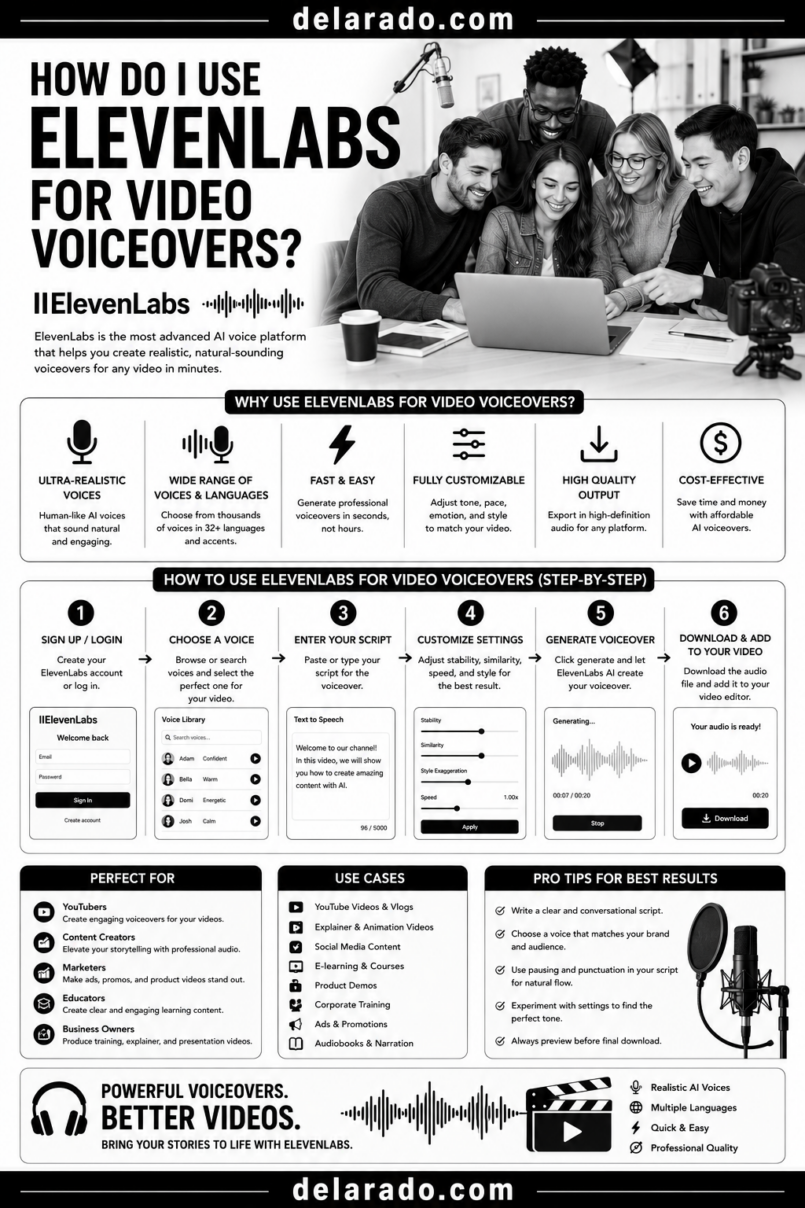
ElevenLabs can be used for video voiceovers by writing a clear script, choosing an appropriate authorized voice, generating short sections of narration, reviewing pronunciation and pacing, adding the audio to your video editor, creating captions, and disclosing synthetic narration when it could mislead viewers about who is speaking.
It can be useful for faceless YouTube videos, software tutorials, course lessons, social media videos, explainers, translated content, podcasts, and audio versions of written articles. It should not be used to impersonate people, create fake customer testimonials, fabricate expert endorsements, or make viewers believe a real person said something they did not say.
ElevenLabs states that generated audio belongs to the user, but commercial-use rights are available only on paid plans; its free plan is intended for personal, non-commercial use and requires attribution. [1172][23]
Who Is This Topic For?
This guide is for bloggers, YouTubers, affiliate marketers, course creators, freelancers, small businesses, agencies, eCommerce sellers, social media managers, educators, and anyone creating narrated videos.
ElevenLabs May Be Useful If You Want To:
- Create faceless YouTube video narration
- Create Reels, TikToks, and YouTube Shorts
- Narrate screen-recording tutorials
- Create online course voiceovers
- Create audio versions of blog posts
- Create multilingual video narration
- Create product explainer videos
- Improve consistency across video content
- Create narration without recording your own voice
- Repurpose written content into video
ElevenLabs May Not Be the Best Fit If You Need To:
- Create real customer testimonials
- Clone another person’s voice without permission
- Record sensitive leadership communications
- Deliver a personal story where your real voice is central
- Create medical, legal, financial, or safety instructions without qualified review
- Use a voice in paid advertising without confirming licensing
- Create narration from confidential source materials without authorization
What Is ElevenLabs?
ElevenLabs is an AI voice platform that can generate text-to-speech narration, create voiceovers, support dubbing and translation workflows, produce sound effects and other audio, and offer certain voice-cloning capabilities under its rules and verification processes.
ElevenLabs Features May Include:
- Text-to-speech voice generation
- AI voice library
- Voice design options
- Instant voice cloning options
- Professional voice cloning options
- Multilingual narration
- Dubbing tools
- Voice editing controls
- Audio projects and studio tools
- Sound effects and music tools
- API integrations
ElevenLabs describes its text-to-speech tools as supporting lifelike AI voices across more than 70 languages, with paid plans providing commercial usage rights for generated audio. [23]
Benefits of Using ElevenLabs for Voiceovers
Can Save Recording Time
Instead of recording multiple takes, correcting mistakes, and setting up a microphone for every video, you can generate a draft narration from an approved script.
Useful for Faceless Content
AI voiceovers can support screen recordings, slide presentations, product demonstrations, animated explainers, whiteboard videos, and other formats where the creator does not appear on camera.
Supports Content Repurposing
A blog post can become a video script, then an AI voiceover, then a YouTube tutorial, Reel, TikTok, Short, podcast-style clip, or audio article.
Can Support Multilingual Content
Businesses may use AI narration and dubbing tools to create versions of educational content for audiences who speak different languages. Every translation should still receive human review.
Provides Voice Consistency
Using the same approved voice across tutorials, onboarding videos, course lessons, and social content can create a more consistent audio identity.
Can Improve Accessibility Workflows
Voiceovers can support content for viewers who prefer audio, while captions and transcripts make the final video easier to access for people watching without sound or using assistive technology.
Useful for Small Teams
Small businesses and solo creators can create basic narration without hiring a voice actor for every short explainer or tutorial.
Risks and Limitations
AI Voices Can Sound Unnatural
Even realistic AI narration can have awkward pacing, incorrect emphasis, mispronounced names, unnatural emotional tone, or odd pauses. Review every generated audio section before publishing.
Voice Cloning Requires Permission
Do not clone, imitate, or use someone else’s voice without clear authorization. This includes employees, customers, clients, celebrities, public figures, competitors, friends, and family members.
Commercial Use Depends on Your Plan
ElevenLabs says its free plan is intended for personal, non-commercial use and requires attribution, while paid plans include commercial rights for generated audio if you own the rights to the input content. [23][1172]
AI Narration Can Mislead Viewers
Do not use synthetic narration to make a viewer believe a real person gave a testimonial, provided professional advice, endorsed a product, or made a public statement when they did not.
Scripts Can Contain Errors
AI narration will faithfully read a bad script. Verify facts, product names, prices, links, statistics, safety information, and claims before generating audio.
Brand Voice Still Matters
An AI voice should match the tone of the content. A formal course lesson, a friendly beginner tutorial, and a short social video may need different pacing and delivery styles.
Privacy Matters
Do not upload confidential client recordings, private customer messages, personal information, financial information, passwords, or sensitive business documents without appropriate authorization.
Ethical AI Voice Principles
Use an Authorized Voice
Choose a voice from the platform library, use a voice you created yourself, or use a voice you have clear permission to use.
Do Not Impersonate People
Do not create narration that sounds like a public figure, customer, employee, competitor, expert, or other identifiable person without authorization.
Use Real Scripts
Make sure the script is accurate, reviewed, current, and based on real information. AI voice should not turn false claims into convincing audio.
Disclose Synthetic Narration When Needed
Use disclosure when a realistic AI voice could cause viewers to believe a real person is speaking or when platform rules require an altered or synthetic content label.
Use Captions and Transcripts
Captions and transcripts improve accessibility, help viewers understand narration in sound-off settings, and make it easier to review the final spoken content.
Keep the Content Human-Centered
AI narration should help viewers understand useful information. It should not be used to deceive, pressure, manipulate, or fabricate trust.
Step-by-Step ElevenLabs Workflow
Step 1: Define the Video Goal
Start with one clear purpose for the narration. The voiceover should help a viewer understand or do something specific.
Possible Video Goals
- Explain a product feature
- Teach a software process
- Create a YouTube tutorial
- Create a short social video
- Introduce a course module
- Explain a business service
- Promote a lead magnet
- Answer a common customer question
- Turn an article into an audio video
- Create onboarding content
Example Goal
Create a two-minute narrated screen-recording tutorial that helps beginner bloggers find low-competition keyword ideas and directs them to a free keyword research worksheet.
Step 2: Write a Clear Script
AI voice tools work best with concise, conversational scripts. Do not paste a long blog post into the tool without editing it for spoken delivery.
Script Structure
- Hook or opening question
- Brief context
- Main lesson or steps
- Example or demonstration
- Summary
- Relevant call to action
Example Script
If you are building a new website, do not choose keywords only because they have high search volume. Broad keywords can be difficult to compete for.
Start with a customer question. Type your topic into Google and review the autocomplete suggestions. Then look at the People Also Ask questions for ideas your audience is already searching for.
For more help, download the free keyword research worksheet from the link below.
Script Writing Tips
- Use short sentences
- Write conversationally
- Explain technical terms
- Use one main idea per video
- Break complex instructions into steps
- Use natural transitions
- Read the script aloud before generating audio
- Remove generic filler
- Use accurate product names and links
- Avoid unsupported claims
Step 3: Choose a Voice
Choose a voice that fits the audience and topic. The goal is not to find the most dramatic voice. It is to find one that is clear, appropriate, and easy to understand.
Voice Selection Criteria
- Clear pronunciation
- Appropriate pace
- Natural tone
- Suitable accent for your audience
- Appropriate energy level
- Consistent brand fit
- Authorized commercial-use rights
- Accessibility for listeners
Voice Style Examples
- Beginner tutorial: Warm, calm, clear, patient
- Business training: Professional, steady, instructional
- Short social video: Clear, energetic, concise
- Product demo: Friendly, confident, informative
- Course lesson: Measured, explanatory, easy to follow
Test a short paragraph with several voices before generating the full narration. Listen with headphones and on a phone speaker to check clarity.
Step 4: Use Voice Cloning Responsibly
If you want to create a voice clone, use your own voice or a voice you have explicit authorization to use. Keep written consent and clearly document the intended use.
Appropriate Voice-Cloning Uses
- Cloning your own voice for accessibility or efficiency
- Creating a consistent version of your own narration
- Creating content for your own business with your own authorized voice
- Working with a hired voice actor who has signed a clear release
- Creating internal content with documented employee permission
Uses to Avoid
- Cloning a celebrity voice
- Cloning a customer’s voice
- Cloning an employee’s voice without permission
- Imitating a competitor or influencer
- Creating fake endorsements
- Creating misleading political, financial, medical, legal, or safety content
- Using someone’s voice after they withdraw permission
ElevenLabs states that Professional Voice Clones can only be created for the user’s own voice; even consent does not allow users to create a Professional Voice Clone of someone else’s voice. [1174]
Consent Record Checklist
- Name of the voice owner
- Written permission or signed release
- Scope of allowed use
- Commercial or non-commercial use terms
- Platforms where the voice may appear
- Duration of the agreement
- Whether the voice can be edited or translated
- How permission can be withdrawn
Step 5: Generate the Voiceover in Sections
Generate narration in short sections instead of creating one long audio file immediately. This makes it easier to fix pronunciation, pacing, tone, or wording without regenerating everything.
Good Section Lengths
- One introduction
- One step in a tutorial
- One slide narration
- One short product explanation
- One call to action
- One paragraph or script block
Section Workflow
- Generate the first section
- Listen for pronunciation and pacing
- Edit the script if necessary
- Regenerate only that section
- Export approved audio
- Label the file clearly
- Move to the next section
File Naming Example
keyword-tutorial_01-hook.mp3
keyword-tutorial_02-step-one.mp3
keyword-tutorial_03-step-two.mp3
keyword-tutorial_04-cta.mp3
Organized audio files make video editing, corrections, translation, and future updates much easier.
Step 6: Review Pronunciation and Pacing
AI voices can mispronounce names, acronyms, software tools, URLs, technical terms, product names, and uncommon words. Review every audio section before adding it to the video.
Listen For:
- Incorrect pronunciation
- Awkward pauses
- Unnatural emphasis
- Rushed pacing
- Monotone delivery
- Words that sound unclear
- Incorrect reading of numbers or dates
- Misread product names
- Unnatural tone changes
- Errors in calls to action or links
Ways to Improve Narration
- Rewrite awkward sentences
- Use shorter sentences
- Spell out acronyms if needed
- Add punctuation to create pauses
- Break long paragraphs into separate sections
- Use phonetic spelling where the tool supports it
- Change voice settings if available
- Choose a different voice if needed
Example
Instead of writing, “Use GSC to inspect URLs,” write, “Use Google Search Console to inspect individual website URLs.”
This often improves clarity for both the listener and the AI voice system.
Step 7: Add the Audio to a Video Editor
After approving your narration, add it to a video editor and build the visuals around the spoken content.
Video Elements to Add
- Screen recordings
- Original screenshots
- Slides
- On-screen text
- Diagrams
- Checklists
- Product demonstrations
- Original photos
- Licensed stock footage
- Captions
- Call-to-action screens
Editing Rule
Every visual should support the narration. Do not add random stock footage simply because the video needs movement.
Example
If the narration says, “Review Google autocomplete suggestions,” show a real screen recording or a clear visual example of search suggestions. Do not show unrelated footage of someone typing on a laptop unless it adds useful context.
Step 8: Add Captions and a Transcript
Captions improve accessibility and help people understand your content when watching with sound off. A transcript provides a searchable written version of the narration.
Caption Checklist
- Match the narration accurately
- Correct spelling errors
- Correct product and brand names
- Review timing
- Use readable font size
- Use sufficient contrast
- Keep captions away from important visual elements
- Make sure captions remain visible long enough to read
Transcript Checklist
- Include all spoken content
- Correct automatic transcription errors
- Use readable paragraphs
- Include important links separately when helpful
- Review names, numbers, technical terms, and product details
Captions are especially important in faceless videos because voiceover narration may be the main way a viewer receives information.
Step 9: Disclose Synthetic Audio When Needed
Disclose AI narration when it could reasonably mislead viewers about who is speaking or when the platform requires disclosure of altered or synthetic content.
Consider Disclosure When:
- The AI voice sounds like a real person
- The voice is a clone of your own voice
- The content uses a synthetic person or avatar
- The video presents realistic altered media
- The narration discusses a sensitive topic
- The viewer may assume a human expert recorded the voice
- YouTube’s altered or synthetic content rules apply
Disclosure Examples
- This video uses an AI-generated voiceover to narrate an original script.
- This tutorial includes synthetic narration and AI-generated visual elements for illustration.
- This course lesson is narrated using an authorized AI voice model.
YouTube allows creators to indicate during upload that a video is AI-generated or meaningfully AI-altered. If selected, viewers may see a label that the content is AI-generated or altered. [1171]
Step 10: Confirm Commercial Use Rights
Before using ElevenLabs narration in monetized videos, client work, products, courses, advertising, podcasts, or commercial projects, confirm that your current plan includes the required commercial rights.
Ask Before Publishing:
- Is my ElevenLabs plan commercial-use eligible?
- Can I monetize the YouTube video?
- Can I use the audio in client work?
- Can I use the voiceover in a paid course?
- Can I use it in advertising?
- Do I own or have rights to the script?
- Do I have rights to all visuals and music in the video?
- Do I need attribution?
- Are there platform-specific restrictions?
ElevenLabs says paid subscriptions provide commercial usage rights for generated audio and allow monetization when users own the intellectual-property rights to their input content. [1172][23]
Step 11: Publish With a Clear Title and Description
Your title and description should accurately explain what the video covers. Do not use a realistic AI voice to make exaggerated claims sound more convincing.
Title Examples
- How to Find Low-Competition Keywords for a New Website
- How to Create a Social Media Content Calendar
- Five Things to Compare Before Choosing WordPress Hosting
- How to Add an Email Signup Form to a Website
Description Elements
- Short video summary
- Relevant website link
- Lead magnet or resource link
- Affiliate disclosure when needed
- AI narration disclosure when appropriate
- Related video or playlist links
- Contact or booking information if relevant
Description Example
This tutorial explains how to find beginner-friendly keyword ideas using Google Search suggestions and related questions.
Download the free keyword research worksheet: [link]
Note: This video uses an AI-generated voiceover to narrate an original tutorial script.
Step 12: Measure Results
Review whether the voiceover helps viewers understand and complete the intended next step.
Video Metrics
- Views
- Watch time
- Audience retention
- Completion rate
- Comments
- Shares
- Likes
- Subscribers gained
- Captions usage where available
Business Metrics
- Website clicks
- Email signups
- Lead magnet downloads
- Consultation bookings
- Product sales
- Affiliate link clicks
- Course enrollments
- Customer support reduction
Questions to Ask
- Is the voice easy to understand?
- Do viewers leave during certain sections?
- Are viewers asking for clarification?
- Does the script feel too fast or too slow?
- Does the narration match the visual pacing?
- Does the content sound trustworthy and appropriate?
- Does the video drive the intended next action?
Use viewer feedback and analytics to improve scripts, voice choice, editing, captions, and future video topics.
ElevenLabs Voiceover Ideas by Business Type
For Bloggers and Affiliate Marketers
- Blog post summary videos
- Product review narration
- Tool comparison videos
- SEO tutorial voiceovers
- Keyword research walkthroughs
- Beginner checklists
- Article-to-video explainers
- Faceless YouTube tutorials
For eCommerce Businesses
- Product-use tutorials
- Product care instructions
- Unboxing narration
- Gift guide narration
- Product comparison explainers
- FAQ videos
- How-to-use product videos
- Customer onboarding instructions
For Local Businesses
- Service explanations
- Seasonal maintenance tips
- Appointment preparation videos
- Local resource guides
- Customer FAQ narration
- Website or booking walkthroughs
- Business process explainers
- Short educational social videos
For Course Creators
- Module introductions
- Slide lesson narration
- Worksheet walkthroughs
- Quiz explanations
- Screen-recorded tutorials
- Lesson summaries
- Course promotion clips
- Multilingual course narration
For Consultants and Agencies
- Client onboarding videos
- Process explanation videos
- Presentation narration
- Case study overviews with permission
- Service FAQ videos
- Proposal walkthroughs
- Training and documentation
- Social media educational videos
Programs That Can Help
ElevenLabs
ElevenLabs can generate AI text-to-speech narration, provide voice library options, support voice design and cloning workflows, and provide dubbing and audio tools. Paid plans include commercial usage rights for generated audio, subject to current terms. [23][1172]
CapCut
CapCut can help add voiceover audio to video, create captions, sync text overlays, edit short-form clips, add transitions, and export content for Reels, TikTok, and YouTube Shorts.
Descript
Descript can help edit audio and video through transcripts, generate captions, remove filler words, create clips, and prepare video transcripts.
Canva
Canva can help create visual slides, thumbnails, social graphics, carousels, presentation videos, diagrams, checklists, and other assets to pair with narration.
Adobe Express
Adobe Express can help edit video, create branded visuals, add captions, resize content, generate images, and prepare videos for social platforms.
YouTube Studio
YouTube Studio can help upload videos, add captions, edit descriptions, review analytics, manage comments, and indicate when uploaded content is AI-generated or meaningfully AI-altered where required. [1171]
Google Analytics
Google Analytics can help measure whether video viewers visit your website, join an email list, download a resource, book a consultation, or purchase a product.
Common Mistakes
Using an Unauthorized Voice Clone
Do not clone or imitate a person’s voice without clear permission. ElevenLabs states that Professional Voice Clones can only be created for your own voice. [1174]
Publishing Without Reviewing Pronunciation
AI voices can mispronounce names, brands, technical terms, acronyms, URLs, dates, and numbers. Review all generated audio before editing the final video.
Using AI Voiceovers for Fake Testimonials
Do not create fake customer reviews, endorsements, professional opinions, or product results with synthetic voices.
Using a Voice That Does Not Match the Audience
A fast, dramatic voice may not suit a beginner tutorial or sensitive topic. Choose a tone that fits the audience and purpose.
Writing Overly Long Scripts
AI narration works better with short, focused sections. Break long content into chapters, slides, or separate videos.
Ignoring Commercial Licensing
Confirm that your current plan provides commercial rights before using audio in monetized YouTube content, client work, courses, advertising, or other commercial projects. [23][1172]
Not Adding Captions
Captions help viewers understand narration in sound-off environments and improve accessibility. Review automatic captions for accuracy.
Not Disclosing Synthetic Media When Needed
Use clear disclosure and platform tools when a realistic AI voice or altered content could mislead viewers about who is speaking or what is real. [1171]
Using Generic Visuals
Pair narration with relevant screens, diagrams, demonstrations, and visuals. Do not use random stock footage that does not support the spoken message.
Not Fact-Checking the Script
AI narration makes a script sound polished, but it does not make the information accurate. Verify important facts, product details, pricing, and claims before generating audio.
Frequently Asked Questions
Can I use ElevenLabs for YouTube voiceovers?
Yes. ElevenLabs can create AI narration for YouTube tutorials, faceless videos, explainers, course lessons, reviews, and other content. Confirm commercial-use rights through your current plan before monetizing the content. [23][1172]
Can I use ElevenLabs for commercial videos?
ElevenLabs states that paid plans include commercial usage rights for generated audio, while the free plan is intended for personal, non-commercial use and requires attribution. Check the current terms before commercial use. [23][1172]
Can I clone someone else’s voice with ElevenLabs?
Do not clone someone else’s voice without clear authorization. ElevenLabs says Professional Voice Cloning is limited to your own voice, even if another person gives consent. [1174]
Do I need to disclose an ElevenLabs AI voiceover?
Disclosure may be appropriate when the synthetic voice could cause viewers to believe a real person is speaking or when platform rules require altered or synthetic content disclosure. YouTube provides an AI-use setting for applicable uploads. [1171]
Can I use an AI voice for a faceless video?
Yes. AI narration can work well with screen recordings, slides, product demonstrations, text overlays, diagrams, and original visuals. Make sure the script is accurate and the visuals do not mislead viewers.
How do I make an AI voice sound more natural?
Use short conversational sentences, add punctuation for pauses, generate audio in small sections, test several voices, correct difficult pronunciations, slow the pace when needed, and review the final audio before publishing.
Can I use ElevenLabs for online course narration?
Yes. It can be useful for course module introductions, slide lessons, software walkthroughs, worksheet explanations, and multilingual narration. Review content carefully and use captions and transcripts for accessibility.
What is the best format for an AI voiceover video?
Screen-recorded tutorials, slide explainers, hands-only demonstrations, whiteboard videos, product walkthroughs, and article-summary videos can work well because visuals support the narration.
Does ElevenLabs own the audio I create?
ElevenLabs says users retain ownership of generated audio, but commercial use depends on having a paid plan and owning the intellectual-property rights to the input content. Confirm current terms before relying on this for a business project. [1172]
How do I avoid AI voiceover copyright or ethics problems?
Use only authorized voices, keep proof of consent where relevant, use scripts you own or have permission to use, verify commercial rights, avoid impersonation, disclose synthetic narration when appropriate, and do not create fake endorsements or misleading content.
Further Reading
- How to Build a Successful Online Business: A Complete Guide to Sustainable Growth
- What Does Third-Party Tested Mean for Supplements?
- What Does Standardized Extract Mean for Herbal Supplements?
- What Does Proprietary Blend Mean on a Supplement Label?
- Daily Value vs. Recommended Intake: What Is the Difference?
- What Does Percent Daily Value Mean on a Supplement Label?
- How to Read a Supplement Facts Label: A Complete Guide
- What Should I Know Before Taking Any New Supplement?
- Do Supplements Replace a Balanced Diet?
- What Are the Differences between vitamins, minerals, herbs and supplements?
- What Are Dietary Supplements?