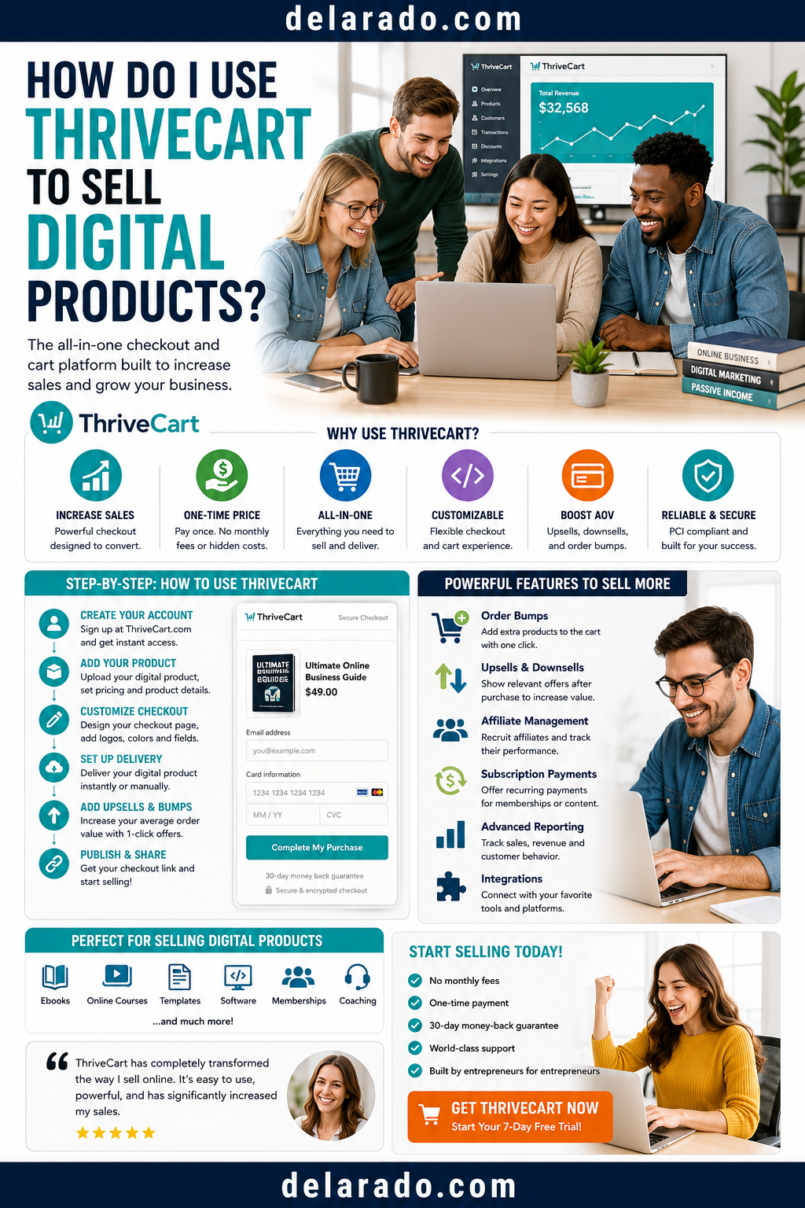
ThriveCart can help you sell digital products by creating a product checkout page, connecting a payment processor, setting pricing, delivering downloads or course access, sending customer notifications, and optionally adding order bumps, upsells, affiliates, and automation. It is especially useful for creators selling courses, templates, ebooks, worksheets, memberships, workshops, coaching offers, software access, and other digital resources.
The best way to start is simple: create one useful product, build one clear checkout page, set up accurate delivery and support information, test the entire purchase process, and only then add more advanced features such as upsells or affiliate management. A checkout platform can process a sale, but it cannot validate a weak offer, create customer trust, guarantee traffic, or replace clear product information and support.
ThriveCart’s product setup documentation says digital products are the standard option for services, courses, and downloads, and that each product requires at least one price, a connected payment processor, and support contact information. [148]
Who Is This Topic For?
This guide is for course creators, bloggers, digital-product sellers, consultants, coaches, template creators, designers, affiliate marketers, agencies, educators, online workshop hosts, and anyone who wants to sell a digital product through an online checkout.
This Article Is Helpful If You Want To:
- Sell an ebook
- Sell a digital download
- Sell an online course
- Sell a template bundle
- Sell a worksheet or planner
- Sell a membership
- Sell a recorded workshop
- Accept payments through checkout pages
- Create order bumps and upsells
- Set up an affiliate program
What Is ThriveCart?
ThriveCart is an online checkout and cart platform designed to help businesses sell products and services. It can support product checkout pages, payment options, pricing structures, digital delivery, subscriptions, affiliate programs, order bumps, one-click upsells, A/B testing, automations, and course delivery through its learning tools.
ThriveCart May Help With:
- Checkout pages
- Product pricing
- Payment processor connections
- Digital-product sales
- Order bumps
- One-click upsells
- Subscription billing
- Split-pay offers
- Pay-what-you-want pricing
- Affiliate program management
- Course and membership access
- Customer receipts
- Coupons and discounts
- Cart recovery workflows
- Automation and integrations
ThriveCart lists features including one-click upsells, order bumps, A/B tests, recurring billing, affiliate management, learning-management tools, and automations. [153]
Is ThriveCart Good for Digital Products?
ThriveCart can be a good fit for digital-product sellers who want a checkout-focused platform with flexible pricing and post-purchase selling tools. It may be especially useful if you sell one or more digital products and want to avoid a recurring monthly cart-platform fee, depending on the current plan you choose.
It may not be the best choice if you need a full content-management system, a large inventory-based eCommerce store, complex shipping logic, advanced retail functions, a full CRM, or highly customized storefront design.
| Situation | Is ThriveCart Likely a Fit? | Why |
|---|---|---|
| You sell an ebook, template, worksheet, or download | Possibly | It can create checkout workflows, pricing, payment processing, and digital delivery. |
| You sell a course or membership | Possibly | It can support course-related checkout, access, and automation workflows. |
| You want order bumps and post-purchase upsells | Likely | ThriveCart lists order bumps and one-click upsells among its platform features. [153] |
| You want to run an affiliate program | Possibly | Affiliate management is available through applicable ThriveCart features and plans. |
| You operate a large physical-product store | Probably not as a primary platform | Shopify or WooCommerce may fit inventory, shipping, product variations, and store management better. |
| You need a blog-heavy SEO website | Use alongside another platform | WordPress or another CMS may be better for primary content publishing. |
| You have no product or audience yet | Not yet | Validate the problem, audience, and offer before investing heavily in checkout software. |
Benefits of ThriveCart
Flexible Digital Product Pricing
ThriveCart’s product setup supports multiple pricing models, including fixed prices, split payments, subscriptions, and pay-what-you-want options. [148]
Checkout-Focused Design
ThriveCart is built around selling products. Its checkout pages, product settings, receipts, payment connections, and post-purchase offers can support a more focused buying flow than a general website form.
Order Bumps and Upsells
You can create optional offers that complement the main purchase. These may help customers get more value from the product and can increase average order value when used ethically and clearly.
Course and Membership Workflows
ThriveCart can support course and membership access through its learning tools and integrations, which may reduce the number of separate systems needed for digital education products.
Affiliate Management
ThriveCart advertises native affiliate-management features, including affiliate onboarding, agreements, tracking, payouts, and partner tools for qualifying accounts and configurations. [153]
Receipt and Customer Communication Options
Product settings can include receipt branding, payment notifications, and support contact information, helping buyers understand who charged them and where to get help. [148]
Can Support Simple Product Launches
One product, one checkout page, one payment processor, and one delivery workflow can be enough to launch a simple ebook, template pack, workshop recording, or course.
Risks and Limitations
Software Does Not Create Demand
ThriveCart can process a purchase, but it cannot guarantee customer interest, traffic, leads, sales, course completion, revenue, or customer satisfaction.
Checkout Pages Are Not a Full Website
You may still need WordPress, Webflow, Shopify, Squarespace, or another platform for your blog, content library, SEO pages, full product catalog, portfolio, support center, or branded website.
Payment Processor Approval Is Separate
Connecting a payment processor does not guarantee that the processor will approve your business, products, refunds, subscriptions, or transactions. Review the processor’s terms separately.
Refunds and Support Remain Your Responsibility
You need clear refund, cancellation, support, product-access, and customer-service processes. ThriveCart provides tools to process refunds, but you remain responsible for how your business handles customer requests. [154]
Upsells Can Harm Trust if Misused
Do not use prechecked offers, hidden recurring charges, fake scarcity, confusing “no thanks” buttons, misleading claims, or long chains of upsells that make customers feel pressured.
Tax Requirements Can Be Complex
Digital-product tax obligations can vary by product type, customer location, business location, and other factors. Do not assume a checkout configuration automatically handles every tax obligation.
Plan Features Can Change
Pricing, features, add-ons, affiliate tools, course access, multiple order bumps, payment options, and tax features may depend on your ThriveCart plan and current terms. Confirm before planning a product launch.
Digital Products You Can Sell
Downloads
- Ebooks
- PDF checklists
- Worksheets
- Digital planners
- Guides
- Spreadsheets
- Prompt libraries
- Audio files
Templates
- Canva templates
- Notion templates
- Website planning templates
- Proposal templates
- Social media templates
- Content calendars
- Email sequence templates
- Business planning worksheets
Education Products
- Online courses
- Mini courses
- Recorded workshops
- Live training access
- Memberships
- Coaching programs
- Course bundles
- Resource libraries
Services and Access Products
- Consultations
- Coaching sessions
- Website audits
- Design services
- Software access
- Private community access
- Paid newsletters
- Subscription resources
ThriveCart’s help documentation identifies digital as the standard product type for services, courses, and digital downloads. [148]
Before You Build Anything
Before creating a checkout page, define the product, audience, promise, delivery process, price, support process, and refund policy. A checkout tool should support a clear offer—not create one for you.
Product Planning Questions
- Who is this product for?
- What specific problem does it help solve?
- What exactly does the buyer receive?
- What is not included?
- How will buyers access it?
- How long will access last?
- What support will be available?
- What is the price and currency?
- What is the refund or cancellation policy?
- Are there any software, device, or account requirements?
- Do you have rights to every file, image, video, font, template, and asset included?
Example Product Definition
Product: Website Launch Checklist Bundle
Audience: Beginner WordPress users
Includes: A printable checklist, editable planning worksheet, launch timeline, and website page outline
Does not include: Hosting, custom web design, technical support, or guaranteed traffic, sales, rankings, or income
Delivery: Immediate access after payment
Support: Support email for download and access issues
Step-by-Step: Sell a Digital Product
Step 1: Create Your Product Files
Prepare the product before creating the checkout. Check that all included files are complete, accurate, readable, properly licensed, and ready to deliver.
Digital Product Checklist
- Product files are complete
- File names are clear
- Downloads open correctly
- Links work
- Instructions are included
- Branding is correct
- Copyright or license information is included if needed
- All third-party assets are authorized
- Product works on expected devices or software
- Support contact information is available
Example File Names
website-launch-checklist.pdf
website-planning-worksheet.pdf
website-launch-timeline.xlsx
start-here-guide.pdf
Clear file names make product delivery and customer support easier.
Step 2: Create a Main Product
In ThriveCart, create a main product and select digital delivery for a course, service, digital file, membership, or other online product.
ThriveCart’s help documentation says the required setup steps for any product include at least one price, a connected payment processor, and support email or URL details in the fulfillment settings. [148]
Product Setup Details
- Product name
- Product type
- Price
- Currency
- Payment model
- Receipt branding
- Support email or URL
- Refund policy link
- Delivery or fulfillment instructions
- Affiliate settings if applicable
- Tax settings if applicable
Example Product Name
Website Launch Checklist Bundle for Beginner WordPress Users
Product Description Example
This digital bundle includes a website launch checklist, an editable planning worksheet, a launch timeline, and a basic website page outline. It is designed for beginner WordPress users who want to organize their first website project. It does not include web hosting, custom design, personal technical support, or guaranteed traffic, sales, rankings, or income.
Step 3: Set Pricing
Choose a pricing structure that reflects the product’s value, support requirements, delivery model, and customer expectations. Make all prices and terms clear before the buyer pays.
Possible Pricing Structures
- One-time payment
- Free product
- Split payment
- Subscription
- Free trial followed by paid subscription
- Pay what you want
- Limited-time discount, if the deadline is real
- Coupon code
ThriveCart’s product settings state that pricing can be configured as fixed-rate, split-pay, subscription, or pay-your-own-price. [148]
Pricing Checklist
- Is the price clearly shown?
- Is the currency clear?
- Are taxes or fees explained?
- Are subscription terms visible?
- Are split-payment dates clear?
- Are discounts real and time-limited only when accurate?
- Does the receipt match the price shown?
- Does the refund policy match the product?
Example
One-time payment: $29 USD
Includes immediate access to four downloadable files.
Refund policy: [Link to your policy]
Do not hide subscription terms, add unexpected fees, or use false discount claims. Customers should understand the full purchase before completing payment.
Step 4: Connect a Payment Processor
Connect a supported payment processor so customers can pay. Use only accounts you own or are authorized to manage.
Before Connecting Payments
- Confirm your business is eligible
- Review processor fees
- Review payout schedules
- Review supported countries and currencies
- Review refund and dispute processes
- Review recurring billing requirements if applicable
- Verify business details and tax information where required
- Test payments before launch
A payment processor may have separate requirements for digital products, subscriptions, refunds, dispute handling, high-risk industries, and international transactions. ThriveCart integration does not replace those requirements.
Step 5: Customize the Checkout Page
Create a checkout page that clearly explains the product and makes payment simple. Keep the page focused on completing the purchase.
Checkout Page Elements
- Product name
- Clear product summary
- Price and currency
- What is included
- Delivery or access information
- Payment fields
- Refund or cancellation policy link
- Support email or URL
- Terms acceptance, where appropriate
- Clear purchase button
Checkout Page Example
Product: Website Launch Checklist Bundle
Price: $29 USD, one-time payment
Includes: Website launch checklist, planning worksheet, launch timeline, and page outline
Access: Immediate digital delivery after successful payment
Support: support@example.com
ThriveCart allows users to add a mandatory terms-and-conditions checkbox at checkout when customers need to confirm agreement before an order is processed. [152]
Step 6: Add Terms, Refund, and Support Information
Make important customer information easy to find before payment. This reduces confusion and creates a more trustworthy checkout process.
Include Links To:
- Refund policy
- Terms and conditions
- Privacy policy
- Support contact page
- Delivery or access policy
- Subscription cancellation terms, if applicable
- Affiliate disclosure, if relevant
For Subscription Products, Clearly Explain:
- Initial price
- Recurring price
- Billing frequency
- Trial length, if any
- When billing begins
- How to cancel
- What happens after cancellation
- Refund terms
Do not hide material terms in small text, use preselected subscription options, or make cancellation difficult. Seek qualified legal advice for recurring billing and consumer-protection compliance.
Step 7: Set Up Product Delivery
Decide how the customer receives the digital product after payment. Delivery should be clear, prompt, and tested before launch.
Delivery Options
- Download link on a thank-you page
- Delivery email with download links
- Course or membership login
- Private resource library
- Account dashboard
- Automated email sequence
- Integration with another course platform
Delivery Checklist
- Does the buyer receive access immediately?
- Are download links secure and working?
- Are files named clearly?
- Does the confirmation email arrive?
- Does the buyer know where to start?
- Are access instructions clear?
- Is support contact information included?
- Does delivery work on mobile?
Example Delivery Email
Subject: Your Website Launch Checklist Bundle Is Ready
Thank you for your purchase.
Download your files here: [Download Link]
Start with the file called “start-here-guide.pdf.” If you need help accessing your purchase, contact support@example.com.
Test product delivery with a real or test purchase before sending customers through the checkout.
Step 8: Create a Thank-You Page
The thank-you page confirms that the purchase was successful and tells the buyer what happens next.
Thank-You Page Elements
- Purchase confirmation
- Product name
- Access or delivery instructions
- Expected email delivery time
- Support contact information
- One relevant next step
- Optional product-use guidance
Example
Thank you for purchasing the Website Launch Checklist Bundle.
Your download link is on its way by email. Start with the “Start Here” guide, then complete the planning worksheet before choosing a domain or hosting plan.
Do not use the thank-you page to overwhelm the customer with a long chain of unrelated upsells. If you make a post-purchase offer, keep it optional, relevant, clear, and easy to decline.
Step 9: Add an Ethical Order Bump
An order bump is an optional add-on offered during checkout. It can help customers get more value from the main product when it is directly related and clearly explained.
Example Order Bump
Yes, add the Editable Website Planning Template Pack for $9.
Includes page-planning templates, content worksheets, and a basic launch timeline to help you apply the Website Launch Checklist Bundle.
Order Bump Rules
- Make it optional
- Use an unchecked checkbox or clear active selection
- Show the price clearly
- Explain what is included
- Keep it relevant to the main purchase
- Show updated order totals
- Do not hide recurring charges
- Make it easy to decline
ThriveCart’s multiple-bump feature is currently limited to digital products and, for eligible Pro+ accounts with Stripe Connect+, can support up to six digital order bumps per product. That does not mean you should use six offers; one clear relevant offer is usually easier for customers to understand. [150]
Step 10: Add a One-Click Upsell Carefully
A one-click upsell appears after the initial purchase and offers an optional additional product. It should improve the customer’s original purchase, not delay access or pressure the buyer.
Example One-Click Upsell
Add the Website Content Planning Workshop Recording for $19.
This optional workshop teaches you how to organize homepage, service-page, and contact-page content after you finish the website launch checklist.
One-Click Upsell Rules
- Make it clearly optional
- Show the full price
- Explain what the buyer receives
- Provide a visible decline option
- Do not use fake scarcity
- Do not block access to the original product
- Show updated purchase details after acceptance
- Disclose recurring billing terms if applicable
ThriveCart lists one-click upsells and order bumps among its core features. [153]
Step 11: Set Up Affiliate Management
If you want other people to promote your digital product, set up an affiliate program only after your product, checkout, delivery, support, and refund process are working reliably.
Affiliate Program Basics
- Define commission rate
- Set commission eligibility rules
- Set payout schedule
- Create affiliate terms
- Provide approved product information
- Provide promotional assets if appropriate
- Prohibit misleading claims
- Prohibit fake testimonials or fake scarcity
- Explain disclosure expectations
- Monitor affiliate activity
Affiliate Rules to Include
- Do not make income guarantees
- Do not use false performance claims
- Do not create fake reviews
- Do not send spam
- Do not use trademarked keywords without permission
- Do not use unauthorized discount codes
- Disclose affiliate relationships clearly
- Use only approved product descriptions
ThriveCart advertises affiliate onboarding, agreements, tracking, revenue splits, and payout-related tools. Its legal terms state that qualifying affiliate payments are made through PayPal under applicable conditions. Review current plan eligibility and terms before launching an affiliate program. [153][151]
Step 12: Test the Entire Purchase Flow
Before publishing your checkout link, test the complete customer journey from product page to payment, delivery, access, support, refund process, and follow-up email.
Testing Checklist
- Does the checkout page load?
- Is the product description accurate?
- Is the price correct?
- Is the currency clear?
- Do payment methods work?
- Are taxes or fees calculated correctly?
- Do order bumps work correctly?
- Does the upsell work correctly?
- Can customers decline optional offers?
- Does the order confirmation appear?
- Does the receipt arrive?
- Does the download or course access work?
- Do support links work?
- Does the checkout work on mobile?
- Does the refund process work as expected?
Use a test account and test payment process where possible. Do not assume your product is ready because the checkout page looks polished.
Step 13: Track Sales and Customer Experience
Track sales data, but do not judge a digital product only by revenue. Review access issues, refunds, support requests, customer outcomes, and long-term satisfaction.
Useful Metrics
- Checkout page views
- Checkout starts
- Purchase completion rate
- Average order value
- Order bump acceptance rate
- Upsell acceptance rate
- Refund requests
- Customer support requests
- Course completion or product use
- Affiliate sales
- Repeat purchases
- Customer satisfaction feedback
Simple Conversion Formula
\[
\text{Checkout Conversion Rate} = \frac{\text{Completed Purchases}}{\text{Checkout Page Visitors}} \times 100
\]
Example
If 250 people visit a checkout page and 15 complete a purchase:
\[
\frac{15}{250} \times 100 = 6\%
\]
Review this number in context. A high conversion rate is not useful if buyers request refunds because the product was unclear or did not match the sales page.
Step 14: Improve One Element at a Time
Improve based on real customer feedback and data. Change one major item at a time so you can learn what affected the result.
Possible Tests
- Clearer product title
- Shorter checkout copy
- Different product preview image
- Improved access instructions
- Clearer refund-policy placement
- Different payment options
- Improved order bump relevance
- Improved support information
- Different course access workflow
- Updated mobile checkout design
Questions to Ask
- Do buyers understand what they are getting?
- Are they surprised by pricing or terms?
- Are download links and access instructions clear?
- Are support questions repeating?
- Does the order bump help or confuse?
- Does the upsell feel relevant?
- Are refunds caused by unclear expectations?
- Does the product deliver the promised value?
Focus on clarity and customer outcomes rather than pressure tactics or superficial conversion tricks.
ThriveCart vs. Other Tools
| Tool | Best Use | Possible Limitation |
|---|---|---|
| ThriveCart | Digital-product checkout, pricing flexibility, order bumps, upsells, affiliates, and course-related workflows | May need a separate content website, CRM, or store platform |
| WooCommerce | WordPress product sales, physical or digital stores, flexible plugin ecosystem | Requires WordPress setup and extension management |
| Easy Digital Downloads | WordPress digital downloads, software, files, templates, and related sales workflows | Focused on WordPress and may need extra tools for courses or advanced funnels |
| Shopify | Product stores, inventory, physical eCommerce, shipping, and retail workflows | May be more than needed for a simple digital product |
| Systeme.io | Lower-cost all-in-one funnels, email, courses, checkout, and basic automation | May offer less specialized checkout depth for some advanced needs |
| ClickFunnels | Funnel-focused pages, checkout, email, courses, and marketing workflows | Higher recurring cost may not suit every beginner |
| Teachable, Thinkific, or Podia | Course delivery, memberships, student experience, and digital education | May need additional checkout or funnel tools depending on the workflow |
The best platform is the one that fits your product type, audience, budget, delivery needs, customer support process, and existing website workflow.
Programs That Can Help
ThriveCart
ThriveCart can help build checkout pages, configure product pricing, connect payment processors, offer order bumps and one-click upsells, manage affiliates, provide learning tools, and automate product workflows. [148][153]
Canva
Canva can help create ebooks, checklists, worksheet packs, course graphics, template covers, product mockups, launch graphics, and downloadable resource designs.
WordPress
WordPress can host product pages, blog articles, SEO content, resource libraries, landing pages, support pages, and lead magnet content that sends visitors to ThriveCart checkout links.
MailerLite, ConvertKit, or Brevo
Email platforms can help deliver lead magnets, send welcome sequences, tag customers, provide onboarding emails, and promote relevant product updates.
ThriveCart Learn or a Course Platform
Course-delivery tools can host lessons, organize modules, provide student access, send course notifications, and support educational products.
Stripe and PayPal
Payment processors can help accept payments through ThriveCart or other checkout tools. Review their current fees, country availability, business requirements, subscription rules, refund processes, and dispute policies.
Google Analytics
Google Analytics can help measure product-page visits, checkout starts, purchases, traffic sources, and drop-off points when configured with appropriate privacy practices.
Common Mistakes
Creating a Checkout Before Creating a Good Product
Do not spend most of your effort on a checkout page before confirming that the product solves a real problem for a specific audience.
Using Vague Product Descriptions
Clearly explain what buyers receive, who it is for, what it helps with, what is not included, how access works, and what support is available.
Making Unsupported Claims
Do not promise guaranteed income, traffic, rankings, sales, health outcomes, legal outcomes, course completion, or business results.
Using Fake Testimonials
Do not create AI-generated reviews, fake student stories, stock-photo customer testimonials, fabricated earnings screenshots, or invented results.
Hiding Subscription Terms
If you sell a subscription, free trial, membership, payment plan, or auto-renewing offer, show the price, frequency, cancellation method, and material terms clearly before purchase.
Using Prechecked Order Bumps
Order bumps should be optional. Do not automatically add paid products, warranties, upgrades, or subscriptions to a customer’s order.
Adding Too Many Upsells
One relevant optional offer can help. A long series of add-ons, timers, popups, and high-pressure pages can harm trust and confuse customers.
Not Testing Delivery
Test the checkout, receipt, payment confirmation, download link, course login, email notifications, support links, mobile layout, and refund process before launch.
Ignoring Customer Support
Digital-product buyers may need help with downloads, login access, file compatibility, billing, refunds, and course navigation. Provide clear support contact information.
Not Reviewing Refunds and Feedback
Refunds, chargebacks, complaints, and repeated support questions may show that the product description, price, onboarding, or delivery process needs improvement.
Ignoring Affiliate Compliance
If affiliates promote your product, provide clear program rules and require honest promotion, clear disclosure, accurate claims, and compliance with applicable platform and advertising policies.
Frequently Asked Questions
What is ThriveCart used for?
ThriveCart is used to sell products and services through checkout pages. It can support pricing, payments, digital delivery, subscriptions, order bumps, upsells, affiliates, automations, and course-related workflows. [148][153]
Can I sell digital products with ThriveCart?
Yes. ThriveCart identifies digital products as the standard type for services, courses, and downloads. You can set pricing, connect a payment processor, provide fulfillment details, and deliver digital access through your chosen workflow. [148]
Can I sell online courses with ThriveCart?
Yes. ThriveCart offers learning-management and course-related features, plus checkout and product delivery workflows. Check your current plan and any course-access configuration before launching.
Can I sell templates and ebooks through ThriveCart?
Yes. You can sell digital downloads such as templates, ebooks, worksheets, checklists, planners, spreadsheets, guides, audio files, and resource packs.
How do I receive payment through ThriveCart?
Connect a supported payment processor, create a product with a price, configure checkout, and test a transaction. ThriveCart’s product setup documentation says a connected payment processor is required for product setup. [148]
Can I use subscriptions or payment plans?
ThriveCart supports fixed pricing, split payments, subscriptions, and pay-what-you-want options. If you use recurring billing, clearly explain the price, frequency, renewal terms, cancellation process, and refund policy before charging customers. [148]
Can I use order bumps and upsells?
Yes. ThriveCart lists order bumps and one-click upsells among its features. Use these only when the offer is optional, relevant, clearly priced, easy to decline, and genuinely useful to the buyer. [153]
Can I create an affiliate program in ThriveCart?
ThriveCart offers affiliate-management features for eligible accounts and plans. It advertises affiliate onboarding, tracking, agreements, payouts, and partner tools. Review current plan terms, payment requirements, and affiliate rules before launching. [153][151]
Do I need a website to use ThriveCart?
Not always. You can share checkout links directly, but a website or landing page can help explain your product, build trust, publish helpful content, answer questions, and attract qualified visitors before they reach checkout.
How do I deliver a digital product after a ThriveCart purchase?
You can use a thank-you page, delivery email, download link, course login, member portal, or integration with a course platform. Test the complete process before launch so buyers can access their purchase easily.
What should I put on a ThriveCart checkout page?
Include the product name, accurate description, price, currency, what is included, delivery or access details, refund or cancellation policy link, support contact information, payment fields, and terms acceptance where appropriate.
What should I avoid when selling digital products?
Avoid unclear product descriptions, fake testimonials, unsupported claims, hidden subscription terms, prechecked paid add-ons, excessive upsells, broken delivery links, unclear refund policies, missing support information, and failure to test checkout before launch.