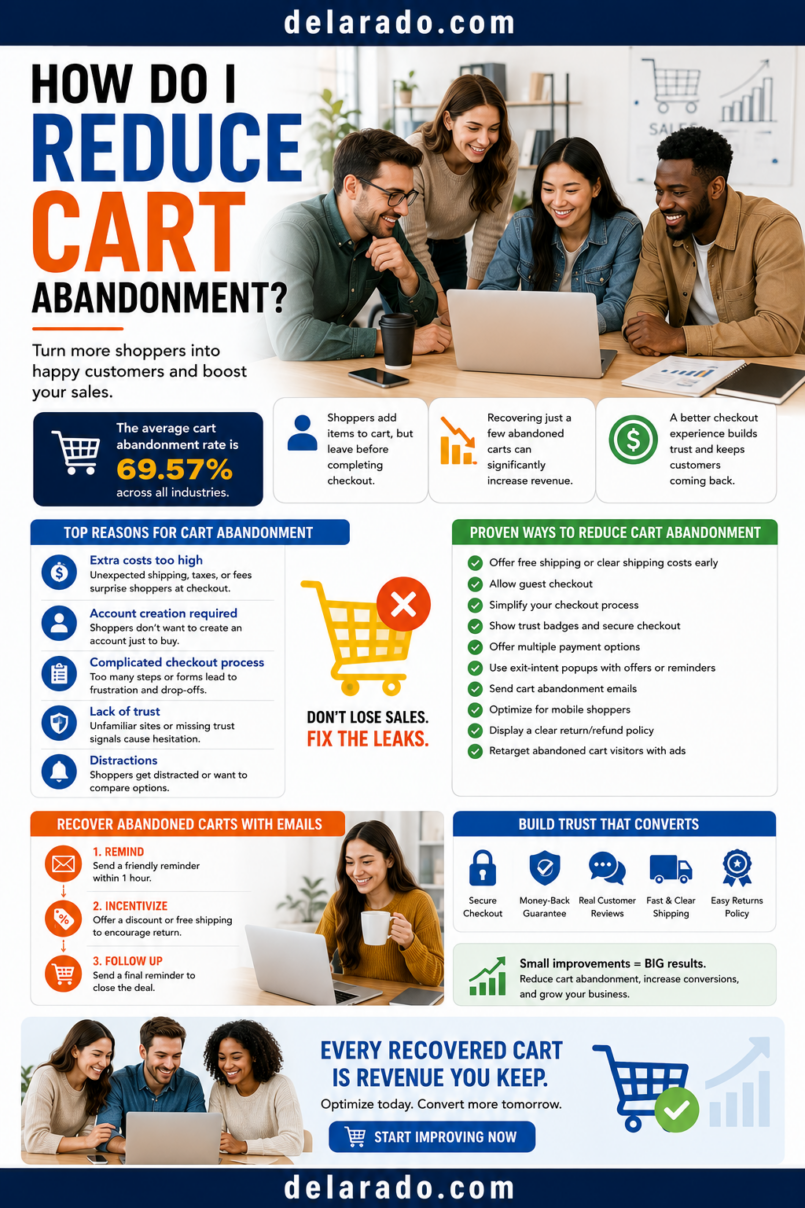
To reduce cart abandonment, make checkout simple, show the total cost early, offer guest checkout, use clear delivery and return information, provide trusted payment options, test the process on mobile, and remove technical barriers. The goal is not to pressure people into buying; it is to make it easier for interested customers to complete a purchase they already chose to start.
Not every abandoned cart is a problem to “fix.” Some people are comparing products, saving items for later, checking prices, waiting for a payment method, or simply not ready to buy. Focus on reducing avoidable friction rather than trying to force every visitor through checkout.
Baymard Institute identifies late unexpected costs, mandatory account creation, and overly complicated checkout as common cart-abandonment causes. Its survey found that 39% of respondents abandoned checkout because extra costs were too high, 19% because account creation was required, and 18% because checkout felt too long or difficult. [138]
Who Is This Topic For?
This guide is for eCommerce sellers, WooCommerce stores, Shopify stores, digital-product sellers, course creators, membership businesses, service providers accepting online payments, local businesses, and anyone who sells through an online cart or checkout page.
This Article Is Helpful If You Want To:
- Reduce shopping cart abandonment
- Improve checkout completion
- Make checkout easier on mobile
- Show fees and shipping costs more clearly
- Offer guest checkout
- Improve payment options
- Set up cart recovery emails
- Track checkout drop-off
- Improve product-page clarity
- Build a more trustworthy purchase experience
What Is Cart Abandonment?
Cart abandonment happens when a shopper adds one or more products to an online cart but leaves before completing the purchase. Checkout abandonment is a more specific situation where the shopper begins entering checkout details but exits before payment is completed.
Simple Customer Journey
Product page → Add to cart → Cart page → Checkout started → Payment details → Purchase completed
Abandonment can occur at any step. A person may add an item to a cart and leave before opening checkout. Another person may begin entering an address, see a shipping fee, and leave. A third may experience a payment error or decide to wait.
Cart Abandonment vs. Checkout Abandonment
| Type | What Happens | Possible Cause |
|---|---|---|
| Cart abandonment | Customer adds an item but does not begin checkout | Browsing, price comparison, uncertainty, distraction, saving items for later |
| Checkout abandonment | Customer begins checkout but does not complete payment | Unexpected costs, long forms, account creation, delivery concerns, payment issues, technical errors |
Google Analytics’ Checkout Journey report shows abandonment rate between each checkout step and can help identify where customers leave a purchase funnel. [133]
Why Do Customers Abandon Carts?
Customers abandon carts for many reasons. Some reasons are outside your control, but many can be reduced through clear pricing, simple checkout design, accurate product information, relevant payment options, and trustworthy customer communication.
Common Reasons
- Extra shipping, tax, or service fees appear late
- Delivery is too slow or unclear
- Account creation is required
- Checkout is too long or confusing
- Too many form fields are required
- The site feels untrustworthy
- Preferred payment methods are unavailable
- Card payment fails
- Website errors or slow page loading occur
- Return or refund policy is unclear
- Product details are incomplete
- The customer is still comparing options
- The customer is not ready to buy
- Mobile checkout is difficult to use
- Too many upsells or popups interrupt checkout
Baymard’s research identifies late extra costs, mandatory account creation, and checkout complexity as key usability causes. It also notes that some abandonment is unrelated to usability because shoppers may simply be browsing or not ready to buy. [138][141]
Benefits of Reducing Cart Abandonment
Improves Customer Experience
A clear, simple checkout helps customers understand what they are buying, how much it costs, when it will arrive or become available, and what happens after payment.
Can Increase Completed Purchases
Removing unnecessary friction may help more interested customers complete purchases without requiring additional traffic or advertising spend.
Can Improve Trust
Transparent prices, visible policies, clear payment steps, relevant support information, and straightforward delivery expectations can make a store feel more reliable.
Can Reduce Support Requests
Clear checkout information may reduce questions about shipping, product access, downloads, returns, billing, account access, and payment status.
Can Improve Mobile Sales
Many people shop on phones. Mobile-friendly forms, buttons, payment options, and page speed can make it easier for those customers to complete a purchase.
Helps Identify Technical Problems
Checkout analytics can reveal issues such as broken payment buttons, slow pages, form validation errors, payment failures, device-specific problems, or shipping calculations that cause customers to leave.
Supports Better Product Decisions
Cart behavior can reveal where people need more product information, clearer pricing, better delivery options, or a simpler product selection process.
Risks and Limitations
Not Every Abandoned Cart Should Be Recovered
Some shoppers are just browsing or not ready. Do not assume every abandoned cart represents a lost sale or a reason to send repeated messages.
Discounts Can Reduce Profit
Offering a discount to every person who abandons a cart can train shoppers to wait for a coupon and may reduce margins. Test carefully before making discounts your main recovery strategy.
Recovery Emails Need Permission and Care
Only use contact information in ways that comply with applicable privacy and marketing rules. Avoid excessive, misleading, or unwanted follow-up.
Too Many Checkout Offers Can Backfire
Order bumps, upsells, cross-sells, popups, countdown timers, and multiple add-ons can distract customers and make checkout feel manipulative.
Hidden Fees Create Trust Problems
Do not use cart recovery as a substitute for transparent pricing. Show expected costs as early as reasonably possible.
Changes Can Create New Errors
Updating checkout fields, payment settings, shipping rules, plugins, forms, or automations can cause technical problems. Test every change before and after launch.
Legal Requirements Vary
Requirements related to subscriptions, negative-option offers, auto-renewals, taxes, marketing emails, accessibility, privacy, returns, and payment disclosures vary by jurisdiction. Seek appropriate professional guidance for your business.
Step-by-Step Process
Step 1: Measure Where Customers Leave
Before changing checkout, identify the step where abandonment occurs. Do not guess whether the issue is the product page, cart page, shipping calculation, account requirement, payment page, or technical setup.
Useful Funnel Steps
- Product viewed
- Product added to cart
- Cart viewed
- Checkout started
- Shipping information entered
- Payment information entered
- Purchase completed
Google Analytics’ Checkout Journey report displays users across checkout steps and shows the percentage of users lost between each step. [133]
Questions to Ask
- Do customers leave before opening checkout?
- Do they leave after seeing shipping costs?
- Do they leave when asked to create an account?
- Do they leave while entering payment details?
- Does the problem happen more on mobile?
- Does one payment method fail more often?
- Does one country, region, device, or browser show more drop-off?
- Are there product-specific abandonment patterns?
Step 2: Show Total Costs Early
Unexpected costs are a major reason people leave checkout. Show product prices clearly, provide shipping estimates where possible, explain taxes or fees, and avoid surprising customers at the final payment step.
Be Clear About:
- Product price
- Shipping cost
- Delivery options
- Taxes
- Service fees
- Currency
- Discount conditions
- Subscription or recurring charges
- Trial conversion dates
- Refund or cancellation terms
Example
Product price: $49
Estimated shipping: $6.95
Estimated total before applicable tax: $55.95
Baymard’s survey found that 39% of respondents who abandoned a checkout cited extra costs such as shipping, taxes, or fees being too high. [138]
Step 3: Offer Guest Checkout
Do not require customers to create an account before making a purchase unless there is a genuine reason and the requirement is clearly explained. Allowing guest checkout can reduce friction for people who want to buy without creating another password or account.
Guest Checkout Benefits
- Fewer steps before payment
- Less password friction
- Faster mobile checkout
- Less concern about unwanted marketing
- Better experience for first-time customers
Better Alternative
Complete your purchase as a guest. After checkout, you can optionally create an account to review orders, access downloads, or manage subscriptions.
Baymard’s research identifies mandatory account creation as a checkout barrier and reports that 19% of surveyed shoppers abandoned because a site required account creation. [138]
Step 4: Simplify Checkout Forms
Ask only for information that is necessary to complete the order, deliver the product, process payment, meet legal requirements, or provide support.
For Physical Products, You May Need:
- Name
- Email address
- Shipping address
- Billing address if different
- Payment details
- Phone number only if genuinely necessary for delivery or support
For Digital Products, You May Need:
- Name
- Email address
- Payment details
- Account credentials only if needed for access
Remove Unnecessary Fields Such As:
- Unneeded date of birth
- Unnecessary phone number
- Unneeded company details
- Optional surveys before checkout
- Extra marketing questions
- Fields that do not affect fulfillment or support
Baymard reports that 18% of surveyed shoppers abandoned checkout because the process was too long or complicated. [138]
Step 5: Make Checkout Mobile-Friendly
Many customers will complete checkout on a phone. A form that works on desktop may be difficult to use on a small screen.
Mobile Checkout Checklist
- Use large tap-friendly buttons
- Use readable text sizes
- Keep forms short
- Use appropriate mobile keyboard types for email, phone, and postal fields
- Allow address autofill where supported
- Keep order summaries visible or easy to access
- Make error messages clear
- Optimize images and page speed
- Test payment methods on mobile
- Test checkout on several devices and browsers
Do not assume checkout works because it looks correct in an editor. Complete real test orders on a phone.
Step 6: Offer Relevant Payment Options
Customers may leave if they cannot use a payment method they trust or prefer. Offer payment methods that fit your market, business type, product price, and payment processor availability.
Possible Payment Options
- Credit cards
- Debit cards
- Digital wallets
- PayPal
- Shop Pay or similar platform wallets
- Apple Pay or Google Pay where supported
- Installment options where appropriate and clearly disclosed
- Bank transfer for qualifying business purchases
Payment Best Practices
- Show supported methods before the final payment step
- Use a trusted payment processor
- Explain currency clearly
- Show the full total before payment
- Give clear error messages after payment failures
- Provide support information if payment fails
- Do not push customers into unfamiliar payment methods
Payment options should simplify the buying process, not hide financing terms, fees, subscriptions, or future charges.
Step 7: Build Trust Before Checkout
Customers are more likely to complete a purchase when product information, pricing, support, delivery, return policies, and business identity are clear.
Trust Elements
- Accurate product descriptions
- Real product photos or videos
- Clear pricing
- Shipping or delivery timelines
- Clear refund, return, or cancellation policy
- Visible contact information
- Business name and support email
- Secure checkout indicators where accurate
- Real customer reviews with permission
- Frequently asked questions
- Clear digital-product access information
Do Not Use:
- Fake trust badges
- Fake customer reviews
- Fabricated ratings
- AI-generated testimonials presented as real
- False urgency
- Fake inventory counters
- Misleading before-and-after results
- Product images that misrepresent what customers receive
Baymard’s checkout research notes that usability and design issues can be a direct cause of checkout abandonment when users do not understand how to complete the checkout process. [136]
Step 8: Make Delivery and Access Clear
Customers need to know when and how they will receive what they buy. This is especially important for shipping products, digital downloads, online courses, memberships, software, consultations, and preorders.
For Physical Products, Explain:
- Shipping cost
- Estimated delivery window
- Shipping locations
- Tracking availability
- International shipping information
- Return policy
For Digital Products, Explain:
- How access is delivered
- Whether access is immediate
- Whether buyers need an account
- How to download files
- How long access lasts
- System requirements
- Support options
- Refund policy
Example
After payment, you will receive an email with your download link within a few minutes. Your purchase includes one PDF checklist and an editable spreadsheet. If you need access help, contact support@example.com.
Clear delivery expectations can reduce uncertainty and help customers complete the purchase with more confidence.
Step 9: Remove Checkout Distractions
Checkout should focus on completing the purchase. Remove elements that distract customers or create unnecessary decisions.
Consider Removing:
- Large navigation menus
- Unrelated blog links
- Autoplay videos
- Excessive popups
- Several competing calls to action
- Multiple unrelated product recommendations
- Long promotional text
- Confusing countdown timers
- Unnecessary surveys
- Hard-to-close overlays
Keep Visible:
- Order summary
- Price and total
- Delivery or access details
- Payment fields
- Support link
- Refund or cancellation policy link
- Clear checkout button
One relevant optional order bump may be appropriate, but a checkout crowded with upsells, cross-sells, popups, and pressure tactics can increase abandonment.
Step 10: Use Order Bumps and Upsells Carefully
Relevant checkout offers can increase average order value, but they should never make the purchase process confusing or create unexpected charges.
Appropriate Checkout Offers
- A compatible accessory
- A product care kit
- A digital worksheet that supports a course
- Gift wrapping
- A related template pack
- An implementation guide
- A workshop recording
Order Bump Rules
- Make it optional
- Show the price clearly
- Use an unchecked selection control
- Show the updated total
- Keep the offer relevant
- Make declining easy
- Do not hide recurring charges
- Do not use fake scarcity
If a purchase option includes recurring billing, automatic renewal, free-trial conversion, or another negative-option feature, the FTC says businesses should obtain proof of consent before charging and retain that proof. [134]
Step 11: Fix Technical Errors
Technical issues can cause people to abandon even when your product and checkout design are good. Test the full process regularly.
Technical Checklist
- Does the add-to-cart button work?
- Does the cart update correctly?
- Does the checkout load quickly?
- Do shipping rates calculate correctly?
- Do discount codes work as expected?
- Do payment methods load correctly?
- Do payment error messages explain the problem?
- Does the purchase confirmation page appear?
- Are receipts sent?
- Do digital downloads or course access work?
- Does checkout work on mobile?
- Does checkout work across major browsers?
Use test transactions and separate test email addresses before launching a new product, payment method, checkout plugin, coupon, order bump, or upsell.
Step 12: Create Ethical Cart Recovery Emails
A cart recovery email can remind someone about an item they were considering. Use it only where you have an appropriate basis to contact the person, and keep the message helpful rather than repetitive or deceptive.
Simple Cart Recovery Sequence
- Friendly reminder that the cart is still available
- Helpful message answering common questions about shipping, delivery, access, or returns
- Final reminder only if it remains relevant and non-deceptive
Example First Recovery Email
Subject: Your cart is still available
You left the Website Planning Template System in your cart.
If you had a question about file access, compatibility, or what is included, you can review the product details here: [Product Link].
No pressure—your cart is available if the resource is still useful for your project.
Recovery Email Guidelines
- Use accurate subject lines
- Identify the product clearly
- Include useful information
- Do not imply inventory is low unless true
- Do not use false deadlines
- Do not send excessive reminders
- Respect unsubscribe preferences
- Do not reveal sensitive cart details in insecure contexts
For commercial email in the United States, the FTC says messages must include a clear and conspicuous way to opt out of future marketing email. [80]
Step 13: Offer Help During Checkout
Some customers leave because they have a question they cannot answer quickly. Provide visible support options without forcing every visitor into a chat window.
Helpful Support Options
- Support email address
- Frequently asked questions
- Shipping information link
- Delivery and access information
- Refund or return policy link
- Live chat during business hours
- Contact form
- Phone support where appropriate
Common Checkout Questions to Answer
- When will my order arrive?
- How do I access my digital product?
- Can I return this item?
- What payment methods do you accept?
- Is this compatible with my device or platform?
- What is included?
- How does a subscription work?
- How do I contact support?
Answering common questions before payment can reduce uncertainty without relying on pressure or hidden details.
Step 14: Test One Improvement at a Time
Do not redesign the entire checkout at once. Change one significant element, measure the result, and review customer feedback.
Possible Tests
- Guest checkout versus account-first checkout
- Shorter form versus longer form
- Earlier shipping estimate
- Different payment options
- Clearer delivery wording
- Different order-summary layout
- Removing an unnecessary upsell
- Adding a relevant FAQ section
- Different mobile button size
- Clearer refund-policy placement
Review Together
- Checkout completion
- Cart abandonment
- Checkout abandonment
- Average order value
- Refunds
- Support requests
- Customer feedback
- Profit margin
A small improvement in one metric may not be worthwhile if it creates more refunds, complaints, or customer confusion.
Programs That Can Help
WooCommerce
WooCommerce can help WordPress stores sell products, manage checkout, process orders, create coupons, add payment gateways, and use compatible extensions for cart recovery or checkout optimization.
Shopify
Shopify can help businesses manage product pages, carts, checkout, payments, shipping, customer accounts, and compatible post-purchase or cart recovery tools.
Easy Digital Downloads
Easy Digital Downloads can help WordPress sites sell ebooks, templates, software, graphics, audio files, and other digital products with checkout and customer access workflows.
FunnelKit
FunnelKit can help WooCommerce users build optimized checkout pages, order bumps, upsells, cart recovery flows, and funnel analytics.
CheckoutWC
CheckoutWC can help WooCommerce stores improve checkout layouts, optimize forms, and create customer-friendly purchase flows.
Stripe and PayPal
Payment processors can help accept payments through online stores. Review current fees, payment options, supported countries, subscriptions, refunds, disputes, and payout requirements before choosing a provider.
Email Marketing Platforms
MailerLite, ConvertKit, Brevo, Klaviyo, Mailchimp, Shopify Email, and other email tools can help create customer communication and cart recovery workflows when used with appropriate consent and privacy practices.
Google Analytics
Google Analytics can help track checkout steps, product activity, purchases, and abandonment. Its Checkout Journey report displays abandonment between funnel steps. [133]
Common Mistakes
Hiding Extra Costs Until the Last Step
Show shipping, tax, service fees, and recurring charges clearly as early as reasonably possible. Unexpected costs are a common reason customers leave checkout. [138]
Forcing Account Creation
Offer guest checkout whenever possible. Let customers create an account after purchase if it is useful for order history, downloads, subscriptions, or future support.
Using Long, Confusing Forms
Request only information needed to process and fulfill the order. Remove unnecessary fields and explain validation errors clearly.
Making Checkout Difficult on Mobile
Test forms, buttons, wallets, address autofill, payment methods, order summaries, and confirmation pages on a phone.
Using Too Many Checkout Offers
One relevant optional add-on may help. Several unrelated order bumps, upsells, popups, timers, and product suggestions can cause confusion and reduce trust.
Using Prechecked Add-Ons
Do not automatically add paid products, subscriptions, warranties, donations, or recurring charges. Obtain an active, informed customer choice.
Using Fake Scarcity
Do not use resettable countdown timers, false “low stock” messages, fabricated deadlines, or fake customer activity to pressure checkout completion.
Not Explaining Digital Access
For downloads, courses, memberships, or software, explain how access works, when it begins, what devices are supported, how long access lasts, and where to get help.
Not Testing Payment and Delivery
Run test orders after changing a payment processor, shipping rule, checkout plugin, coupon, order bump, upsell, product access rule, or email automation.
Sending Too Many Recovery Emails
Use a limited, helpful recovery sequence. Repeated, misleading, or unwanted messages can damage trust and lead to unsubscribes or complaints.
Measuring Only Cart Abandonment
Review checkout completion, AOV, refunds, profit, support requests, delivery issues, satisfaction, and repeat purchases along with abandonment data.
Frequently Asked Questions
What is cart abandonment?
Cart abandonment occurs when a shopper adds products to an online cart but leaves without completing the purchase. Checkout abandonment occurs when the shopper begins checkout but does not finish payment.
Why do customers abandon carts?
Common reasons include unexpected shipping, tax, or service fees; required account creation; complicated forms; slow delivery; lack of trust; payment issues; mobile problems; technical errors; and simple browsing behavior. Baymard identifies late extra costs, mandatory account creation, and checkout complexity as common causes. [138]
How can I reduce cart abandonment?
Show total costs early, offer guest checkout, simplify forms, make checkout mobile-friendly, provide trusted payment options, explain delivery and returns clearly, remove distractions, test technical performance, and use limited ethical cart recovery messages.
Should I offer guest checkout?
Usually, yes. Guest checkout can reduce friction for customers who do not want to create an account before buying. Account creation can be offered after the purchase if it is useful.
How many cart recovery emails should I send?
Use a limited sequence that provides helpful information. Start with one reminder, then consider a second message answering common delivery, support, or return questions. Avoid repeated or misleading messages.
Should I offer a discount for abandoned carts?
Test carefully. Discounts may recover some carts but can reduce profit and teach customers to wait for a coupon. First improve transparency, checkout usability, payment options, delivery information, and trust.
Can order bumps increase cart abandonment?
They can if they are irrelevant, preselected, confusing, or one of many checkout distractions. Use only one clear, optional, relevant add-on and show the updated total before payment.
How do I track checkout abandonment?
Track product views, add-to-cart actions, cart views, checkout starts, shipping or payment steps, and completed purchases. Google Analytics’ Checkout Journey report can show abandonment between checkout steps. [133]
What should I show at checkout?
Show the product name, price, quantity, shipping or delivery information, taxes or fees, full total, payment methods, refund or cancellation policy, support information, and a clear purchase action.
What should I avoid at checkout?
Avoid hidden fees, forced account creation, long forms, prechecked paid add-ons, unclear subscription terms, fake urgency, multiple distracting upsells, hard-to-find support, and unclear delivery or refund information.
Do I need to show recurring billing terms before checkout?
Yes. If an offer includes recurring billing, auto-renewal, a subscription, or a trial that converts to a paid plan, clearly disclose material terms and obtain appropriate informed consent before charging. Review current legal requirements for your location and business. [134]