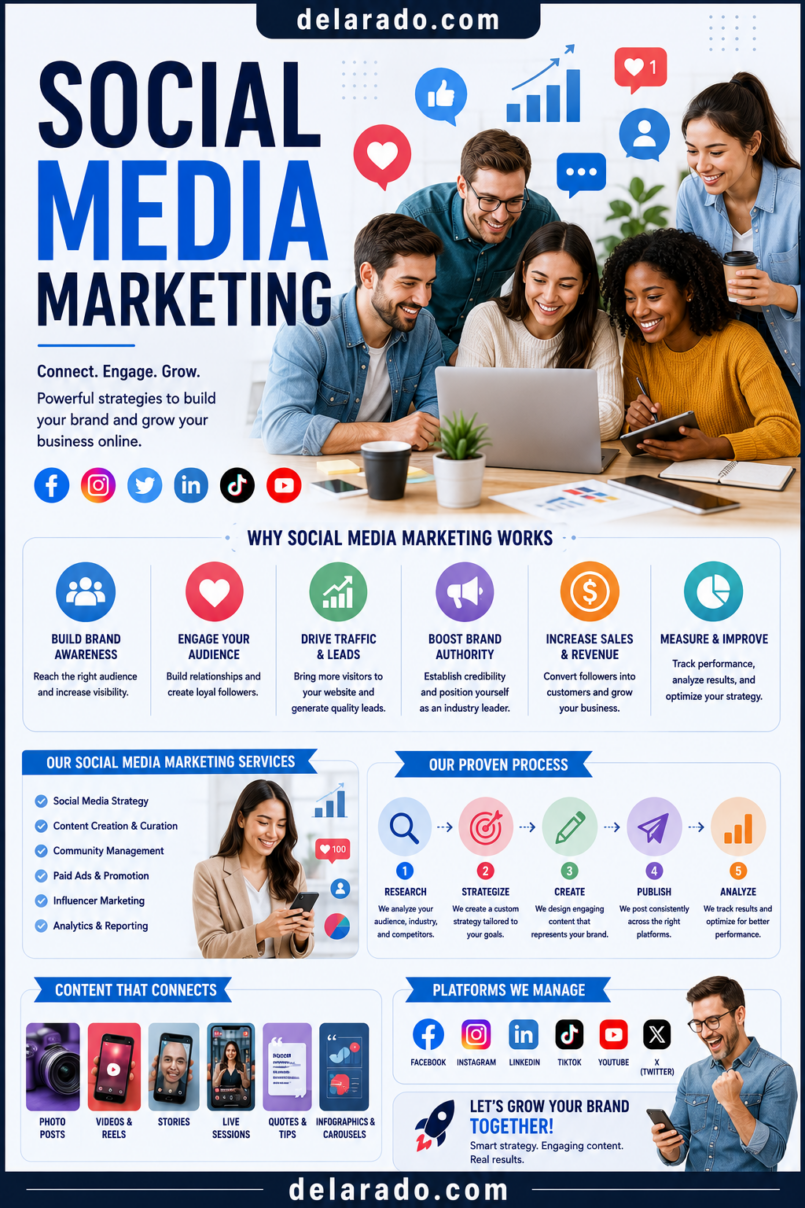
Social media marketing is the use of social platforms to build awareness, communicate with an audience, share useful content, drive website visits, grow an email list, generate leads, support customers, and promote products or services. It works best when it is part of a larger marketing system that includes a website, helpful content, email marketing, customer service, and clear business goals.
Social media is not only about getting followers or posting every day. A strong strategy helps the right people discover your business, understand what you offer, trust your expertise, and take an appropriate next step—such as reading an article, joining your email list, requesting a quote, booking a consultation, or buying a product.
The most sustainable approach is to create useful, honest, audience-focused content rather than chase every trend, copy competitors, or rely entirely on one platform.
Who Is This Topic For?
This guide is for small business owners, bloggers, affiliate marketers, freelancers, consultants, local businesses, eCommerce sellers, course creators, coaches, creators, nonprofit organizations, and online entrepreneurs who want to use social media strategically.
Social Media Marketing Can Help If You Want To:
- Build brand awareness
- Drive visitors to your website
- Grow an email list
- Generate leads and quote requests
- Promote products or services
- Share blog posts, guides, and resources
- Build trust with a target audience
- Connect with local customers
- Support customer questions
- Promote affiliate products transparently
What Is Social Media Marketing?
Social media marketing is the process of using social platforms to communicate with an audience and support a business goal. It can include organic posts, short videos, images, stories, live streams, community engagement, direct messages, creator partnerships, paid ads, social commerce, and customer support.
Common Social Media Marketing Activities
- Publishing educational posts
- Sharing blog articles and guides
- Creating short-form videos
- Posting product demonstrations
- Sharing customer stories with permission
- Answering comments and messages
- Promoting webinars or events
- Growing an email list
- Running social media ads
- Partnering with creators or influencers
- Building a community around a topic
- Providing customer service updates
Simple Example
A beginner blogging website publishes a detailed article about WordPress hosting. It then creates a short video explaining three things beginners should check before buying hosting, designs a Pinterest graphic linking to the article, shares an Instagram carousel with a hosting checklist, and offers a free Website Launch Checklist in exchange for an email signup.
Each piece of social content supports a useful resource on the website rather than trying to force an immediate sale.
Benefits of Social Media Marketing
Builds Awareness
Social media can introduce your business to people who may not yet know you exist. Consistent useful content can help people recognize your brand, services, products, and expertise.
Creates Direct Communication
Social platforms can make it easier to answer questions, respond to comments, provide updates, and understand the concerns of your audience.
Supports Website Traffic
Social content can direct people to blog posts, landing pages, product pages, service pages, webinars, lead magnets, and email signup forms.
Helps Build Trust
Helpful content, transparent recommendations, real examples, behind-the-scenes content, clear communication, and timely responses can help people feel more comfortable with your business.
Can Support Customer Research
Comments, questions, messages, and community discussions can show you what customers struggle with. These insights can become future blog posts, product improvements, FAQs, email topics, videos, or service offerings.
Works With Other Marketing Channels
Social media can support SEO, email marketing, content marketing, paid advertising, partnerships, local marketing, affiliate marketing, and customer retention.
Offers Targeted Advertising Options
Many platforms offer paid advertising tools that can help businesses reach defined audiences based on location, interests, behaviors, and other targeting options. Always review current platform policies and privacy requirements before advertising.
Risks and Limitations
Platform Algorithms Can Change
Social platforms control what content users see. Reach can change suddenly because of algorithm updates, changing audience behavior, competition, or platform feature changes.
You Do Not Own Your Audience
Your social profile belongs to the platform. If an account is restricted, hacked, suspended, or loses reach, your business may lose access to a large part of its audience. Build an email list and website alongside social media.
Social Media Can Be Time-Consuming
Creating content, recording video, responding to messages, moderating comments, tracking results, and staying current with trends can take significant time. Choose a schedule and platform mix you can maintain.
Public Mistakes Can Spread Quickly
Misleading claims, poorly handled customer complaints, insensitive content, fake reviews, exaggerated results, or unclear sponsorships can damage trust quickly.
Vanity Metrics Can Distract You
Likes, follower counts, and views can be useful signals, but they do not automatically create leads, sales, or customer loyalty. Track actions that connect to your business goals.
Disclosure and Privacy Rules Matter
If you are paid, receive free products, use affiliate links, have a business relationship with a brand, or promote your own paid offer, be transparent. The FTC says social-media endorsements should make material connections with brands obvious to consumers.
Not Every Platform Fits Every Business
Trying to be active on every platform can lower quality and cause burnout. Focus on platforms where your intended audience is active and where your business can create useful content consistently.
Common Social Media Platforms
| Platform | Often Useful For | Content Types |
|---|---|---|
| Local businesses, communities, groups, customer support | Posts, videos, groups, events, ads, live streams | |
| Visual brands, creators, products, services, personal brands | Reels, Stories, carousels, photos, direct messages | |
| TikTok | Short-form educational, entertaining, and creator-style content | Short videos, live streams, search-focused videos, ads |
| YouTube | Tutorials, product demonstrations, education, reviews | Long-form videos, Shorts, live streams, playlists |
| B2B services, consultants, professional brands, recruiting | Posts, articles, videos, newsletters, documents | |
| Visual search, blogs, products, guides, lifestyle content | Pins, idea pins, graphics, product images | |
| X | Real-time commentary, communities, news, professional conversation | Short posts, threads, images, links, conversations |
Choose platforms based on your audience and business goals, not simply because a platform is popular.
Step-by-Step Social Media Strategy
Step 1: Define Your Business Goal
Start with a clear goal. Social media should support a business outcome rather than simply filling a posting calendar.
Possible Goals
- Build brand awareness
- Grow an email list
- Drive website traffic
- Generate local leads
- Book consultations
- Sell products
- Promote affiliate content responsibly
- Increase event registrations
- Support customer retention
- Build a professional reputation
Goal Statement Template
This social media strategy helps [audience] learn about [topic, product, or service] and encourages them to [primary action].
Example
This social media strategy helps beginner bloggers learn WordPress basics and encourages them to visit helpful guides and join an email list for website-building resources.
Step 2: Define Your Audience
Know who you want to reach. Your content should answer their questions, reflect their interests, and help them solve relevant problems.
Audience Questions
- Who is my ideal customer or reader?
- What problem are they trying to solve?
- What level of experience do they have?
- What type of content do they find useful?
- Which platforms do they use?
- What objections or concerns do they have?
- What language do they use?
- What action should they take after seeing my content?
Example Audience
A beginner blogger with a limited budget who wants to create a WordPress website, feels overwhelmed by technical setup, and wants simple tutorials, affordable tool recommendations, and clear checklists.
Step 3: Choose One or Two Main Platforms
Start small. It is usually better to create consistent useful content on one or two platforms than post weak or inconsistent content everywhere.
Platform Selection Questions
- Where does my audience already spend time?
- What format can I create consistently?
- Do I prefer writing, visuals, short videos, or long tutorials?
- Does the platform support my business goal?
- Can I direct visitors to my website or email list?
- Do I have time to respond to comments and messages?
- Can I create content that feels natural for this platform?
Simple Starting Examples
- A visual blog may start with Pinterest and Instagram.
- A local service business may start with Facebook and Instagram.
- A B2B consultant may start with LinkedIn and YouTube.
- A tutorial-based website may start with YouTube and Pinterest.
- A creator-focused brand may start with TikTok and Instagram.
Step 4: Set Up Professional Profiles
Your profile should quickly explain who you help, what you offer, and where someone can learn more.
Profile Setup Checklist
- Use a clear business or creator name
- Use a professional profile photo or logo
- Write a clear bio
- State who you help
- Explain the main benefit or topic
- Add a website or landing-page link
- Add contact details where appropriate
- Use consistent branding across platforms
- Set up two-factor authentication
- Review account permissions regularly
Bio Formula
I help [specific audience] achieve [desired outcome] through [topic, service, or method]. Get [relevant resource] below.
Example
I help beginner bloggers build WordPress websites with clear tutorials, helpful tools, and practical SEO guidance. Get the free Website Launch Checklist below.
Step 5: Create Content Pillars
Content pillars are a small number of repeating themes that guide your posts. They help keep your content focused and make planning easier.
Example Content Pillars for a Beginner Blogging Website
- WordPress setup tips
- SEO and keyword research
- Blogging and content planning
- Email list building
- Website tools and honest reviews
- Common beginner mistakes
- Behind-the-scenes progress and lessons
Example Content Pillars for a Local Service Business
- Customer education
- Common problems and solutions
- Service explanations
- Local community content
- Before-and-after examples with permission
- Team and business updates
- Seasonal tips and reminders
Choose three to six pillars that connect directly to your audience and business goals.
Step 6: Choose Content Formats
Different formats work for different messages. Repurpose core ideas instead of creating every post from scratch.
Useful Content Formats
- Short educational videos
- Step-by-step carousels
- Before-and-after process examples
- Checklists
- Quick tips
- FAQ posts
- Product demonstrations
- Blog post summaries
- Behind-the-scenes posts
- Customer testimonials with permission
- Case studies
- Myth-versus-fact posts
- Live Q&A sessions
- Polls and question prompts
Short Video Structure
Hook: State the problem or question.
Body: Share one clear tip, lesson, or example.
Close: Give a relevant next step.
TikTok’s advertising guidance recommends a three-part content structure that includes a hook, body, and close with a clear call to action. [
Step 7: Create a Content Calendar
A content calendar helps you publish consistently without deciding what to post at the last minute.
Useful Content Calendar Columns
- Date
- Platform
- Content pillar
- Post topic
- Format
- Caption or script
- Visual or video needed
- Call to action
- Link destination
- Disclosure needed
- Status
- Performance notes
Simple Weekly Schedule Example
| Day | Content Type | Goal |
|---|---|---|
| Monday | Educational tip or carousel | Build trust and provide value |
| Wednesday | Short video answering a common question | Reach new people and demonstrate expertise |
| Friday | Blog post, checklist, or lead magnet promotion | Drive qualified website visits or email signups |
| Weekend | Community engagement, poll, or behind-the-scenes content | Start conversations and learn audience needs |
Choose a schedule that you can maintain. One useful post per week is better than trying to publish daily and quitting after a month.
Step 8: Create a Clear Call to Action
Every post does not need to sell. However, most content should have a relevant next step when appropriate.
Useful Calls to Action
- Read the full guide
- Download the free checklist
- Join the email list
- Save this post for later
- Share with someone who needs it
- Leave a question in the comments
- Book a consultation
- Request a quote
- Watch the full tutorial
- Compare the tools
- Visit the link in the bio
Example
Starting a WordPress website? Download the free Website Launch Checklist from the link in our profile.
Match the call to action to the content. A beginner tutorial should lead to a helpful next resource, not necessarily a hard sales pitch.
Step 9: Engage With Your Audience
Social media is a conversation. Responding thoughtfully to comments and messages can build trust, improve customer service, and reveal useful content ideas.
Engagement Best Practices
- Reply to relevant comments
- Answer customer questions clearly
- Thank people for useful feedback
- Moderate spam, harassment, and harmful comments
- Do not argue publicly with customers
- Move sensitive support issues to private channels when appropriate
- Set boundaries around response times
- Save frequently asked questions for future content
- Use feedback to improve products and services
Do not use fake engagement, purchased followers, automated comments, or misleading customer interactions. These tactics can damage trust and distort your performance data.
Step 10: Use Disclosures and Honest Marketing
Be transparent when content includes an affiliate link, sponsorship, paid partnership, gifted product, or another material relationship with a brand.
Disclosure Example
Disclosure: This post may contain affiliate links. If you purchase through a qualifying link, I may earn a commission at no extra cost to you.
For Sponsored Content
Sponsored by [Brand]. I received compensation to create this post. All opinions are my own.
The FTC says that when someone endorses a product on social media, it should be obvious when there is a material connection to the brand, including payment, employment, family relationships, or free or discounted products.
Disclosure Best Practices
- Use plain, understandable language
- Place disclosures where people can easily see them
- Do not hide disclosures among many hashtags
- Use visible on-screen disclosures in short-form video when needed
- Include verbal disclosures in video when appropriate
- Do not rely only on a profile bio or website disclosure page
- Make disclosures clear before or near the endorsement
Step 11: Use Paid Social Ads Carefully
Paid social advertising can help you reach a more specific audience, promote high-performing content, generate leads, or retarget people who have interacted with your business. Start with a clear objective and proper tracking.
Paid Social Campaign Goals
- Website traffic
- Email signups
- Lead generation
- Sales
- App downloads
- Video views
- Event registrations
- Local awareness
- Remarketing
Paid Social Checklist
- Choose one clear campaign goal
- Create a relevant landing page
- Install conversion tracking where appropriate
- Use accurate claims and visible disclosures
- Start with a controlled test budget
- Use audience targeting carefully
- Test multiple ad creatives
- Review lead quality, not only clicks
- Refresh underperforming ads
- Follow each platform’s ad policies
TikTok’s business guidance recommends combining organic and paid content, using authentic creative, and engaging with the community.
Step 12: Measure Results
Measure social media performance based on the goals you set at the beginning. Do not rely only on likes, views, or follower counts.
Awareness Metrics
- Reach
- Impressions
- Video views
- Profile visits
- Follower growth
- Brand mentions
Engagement Metrics
- Comments
- Shares
- Saves
- Likes
- Direct messages
- Story replies
- Engagement rate
Business Metrics
- Website visits
- Email signups
- Lead form submissions
- Quote requests
- Consultation bookings
- Product purchases
- Affiliate link clicks
- Revenue, where accurately tracked
- Customer acquisition cost
Simple Engagement Rate Formula
Engagement rate = Total engagements ÷ Reach × 100
Use metrics to identify patterns. For example, if short tutorials generate saves and website clicks, create more practical tutorial content. If a post gets many views but no meaningful action, review the topic, message, call to action, and landing page.
Step 13: Build an Email List
Social media followers can be valuable, but an email list gives you a more direct way to communicate with people who have opted in to hear from you.
Lead Magnet Ideas
- Free checklist
- Template
- Beginner guide
- Mini-course
- Worksheet
- Resource list
- Discount code
- Webinar registration
- Email challenge
- Product comparison chart
Example Funnel
Instagram Reel about choosing WordPress hosting → Link in bio → Free Website Launch Checklist landing page → Email signup → Helpful welcome sequence → Relevant tutorial, service, or product recommendation.
Clearly tell people what they will receive and how often you plan to email them. Use an unsubscribe option and protect subscriber data.
Programs That Can Help
Meta Business Suite
Meta Business Suite can help manage Facebook and Instagram content, messages, ads, scheduling, reporting, and business account access. Review current features and account permissions regularly.
Canva
Canva can help create social media graphics, carousels, short video assets, Pinterest pins, thumbnails, lead magnet covers, templates, and branded visuals.
Buffer, Later, Hootsuite, and Metricool
Scheduling tools can help plan posts, manage publishing calendars, review engagement, and organize content across multiple platforms. Check current pricing, platform compatibility, and feature limits before choosing a tool.
CapCut and Adobe Express
Video editing tools can help create short-form videos, captions, basic transitions, text overlays, and vertical content for TikTok, Reels, Shorts, and other video platforms.
Google Analytics
Google Analytics can help measure visitors arriving from social platforms and track whether they sign up, buy, book, or complete other important actions on your website.
Google Tag Manager
Google Tag Manager can help manage tracking tags and events for social advertising, analytics, remarketing, and conversion measurement. Configure tracking responsibly and follow privacy requirements.
MailerLite, ConvertKit, Brevo, HubSpot, and ActiveCampaign
Email marketing tools can help create signup forms, landing pages, lead magnet delivery, welcome sequences, subscriber segments, and follow-up campaigns.
WordPress
WordPress can support the content behind your social strategy, including blog posts, landing pages, product reviews, email signup pages, resource libraries, service pages, and lead magnets.
Common Social Media Marketing Mistakes
Trying to Be on Every Platform
Start with one or two platforms where your audience is active. Expand only after you have a sustainable content process.
Posting Without a Goal
Every post does not need to sell, but your overall content should support a clear purpose such as awareness, trust, traffic, signups, leads, or sales.
Focusing Only on Followers
A large follower count does not automatically create a successful business. Track website traffic, email signups, inquiries, bookings, purchases, and customer quality.
Using Only Promotional Posts
Constant selling can cause people to ignore your content. Balance promotion with education, problem-solving, useful tips, community interaction, stories, and practical examples.
Ignoring Comments and Messages
Social media is interactive. Responding to legitimate questions and feedback can build trust and reveal valuable customer insights.
Buying Followers or Engagement
Purchased followers, likes, and comments can distort your metrics, reduce trust, and create a weak audience that does not become customers.
Hiding Affiliate or Sponsorship Disclosures
Disclosures should be clear, visible, and close to the endorsement. Do not bury them in a long caption, a group of hashtags, or an unrelated profile page.
Making Unsupported Claims
Do not promise guaranteed income, instant results, health outcomes, rankings, sales, or performance results that you cannot support.
Ignoring Mobile Viewing
Most social media content is viewed on phones. Use readable text, vertical-friendly visuals, captions, clear audio, and simple calls to action.
Depending Entirely on Social Platforms
Use social media to support a website, email list, customer relationships, and other owned business assets. Do not build your entire business on a single platform you do not control.
Frequently Asked Questions
What is social media marketing?
Social media marketing is the use of social platforms to build awareness, share content, communicate with an audience, drive traffic, generate leads, support customers, and promote products or services.
Which social media platform is best for business?
The best platform depends on your audience, business model, content format, and goals. A local service business may benefit from Facebook and Instagram, a B2B consultant may prefer LinkedIn, and a tutorial-based business may benefit from YouTube or TikTok.
How often should I post on social media?
Post at a pace you can maintain while keeping content useful and accurate. A consistent schedule of one to three quality posts per week can be better than posting every day without a strategy.
Do I need social media for my business?
No, but it can be useful when your audience uses social platforms and you can create content that supports a clear goal. A business can also grow through SEO, email marketing, referrals, partnerships, local marketing, and paid search.
Should I use paid social media ads?
Paid ads can be useful for targeted awareness, leads, sales, events, and remarketing. Start with a clear goal, a relevant landing page, conversion tracking, accurate claims, and a controlled test budget.
How do I grow followers organically?
Focus on useful, audience-specific content; clear positioning; consistent posting; engaging with people; searchable topics; strong visuals; relevant collaborations; and a clear reason for someone to follow. Avoid buying followers.
Can I use affiliate links on social media?
Yes, if the platform and affiliate program allow it. Disclose the affiliate relationship clearly and make sure recommendations are relevant, honest, and not misleading.
How should I disclose a sponsored post?
Use clear, easy-to-understand disclosure language close to the endorsement. For video or temporary content, make the disclosure visible on screen and consider stating it verbally when appropriate. The FTC advises that material connections should be obvious to consumers.
What should I post if I do not want to show my face?
You can create screen recordings, tutorial slides, voiceovers, text-based videos, product demonstrations, hands-only videos, carousels, checklists, customer FAQs, infographics, animations, and behind-the-scenes content that does not show your face.
How do I know whether social media is working?
Measure results against your goal. Track reach and engagement for awareness, website visits for traffic, email signups for list growth, and inquiries, bookings, sales, or qualified leads for business results.
Further Reading
- How Often Should a Business Post on Social Media?
- Which Social Media Platform Is Best for My Business?
- How Do I Create a Social Media Marketing Strategy?
- What Type of Social Media Content Gets the Most Engagement?
- How Do I Grow an Instagram Account for My Business?
- How Do I Create Instagram Reels That Get Views?
- Is GramGenies Useful for Instagram Marketing?
- How Do I Use Pinterest to Drive Traffic to My Business?
- How Do I Use TikTok to Promote an Online Business?
- How Do I Use TikTok to Promote an Online Business?
- How Do I Use LinkedIn to Get Business Leads?
- How Do I Turn Social Media Followers Into Email Subscribers?
- How Do I Create a Social Media Content Calendar?
- How Do I Repurpose One Blog Post Into Social Media Content?
- How Do I Handle Negative Comments or Customer Complaints on Social Media?
- Social Media Marketing: A Complete Guide for Growing an Online Business
“`